DYann.1
Senior II
July 24, 2023
Solved

SAI configuration of the STM32L5xxx board

  • July 24, 2023
  • 3 replies
  • 4078 views

Hello,

I would like to know if there are people who have already configured the SAI PORT to communicate with a CODEC ?

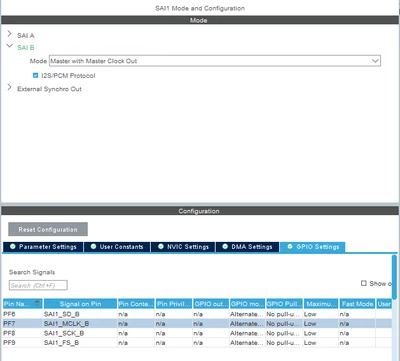
I configured like this :
DYann1_0-1690208469198.png

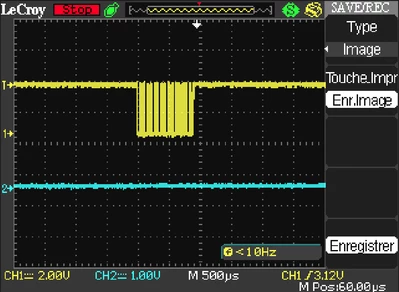
But I don't have the clock on the PIN PF7 :
DYann1_1-1690208589059.png

The SAI_MCLK_B is the curve in blue. Thank you for your helps.
Regards.
This topic has been closed for replies.
Best answer by AScha.3

clock...dont know. but without continuous stream anyway useless...the dac will not work.

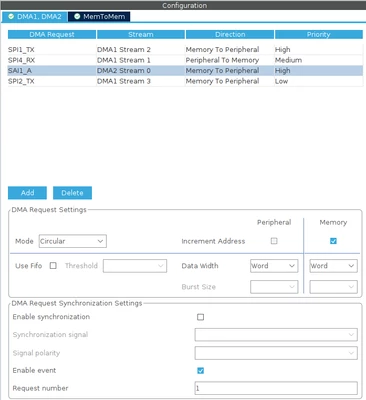
so use dma channel ->

AScha3_0-1690212903496.png

enable callbacks in project-> advanced settings

AScha3_1-1690213024480.png

in main : register callbacks

AScha3_2-1690213148395.png

AScha3_4-1690213237338.png

then start it

AScha3_5-1690213285406.png

init buffer, size should match, what you expect in update interval; i use 32bit data ymmv.

int32_t playbuf[4096*2] __attribute__ ((aligned (32)));

and for begin, switch off d-cache, if your cpu has it. (cache management ...for later. :) )

in callbacks put your data, or for "pause" , set data zero. but never stop the running stream !


3 replies

AScha.3
Super User
July 24, 2023

yes, SAI to ES9038 DAC . working fine.

but...you just enabled the sai. doing nothing....

you see signal (and clock) when you send something !

typical I2S is continuous stream, so circular DMA -> SAI -> DAC (codec)

"If you feel a post has answered your question, please click ""Accept as Solution""."
DYann.1
DYann.1Author
Senior II
July 24, 2023

Hello,

I'm working SAI with another CODEC (SGTL5000) but the principle is the same for the SAI. First, I sent data to configure the CODEC via the I2C bus, that you can see in my previous screenshot (the yellow curve) but I haven't nothing on the PIN 'SAI_MCLK_B'. 

DYann1_0-1690209978327.png

I don't know if it is necessary to work in interruption, after your answer I have to work in DMA but how ?

DYann1_1-1690210154559.png

How to configure the settings? Do we leave it as default ?

DYann1_2-1690210363361.png

why in mode without DMA we do not see the clock ?

AScha.3
AScha.3Best answer
Super User
July 24, 2023

clock...dont know. but without continuous stream anyway useless...the dac will not work.

so use dma channel ->

AScha3_0-1690212903496.png

enable callbacks in project-> advanced settings

AScha3_1-1690213024480.png

in main : register callbacks

AScha3_2-1690213148395.png

AScha3_4-1690213237338.png

then start it

AScha3_5-1690213285406.png

init buffer, size should match, what you expect in update interval; i use 32bit data ymmv.

int32_t playbuf[4096*2] __attribute__ ((aligned (32)));

and for begin, switch off d-cache, if your cpu has it. (cache management ...for later. :) )

in callbacks put your data, or for "pause" , set data zero. but never stop the running stream !


"If you feel a post has answered your question, please click ""Accept as Solution""."
DYann.1
DYann.1Author
Senior II
July 24, 2023

I tried with this configuration but there are too many errors in this code

DYann1_3-1690211063440.png

24 errors

DYann1_4-1690211102968.png

Now I have no more errors these are priorities

DYann.1
DYann.1Author
Senior II
July 25, 2023
uint16_t write (uint16_t reg,uint16_t data)
{ 	HAL_StatusTypeDef txResponse;
	uint8_t buff[4] ;
	buff[3]=0xff & data;
	buff[2]= 0xff & data>>8;
	buff[1]= 0xff & reg;
	buff[0]= 0xff & reg;

	txResponse = HAL_I2C_Master_Transmit(&hi2c1,WRITE_ADDRESS,buff,4,HAL_MAX_DELAY); //0XFF
 if (txResponse != HAL_OK)
	{
 	return HAL_ERROR;
	}
 HAL_Delay(1) ;
 return (0);
}

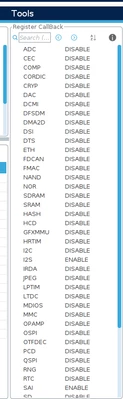
I don't know where is the 'DCACHE' but now I have a clock on the MCLK pin and I have no errors on my I2C bus.
Before I have an error in this function. Thank you for your helps AScha.3.

AScha.3
Super User
July 25, 2023

good !

and - if not there - your cpu has no d-cache !  :)

"If you feel a post has answered your question, please click ""Accept as Solution""."