

NDinu.1
Associate II
October 19, 2020
Solved

Creating a new SPC5 application from Scratch

  • October 19, 2020
  • 1 reply
  • 1226 views

Hi,

I am using a SPC570S-DISP development board, and I am trying to create a new application form that. I have tested out a few example application given in the IDE, and they work fine.

Now I want to develop such an application from scratch. However, there seem to be no guide as such, showing the necessary step to follow in order to properly configure the application. I have also referred the Help section.

One problem that I came across is that, in the MCU wizard, I am unable to configure any of the peripherals. When I click on one of the peripherals, no options seem to appear. Is there a document that can be referred, or a tutorial that I can follow?

Thanks.

Dinuke
    This topic has been closed for replies.
    Best answer by Erwan YVIN

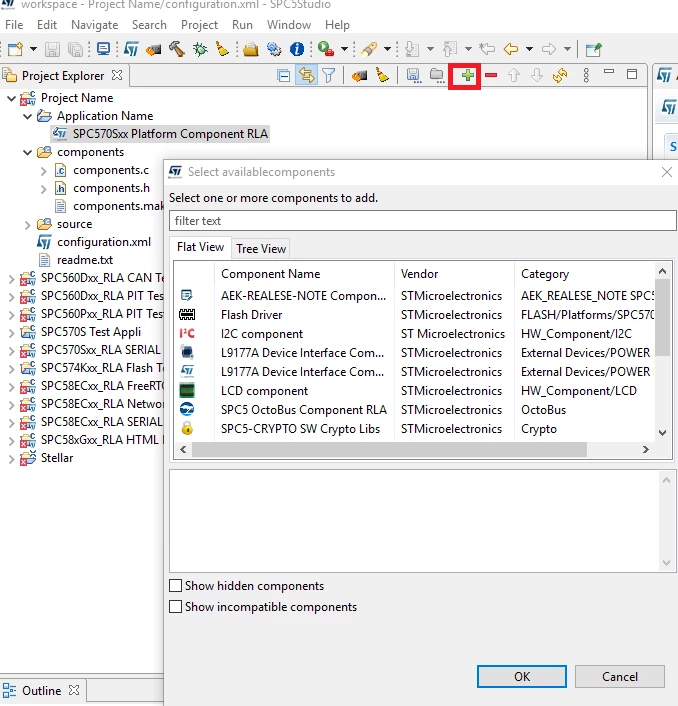
    1) First, add the platform component

    2) You have to click on the + button to add the compatible component

    0693W000004KVJoQAO.png 

    Best regards

    Erwan

    1 reply

    Erwan YVIN
    ST Employee
    October 20, 2020

    Hello Dinuke ,

    There is a help section in SPC5Studio , (Cf Help Section)

    you can add any compatible component, configure and generate the code.

    Best Regards

    Erwan

    0693W000004KQZ3QAO.png 

    NDinu.1
    NDinu.1Author
    Associate II
    October 20, 2020

    Hello Erwan,

    I followed the help section. I have already created a new SPC5Studion application. I cant unable to find compatible components. Where do I can find the compatible components.

    Best Regards,

    Dinuke

    Erwan YVIN
    Erwan YVINBest answer
    ST Employee
    October 21, 2020

    1) First, add the platform component

    2) You have to click on the + button to add the compatible component

    0693W000004KVJoQAO.png 

    Best regards

    Erwan