

Sathish Sulegai
Associate
March 22, 2018
Solved

eTimer Clock selection

  • March 22, 2018
  • 1 reply
  • 1681 views
Posted on March 22, 2018 at 18:36

Hello Dear Forum members,

This question is regarding SPC560P40L1 controller's eTimer module.

At the moment my eTimer module using 'IP Bus clock' which is of 64M Hz. I am using prescaler value of '32' to get 2M Hz to eTimer module.

I want to have clock frequency of 20M Hz(or 40M Hz or multiples of 20M Hz basically).

I see in the block diagram of technical datasheet that(Please see attachments) there is option to choose from clock sources: 'Clock' or 'IP Bus clock'

The crystal oscillator frequency is 40M Hz. I would like to use this frequency as input to my eTimer module but i don't know how or even it's possible to get this Frequency routed to eTimer ?

I would be happy if someone can share any useful tips or suggestion in this regard.

Best regards

Sathish 

#spc5 #spc5x #clock-selection #etimer
    This topic has been closed for replies.
    Best answer by Erwan YVIN
    Posted on March 23, 2018 at 10:10

    Hello Sathish ,

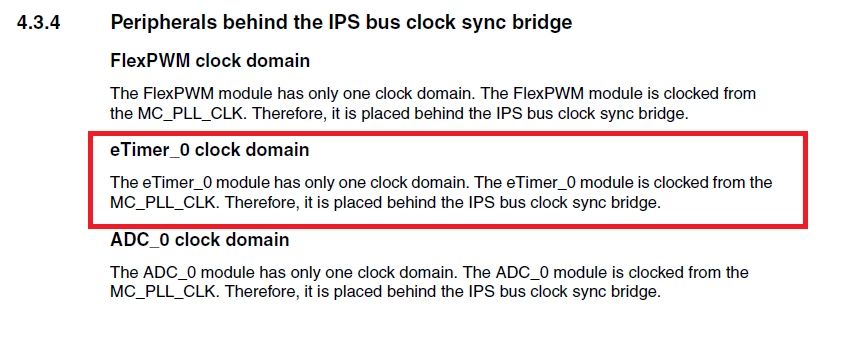
    The RM is not clear in the clock domain

    0690X0000060ADYQA2.png

    if you want to configure correctly,

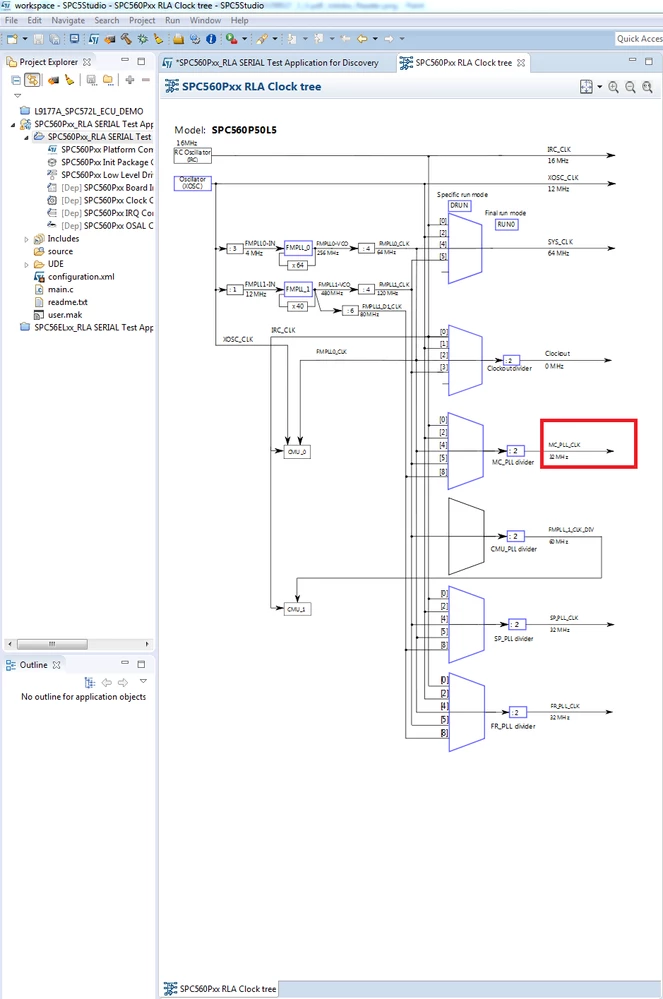
    It is a good thing to use the clocktree in SPC5Studio Tools Suite.

    0690X0000060A5lQAE.png

      Best regards

                 Erwan

    1 reply

    Erwan YVIN
    Erwan YVINBest answer
    ST Employee
    March 23, 2018
    Posted on March 23, 2018 at 10:10

    Hello Sathish ,

    The RM is not clear in the clock domain

    0690X0000060ADYQA2.png

    if you want to configure correctly,

    It is a good thing to use the clocktree in SPC5Studio Tools Suite.

    0690X0000060A5lQAE.png

      Best regards

                 Erwan

    Sathish Sulegai
    Associate
    March 23, 2018
    Posted on March 23, 2018 at 12:12

    Dear Erwan,

    Thank you for your reply.

    In my project clock tree(Please see attachment) i do not see clock selection logic block for ''MC_PLL_CLK''.

    Please let me know how could i add this block and how do i route this(MC_PLL_CLK) to eTimer module instead of  SYS_CLK with Prescaler 0690X0000060ACzQAM.png?

    Freundliche Grüßen

    Sathish 

    Erwan YVIN
    ST Employee
    March 23, 2018
    Posted on March 23, 2018 at 13:46

    Hello Sathish,

    for P40 Family, you should take SYS_CLK.

    the clocktree is well valid (cf below)

    0690X0000060AAuQAM.png

    The RM is a game of investigation ;)

      best regards

                 Erwan