
AAsho.2
Associate
May 22, 2023
Question

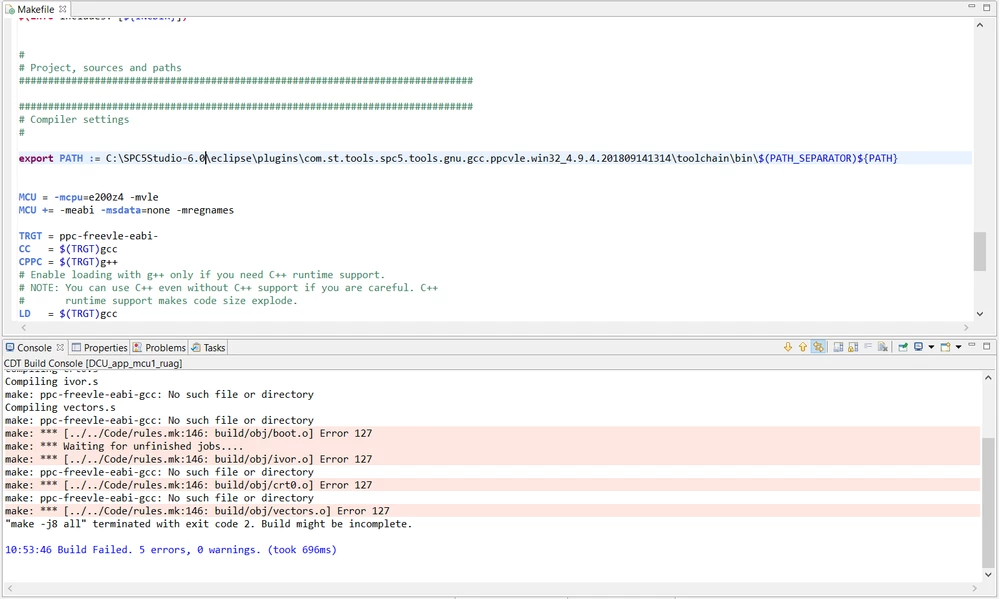
Facing this error While trying to build a project on SPC5 Studio "make: ppc-freevle-eabi-gcc: No such file or directory" Knowing that it exist in the SPC5 Studio plugins
  • May 22, 2023
  • 7 replies
  • 1758 views


_legacyfs_online_stmicro_images_0693W00000bkdxvQAA.pngthis is the path in the make file and the path is written correctly
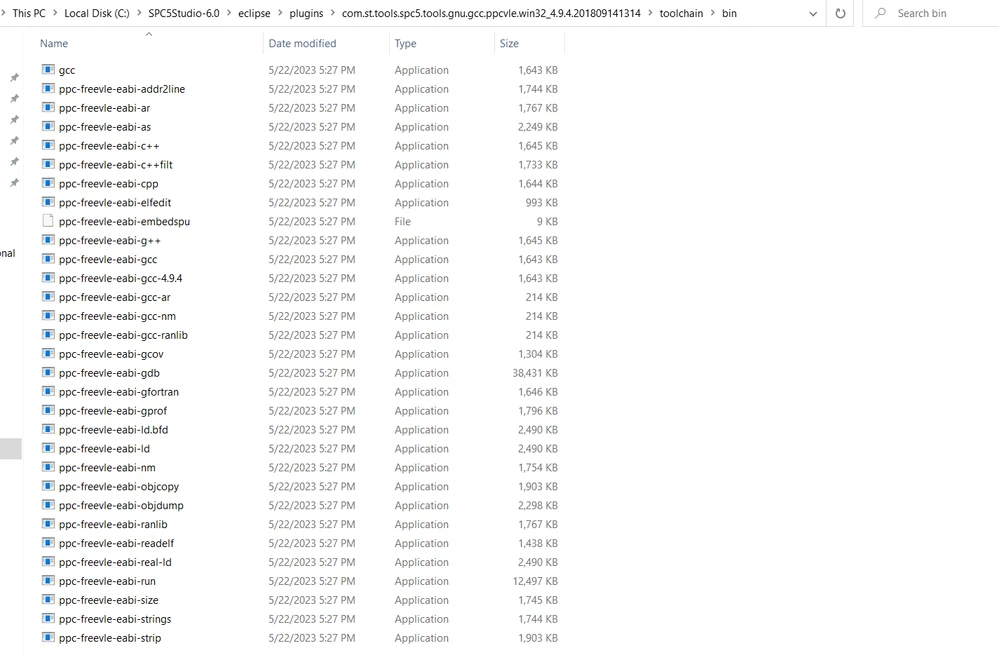

_legacyfs_online_stmicro_images_0693W00000bkdyZQAQ.png 

    This topic has been closed for replies.

    7 replies

    Tesla DeLorean
    Guru
    May 22, 2023

    Tools generally don't lie, there's usually some problem..

    ie the PATH is not set properly, or mis-formatted.

    Contains spaces or other hieroglyphs that shouldn't be in file names and paths.

    Inconsistent use of \ or / characters

    Use of virtual directories, like Desktop

    Create a test app that when runs it outputs parameters, call paths, environment variables and system paths, replace the app that's being run currently with this to understand what environment it's being furnished

    Tips, Buy me a coffee, or three.. PayPal VenmoUp vote any posts that you find helpful, it shows what's working..
    ODOUV.1
    ST Employee
    May 23, 2023

    The gcc path is added at compilation time thanks to this line in Makefile:

    export PATH := C:\SPC5Studio-6.0\eclipse\plugins\com.st.tools.spc5.tools.gnu.gcc.ppcvle.win32_4.9.4.20200908161514\toolchain\bin\$(PATH_SEPARATOR)${PATH}

    AAsho.2
    AAsho.2Author
    Associate
    May 23, 2023


    _legacyfs_online_stmicro_images_0693W00000bkdxvQAA.pngthis is the path in the make file and the path is written correctly


    _legacyfs_online_stmicro_images_0693W00000bkdyZQAQ.png 

    ODOUV.1
    ST Employee
    May 23, 2023

    can you try to add it manually in your path ? using windows environment settings ?

    AAsho.2
    AAsho.2Author
    Associate
    May 23, 2023

    Tried this and still the same error


    _legacyfs_online_stmicro_images_0693W00000bkf7cQAA.png

    ODOUV.1
    ST Employee
    May 23, 2023

    can you try to uninstall/reinstall SPC5Studio ?

    Erwan YVIN
    ST Employee
    May 23, 2023

    Normaly we are using the version C:\SPC5Studio-6.0\eclipse\plugins\com.st.tools.spc5.tools.gnu.gcc.ppcvle.win32_4.9.4.20200908161514\toolchain\bin

    i suspect that that your toolchain has been removed or is obsolete

    Best Regards

    Erwan