

AVM
Associate II
January 25, 2022
Question

Flash Erase for SPC58NG84E7 is not working

  • January 25, 2022
  • 9 replies
  • 5542 views

Hello,

I am working on the bootloader, trying to flash only 256 bytes. So, before flashing, erasing the block 0xFF0000. There is already some data in this block. But erase is not happenin, even if FlashErase() returns 0 and FlashCheckStatus() also gives opResult=0. Also when I check memory, it still shows the same data and not erased.

Following below steps to get flash block erased-

#define LOWBLOCKSELECT 0x00000100U

#define MIDBLOCKSELECT 0x00000000U

#define HIGHBLOCKSELECT 0x00000000U

/* Unlock the requested block for Erase operation */
nLargeBlockSelect.firstLargeBlockSelect = 0;
nLargeBlockSelect.secondLargeBlockSelect = 0;
SetLock(&FLSHM_ssdConfig, C55_BLOCK_LOW, UNLOCK_ALL_BLOCKS);
 
irqIsrDisable();
 
/* Erase the requested block */
Return_Val = FlashErase(&FLSHM_ssdConfig, C55_ERASE_MAIN, LOWBLOCKSELECT, MIDBLOCKSELECT, HIGHBLOCKSELECT, nLargeBlockSelect);
if(Return_Val == C55_OK)
{
while(C55_INPROGRESS == FlashCheckStatus(&FLSHM_ssdConfig, 
C55_MODE_OP_ERASE, &opResult, &FLSHM_eraseCtxData))
{}
/* Erase is in progress */
}
else
{
/* Erase failed */
}
 
irqIsrEnable();

Configuration for flash is as follows -

SSD_CONFIG FLSHM_ssdConfig = {
C55_REG_BASE, /* C55 control register base */
MAIN_ARRAY_BASE, /* base of main array */
{ 0, 0, 0 }, /* blocks info of low address space */
{ 0, 0, 0 }, /* blocks info of mid address space */
{ 0, 0, 0 }, /* blocks info of high address space */
0, /* number of blocks in 256K address space */
UTEST_ARRAY_BASE, /* base of UTEST array */
TRUE, /* interface flag indicate main or alternate interface */
256U,/* programmable size */
FALSE /* debug mode selection */
};
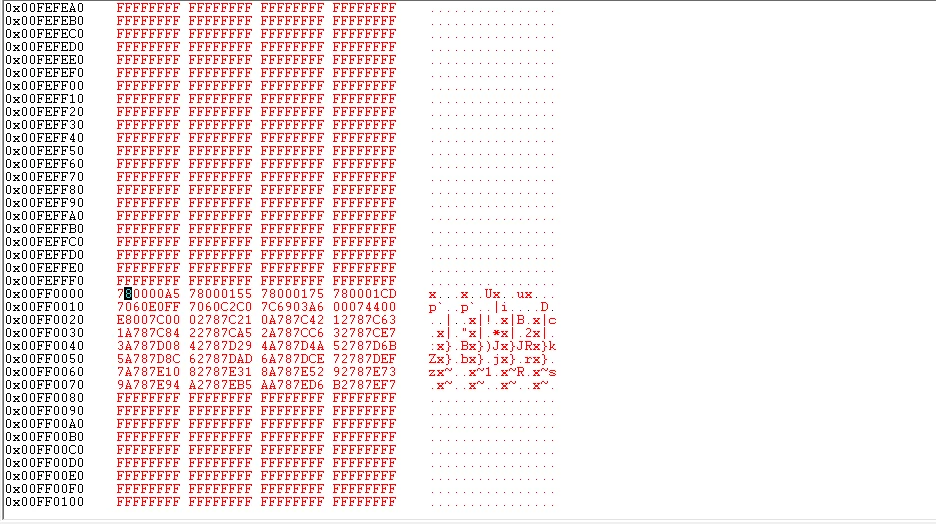
0693W00000JNFt8QAH.png 

What could be the issue here?

Regards,

AM

    This topic has been closed for replies.

    9 replies

    ODOUV.1
    ST Employee
    January 25, 2022

    Hello,

    I would say you maybe inverted IrqIsrEnable and IrqIsrDisable, and you forgot componentsInit ?

    Best Regards,

    -Olivier

    AVM
    AVMAuthor
    Associate II
    January 27, 2022

    Hi Olivier,

    In the beginning, componentsInit() is called in main().

    Also I have tried this with IrqIsrEnable() and then IrqIsrDisable(), but no success.

    Warm Regards,

    AM

    ODOUV.1
    ST Employee
    January 28, 2022

    Hello,

    on SPC58xGxx, it seems that flash sector 0x00FF0000 is in Low select block 9:

    0693W00000JNYJTQA5.png 

    would you please try using 0x200 instead of 0x100 for LOWBLOCKSELECT ?

    Best regards,

    -Olivier

    ODOUV.1
    ST Employee
    January 27, 2022

    Hello,

    on SPC58xGxx, it seems that flash sector 0x00FF0000 is in Low select block 9:

    0693W00000JNYJTQA5.png 

    would you please try using 0x200 instead of 0x100 for LOWBLOCKSELECT ?

    Best regards,

    -Olivier

    AVM
    AVMAuthor
    Associate II
    January 28, 2022

    Hi Olivier,

    I corrected the value,

    #define LOWBLOCKSELECT 0x00000200U

    So, now with this corrected value, I am able to erase the block 0xFF0000 only when I keep breakpoint at line8 in below code. But when I run it without breakpoint at line8 and put it on line14, line19, execution goes to unhandled exception.

    /* Unlock the requested block for Erase operation */
    nLargeBlockSelect.firstLargeBlockSelect = 0;
    nLargeBlockSelect.secondLargeBlockSelect = 0;
    SetLock(&FLSHM_ssdConfig, C55_BLOCK_LOW, UNLOCK_ALL_BLOCKS);
     
    /* Erase the requested block */
    Return_Val = FlashErase(&FLSHM_ssdConfig, C55_ERASE_MAIN, LOWBLOCKSELECT, MIDBLOCKSELECT, HIGHBLOCKSELECT, nLargeBlockSelect);
    if(Return_Val == C55_OK)
    {
    while(C55_INPROGRESS == FlashCheckStatus(&FLSHM_ssdConfig, 
    C55_MODE_OP_ERASE, &opResult, &FLSHM_eraseCtxData))
    {}
    /* Erase is done */
    FLSHM_CmdStat = FLSHM_SUCCESS;
    }
    else
    {
    /* Erase failed */
    FLSHM_CmdStat = FLSHM_ERASEFAILED;
    }

    ODOUV.1
    ST Employee
    January 28, 2022

    Hello,

    1) question:

    How and where is declared/defined FLSHM_eraseCtxData ?

    2) few remarks:

    It should be safer to check the returned value from SetLock at line 4.

    It should be safer to check opResult value at line 14 instead of always returning SUCCESS.

    It should be safer to use default 0x80 instead of 256 for programmable size in FLSHM_ssdConfig.

    Best Regards,

    -Olivier

    AVM
    AVMAuthor
    Associate II
    January 28, 2022

    Hi Olivier,

    Ans:1) It is defined as global CONTEXT_DATA FLSHM_eraseCtxData;

    Should this CONTEXT_DATA argument be same for both in case of erase and program calls?

    For your remark point 2, I will check with those points as well and let you know the results.

    Warm Regards,

    AM

    ODOUV.1
    ST Employee
    January 28, 2022

    programmable size 256 should be OK, but did you forget to call FlashInit before the SetLock ?

    BRs,

    -Olivier

    ODOUV.1
    ST Employee
    January 28, 2022

    Would you please show me your BOOT configuration in SPC58xGxx RLA Platform->runtime_settings ?

    as example:

    0693W00000JNhthQAD.pngBRs,

    -Olivier

    AVM
    AVMAuthor
    Associate II
    January 28, 2022

    Hi Olivier,

    Here's the Platform RLA configuration (I dont have watchdog option in this)-

    0693W00000JNiPWQA1.pngWatchdog is in clock RLA -

    0693W00000JNiRrQAL.png 

    Warm Regards,

    AM

    ODOUV.1
    ST Employee
    January 28, 2022

    Could you try this Load in RAM configuration ? (in runtime settings)0693W00000JNilIQAT.png 

    BRs,

    -Olivier

    AVM
    AVMAuthor
    Associate II
    January 28, 2022

    Hi Olivier,

    Great! This is erasing the flash successfully, even writing to flash is also working.

    Could you tell me the reason for this?

    Warm Regards,

    AM

    ODOUV.1
    ST Employee
    January 28, 2022

    I am not 100% sure, I will check with Flash expert,

    but I think you cannot erase a flash sector near to the one you are executing your own program.

    0xFC_0000 and 0xFF_0000 are may be too closed from each other.

    Load your program in RAM and executing from RAM, there is no more conflict

    BRs,

    -Olivier

    AVM
    AVMAuthor
    Associate II
    January 28, 2022

    Hi Olivier,

    Sure, please check with the expert and let me know the reason for this.

    '0xFC_0000 and 0xFF_0000 are may be too closed from each other.' - If so, I will check this scenario for different flash block then.

    Also, loading the program in RAM should certainly have some limitations I suspect. Am I right?

    Warm Regards,

    AM

    ODOUV.1
    ST Employee
    January 28, 2022

    Sure I will provide confirmation as soon as I have all the information.

    For load in RAM the program must fulfill into limited RAM size..

    BRs,

    -Olivier

    ODOUV.1
    ST Employee
    January 31, 2022

    Good morning,

    Thank you for your comments.

    I asked for support from R&D,

    you should have an answer this week.

    Best Regards,

    -Olivier

    AVM
    AVMAuthor
    Associate II
    January 31, 2022

    Hi Olivier,

    Good morning!

    Thanks for the update.

    One more heads up, as mentioned earlier, this flash erase is part of my bootloader code and I would prefer to execute it from Flash memory itself(instead of Load in RAM).

    Awaiting to get this resolved soon.

    Warm Regards,

    AM

    ODOUV.1
    ST Employee
    February 4, 2022

    Hello,

    R&D had no time to provide an analysis for this issue this week.

    I hope they could next one.

    Best Regards,

    -Olivier

    Giovanni CUCE
    Visitor II
    February 11, 2022

    hello,

    It seems you are using an older version of this SSD (Standard Software Driver). Could you please download the new one (SPC58xEC-FLASH-0.2.2) and let me know? At the moment this new version is available only on TeamSpaces.

    I confirm also the max PROGRAMMABLE_SIZE is 0x80.

    BR,

    Giovanni