Pradnya
Associate II
January 8, 2020
Solved

Hi, I have SPC560P-DISP board with FTDI . I have install UDE SDK 5, i can see debuger in Device manager ( windows 10 ) but unable to access "Excecute and Debug your application" Please tell me how to access the debuger.

  • January 8, 2020
  • 2 replies
  • 942 views

also saved Hitec license in SPC5STUDIO
    This topic has been closed for replies.
    Best answer by Erwan YVIN

    Hello Rimzim ,

    it is a PLS issue on Windows 10

    you can access it by launching the external tool

    or

    Use DefaultProgramsEditor Standalone

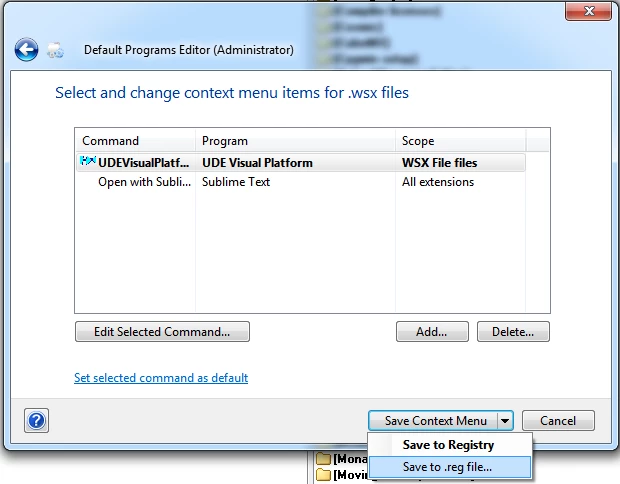
    1)   File Type Settings

    2)   Context Menu

    3)   WSX Extension to change

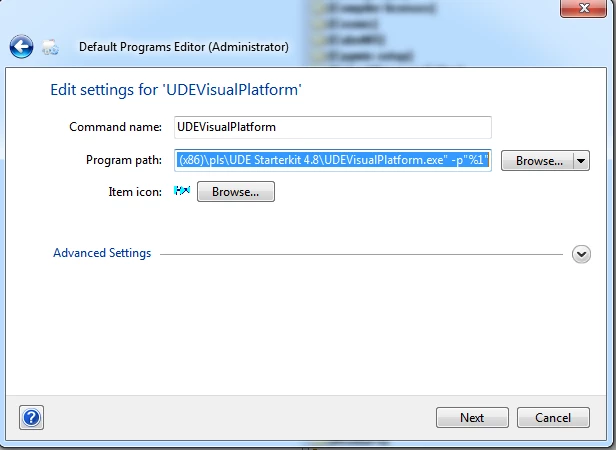
    4)   Add or Change UDE Visual Platform (cf screenshot 1)

    0690X00000BvzVSQAZ.png

    5) Save the context menu and registry file (cf screenshot 2)

    0690X00000BvzVcQAJ.png

    Best regards

    Erwan

    2 replies

    Erwan YVIN
    Erwan YVINBest answer
    ST Employee
    January 14, 2020

    Hello Rimzim ,

    it is a PLS issue on Windows 10

    you can access it by launching the external tool

    or

    Use DefaultProgramsEditor Standalone

    1)   File Type Settings

    2)   Context Menu

    3)   WSX Extension to change

    4)   Add or Change UDE Visual Platform (cf screenshot 1)

    0690X00000BvzVSQAZ.png

    5) Save the context menu and registry file (cf screenshot 2)

    0690X00000BvzVcQAJ.png

    Best regards

    Erwan

    Pradnya
    PradnyaAuthor
    Associate II
    January 15, 2020

    Hi Erwan,

    Thanks for the reply. Currently I am using UDE by launching external tool.

    I don't have .wsx file in my 'default app by file type'.

    While developing s/w, for breakpoint debug; SPC5Studio with debuger is essential.

    Any help at all would be appreciated.

    Thanks and regards,

    Rimzim