

stefano maccari
Visitor II
June 27, 2017
Question

Hightec compiler problem with SPC5Studio

  • June 27, 2017
  • 1 reply
  • 1677 views
Posted on June 27, 2017 at 15:06

Hello everyone,

I have a problem with the Hightech compiler used in SPC5Studio, I try to explain my issue: on my PC I have installed the SPC5Studio v5.0.0 and the Hightec compiler toolchain v4.6.6.1.

I configured the SPC5 Studio to use the Hightech compiler by adding the following values in the PATH:

C:\HighTec\toolchains\powerpc\v4.6.6.1\bin;

C:\HighTec/licensem

situated under

Windows -> Preferences ->C/C++ -> Build -> Environment  (see the attachment )
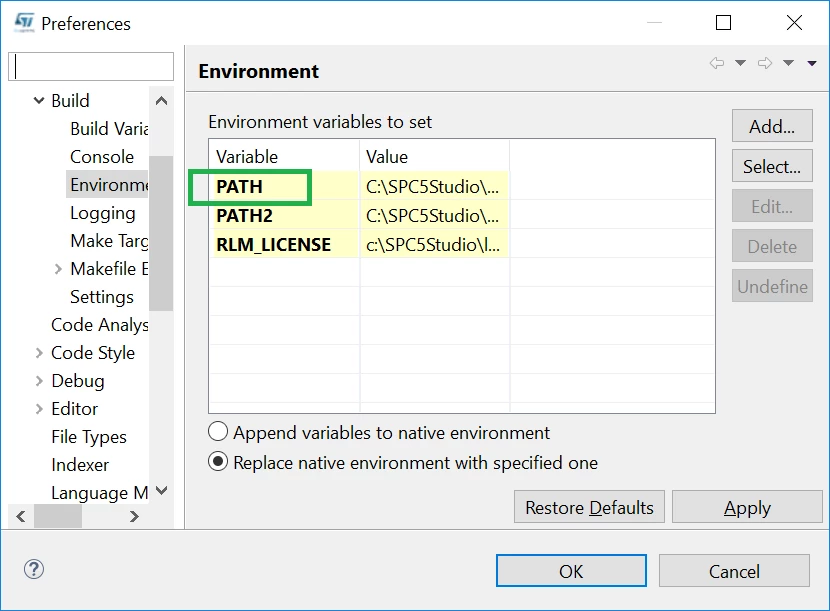
0690X00000607WcQAI.png

I made a test project, builded it and all worked fine, but if I close the SPC5 Studio then reopen it and build again the project (after a clean) the buildin doesn't work anymore; I checked under

Windows -> Preferences ->C/C++ -> Build -> Environment and the values:

C:\HighTec\toolchains\powerpc\v4.6.6.1\bin;

C:\HighTec/licensemanager

were missing in the PATH, the only way to make it work is to copy again in the PATH these two values.

Then I tried to add a new variable and copy in it the two values, but it didn't work too.

I'm asking if there is a way to avoid the copy of the values every time I close and open the SPC5 Studio.

Thank you in advance.

Stefano Maccari

    This topic has been closed for replies.

    1 reply

    Erwan YVIN
    ST Employee
    June 28, 2017
    Posted on June 28, 2017 at 09:36

    Hello Stefano ,

    Have you followed 

    https://community.st.com/0D50X00009bMM5XSAW

     ?

    Could you confirm that you are in SPC5Studio 5.4.0 ?

    it is a bug in SPC5Studio Core

    it will be corrected in the next release

    in checking the coherency the PATH variable, the PATH Variable is not persistent

    1) could you update your system environment in Windows

    2) and check Append variables to native environment

        Best regards

                       Erwan

    alessandro2
    Associate III
    June 28, 2017
    Posted on June 28, 2017 at 14:54

    Hello,

    I'm facing the same issue with SPC5Studio v. 5.0.0

    I've added the following paths to the Windows PATH environment variable:

    C:\HIGHTEC\toolchains\powerpc\v4.6.6.1\bin

    C:\HIGHTEC\licensemanager

    but still it is not working,

    0690X00000607XfQAI.png

    Is there any workaround to overcome the issue without having to update SPC5Studio to the latest release?

    Thank you.

    Regards

    Alessandro

    Erwan YVIN
    ST Employee
    June 28, 2017
    Posted on June 28, 2017 at 16:21

    yes ,

    Do not remove

    C:\SPC5Studio\eclipse\plugins\com.st.tools.spc5.tools.gnu.win32_1.0.0.201706271047\gnutools;C:\SPC5Studio\eclipse\plugins\com.st.tools.spc5.tools.hightec.win32_1.0.0.201306281422\hightec\ppc-ht-eabi\bin;C:\SPC5Studio\eclipse\plugins\com.st.tools.spc5.tools.hightec.win32_1.0.0.201306281422\hightec\bin;C:\SPC5Studio\eclipse\plugins\com.st.tools.spc5.tools.gnu.gcc.ppcvle.win32_1.0.0.201702151735\toolchain\powerpc-eabivle\bin;C:\SPC5Studio\eclipse\plugins\com.st.tools.spc5.tools.gnu.gcc.ppcvle.win32_1.0.0.201702151735\toolchain\bin;�?�?�?

    Add in hightec PATH (at the beginning of the String) ..

    WARNING : do not remove the next strings which GnuTools PATH and the others Free GCC PATH

    Because SPC5Studio is going to check the coherency of GNU TOOLS path

    c:\HIGHTEC\toolchains\powerpc\v4.6.5.0\bin\;C:\SPC5Studio\eclipse\plugins\com.st.tools.spc5.tools.gnu.win32_1.0.0.201706271047\gnutools;C:\SPC5Studio\eclipse\plugins\com.st.tools.spc5.tools.hightec.win32_1.0.0.201306281422\hightec\ppc-ht-eabi\bin;C:\SPC5Studio\eclipse\plugins\com.st.tools.spc5.tools.hightec.win32_1.0.0.201306281422\hightec\bin;C:\SPC5Studio\eclipse\plugins\com.st.tools.spc5.tools.gnu.gcc.ppcvle.win32_1.0.0.201702151735\toolchain\powerpc-eabivle\bin;C:\SPC5Studio\eclipse\plugins\com.st.tools.spc5.tools.gnu.gcc.ppcvle.win32_1.0.0.201702151735\toolchain\bin;�?�?

    Best regards

    Erwan