

Job Shen
Associate III
November 29, 2017
Question

Is there sample application available for SPC570S-DISP?

  • November 29, 2017
  • 3 replies
  • 2038 views
Posted on November 29, 2017 at 02:34

Hi,

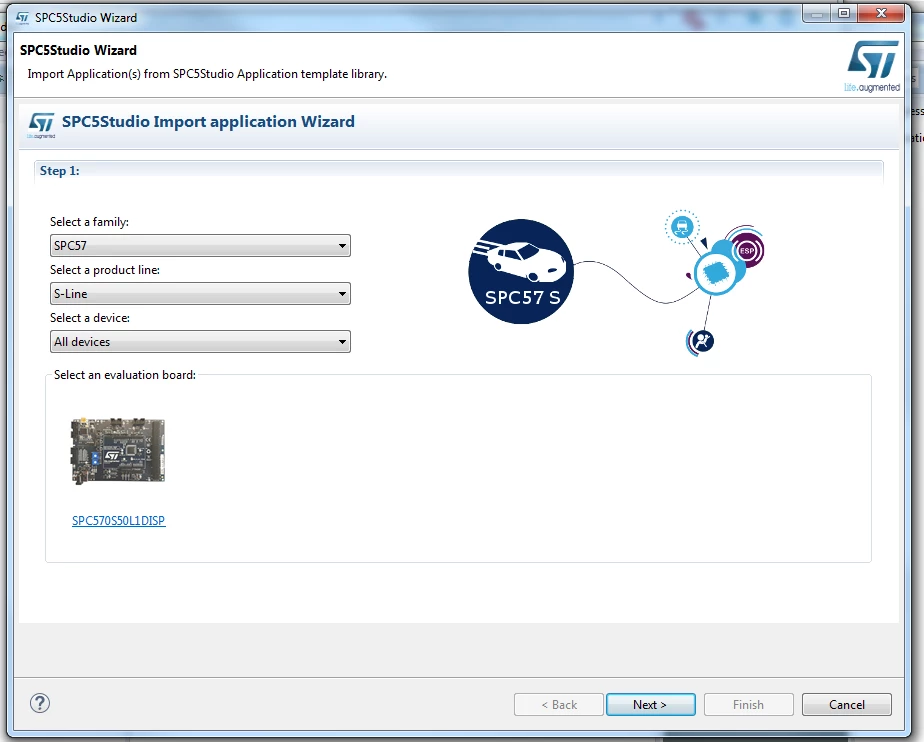
We have the SPC570S-DISP board which has the SPC570S50E1 MCU. The SPC5Studio Import application Wizard only has SPC570S50L1DISP for the SPC57 S-Line.

After import application such as SPC570Sxx_RLA SERIAL Test Application for Discovery, generate and compile it, run the PLS UDE debug, there is nothing printed on the console (the 2nd COM port), and the UDE STK 4.8 gives warning ''Core0::PowerPcInstr PowerPC mode is different between target and pattern, VLE mode is forced''. 

Question:

1. How to get sample code for the SPC570S-DISP with SPC570S50E1 MCU?

2. The console issue, was it because the code was generated for SPC570S50L1 MCU so it doesn't work properly on the SPC570S50E1?

Thanks for any help.

Job0690X00000608zpQAA.png
    This topic has been closed for replies.

    3 replies

    Erwan YVIN
    ST Employee
    November 29, 2017
    Posted on November 29, 2017 at 10:47

    Hello Job ,

    All the SPC57S applications are ok (tested and validated by our Continuous Integration) in SPC5Studio.

    it seems to be a PLS workspace issue. (check your cfg file (board specific))

    Which application do you use ?

    • Please check your driver on Windows (FTDI)
    • Example for SPC570Sxx_RLA serial Test application in Appwizard
    0690X00000604FiQAI.jpg0690X000006090sQAA.png

       Best Regards

                     Erwan

    Job Shen
    Job ShenAuthor
    Associate III
    November 29, 2017
    Posted on November 29, 2017 at 20:04

    Hi Erwan,

    Thanks so much for looking into the issue.

    I use the same application - SPC570Sxx_RLA SERIAL Test Application for Discovery. 

    The COM port name is PLS USB Serial Port, provider is PLS Development Tools and if open driver detail, 3 of the driver files are from FTDI.

    I am new to the SPC5Studio, so which cfg file shall i check, and what are the expected changes? I imported the application without any changes.

    I uploaded 4 images.

    1 - application with USB port names

    2 - program board ok and com port info

    3 - step in caused warning -  ''powerpc mode is different between target and pattern''

    4 - my board

    Best Regards,

    Job

    0690X00000608yuQAA.png0690X00000608yTQAQ.png0690X000006091gQAA.png0690X00000604H0QAI.jpg
    Erwan YVIN
    ST Employee
    November 30, 2017
    Posted on November 30, 2017 at 09:41

    Hello Job ,

    According to your screenshot, all is ok.

    Your program is halted by an internal breakpoint.

    you should click on Go to continue the program.

    the warning : 

    'powerpc mode is different between target and pattern VLE is forced' is normal.

    Anyway, all the program on SPC56,SPC57 are compiled in VLE mode.

        Best regards

                          Erwan

    Job Shen
    Job ShenAuthor
    Associate III
    November 30, 2017
    Posted on November 30, 2017 at 19:51

    Hi Erwan,

    Thank you for quick response. And i feel relieved knowing that my setup is ok.

    One thing still puzzles me, by run this 'SPC570Sxx_RLA SERIAL Test Application for Discovery', do i suppose to see the 'Hello World!' get printed on console every time after the three LEDs (LED 13, 14, 15) toggled state? There are 2 COM ports (see the screen shot in my previous reply), the first one is for the PLS UDE to program/flash/debug the board, i assume the second port is console, and i set it to 38400 bps. Is there any document or instructions talk about the console port?

    By changing the length of delay from 200ms to 1000ms before toggling the LED, i could see the effect on the board, so i am sure that part is working perfectly for me.  

    By the way, there is no 'Go' in the debug menu, so i use 'Step out of Subroutine' to let the program run.

    Best regards,

    Job

    Job Shen
    Job ShenAuthor
    Associate III
    December 2, 2017
    Posted on December 02, 2017 at 02:36

    As a follow up, all 4 imported Test Application for Discovery are working fine on my setup. I have 

    SPC570Sxx OS-Less

    SPC570Sxx_RLA FreeRTOS SERIAL

    SPC570Sxx_RLA SERIAL

    SPC570Sxx_RLA STM

    I could receive data from TX PINs using Raspberry Pi 3 GPIO and use miniterm.py to print them out.

    But one thing still puzzles me, the intgerated USB/JTAG debugger, the first USB port is used by UDE STK 4.8 to program/debug the board, what is the second USB port for? and how to write data to the second USB port? 

    I would really appreciate if someone can shed some light? Even answer like 'this port is reserved, don't use it' will clear my doubts.

    Best,

    Job

    LJaey
    Associate
    February 12, 2019

    Hello Erwan YVIN.

    i have a same problem....

    the warning : 'powerpc mode is different between target and pattern VLE is forced' is normal'

    i wonder how solved this problem

    thanks