AndreasPA
Associate III
March 31, 2020
Solved

Missing CFG & lib files after adding in Eeprom driver / looking into the example

  • March 31, 2020
  • 3 replies
  • 2356 views

Heya

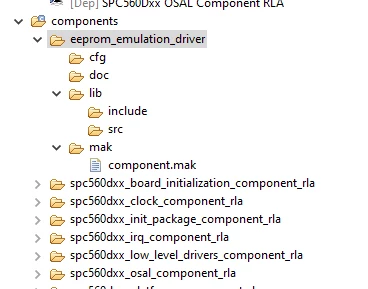
in both the flash example and my personal implementation the CFG and lib files for the eeprom_emulation_driver are missing which prompts the error

 0693W000000V1u7QAC.png

Any ideas ?

0693W000000V1uHQAS.png

    This topic has been closed for replies.
    Best answer by Erwan YVIN

    Hello ,

    It is ok from now (SPC5Studio generation and compilation) ?

    we supported Chibios (version 2.6.4) and NIL (version 1.1.2), (http://community.st.com)

    Note : it is not the last version

    we still use chibios test application for Students projects

    We have not followed the last version of chibios for SPC5 Families (Bandwidth problematic)

    https://github.com/microwan/spc5-chibios

    https://github.com/microwan/spc5-nil

    you have more information on http://www.chibios.org.

    We are supporting FreeRTOS too.

    Best regards

    Erwan

    3 replies

    Erwan YVIN
    ST Employee
    March 31, 2020

    Hello ,

    Could you send me your installation details (Help ==> About SPC5Studio) ?

    EEProm Emulation driver is a component .

    You need to click on clean and generate .

    0693W000000V59yQAC.png

    Best Regards

    Erwan

    AndreasPA
    AndreasPAAuthor
    Associate III
    March 31, 2020

    Hey Erwan,

    thanks for the quick reply.

    I've already tried that haha, this is the only one i've run into that doesnt generate anything upon generation.

    i've also checked for the files are within the plugins folder i would personally add them but they are .ftl and i dont want to risk accidently setting up an

    incorrect value haha.

    Sure, attached my installation details.

    SPC5 STUDIO V5.8.1

    0693W000000V5FNQA0.png

    0693W000000V5FSQA0.png

    Regards,

    Andreas

    AndreasPA
    AndreasPAAuthor
    Associate III
    April 1, 2020

    I've also just completed a full uninstall and reinstall of the program.

    a clean reinstall of spcstudio straight from the website gives me this error

    0693W000000VAwHQAW.png

    Erwan YVIN
    ST Employee
    April 2, 2020

    Hello ,

    There are eclipse and feature does not match with official installer

    Are you sure that your have used :

    en.SPC5Studio-5.8.1-Hubble.exe located in ST Website ?

    You should remove the full directory c:\SPC5Studio before installation

    Could you send me your installation details (Configuration Tab ==> Copy to Clipboard)

    Best Regards

    Erwan

    AndreasPA
    AndreasPAAuthor
    Associate III
    April 2, 2020

    Hey Erwan, that installation i had downloaded all the addons through the online installer.

    i completely removed spc5studio and reinstalled it. the second time around i didnt download any addons and i had two folders for ee.spc560dxx (attachted image below) one folder had all the files the other had nothing, so i went in and copied the files and now it compiles.

    0693W000000VD5aQAG.png