Associate II
January 17, 2024
Solved

NeedEvaluationBoard for Verifying the BMS algorithms(SOC,SOH and SOE)

  • January 17, 2024
  • 2 replies
  • 1924 views

Hello Team,

I am looking for Battery Management evaluation boards to verify the algorithms like SOC, SOH and SOE, protection and safety modules.


Can anyone suggest suitable STM evaluation boards with software tools for the software development.


I have look through one of the boards EVAL-L9963E-MCU evaluation board, but it is having preloaded GUI to verify the L9963E chip, but I am looking for the software development board to write the algorithms and develop the application software by own.


BR

Venkat


This topic has been closed for replies.
Best answer by Max VIZZINI

Hi,

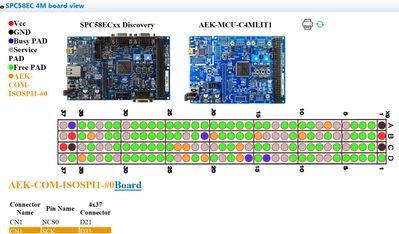
Inside AutoDevKit Studio you will get the complete code and information including the wiring information, just by activating the BoardView.

Download AutoDevKit Studio from www.st.com/autodevkitsw 

At the end you need to connect only the AEK-MCU-C4MLIT1 MCU board with the transceiver board AEK-COM-ISOSPI1 by wiring.

Then the ISOSPI1 board is plugged in the USB-like connector directly in the node board AEK-POW-BMS63EN.

Use the AEK-MCU-C4MLIT1 mcu board for SPC58EC microcontroller.

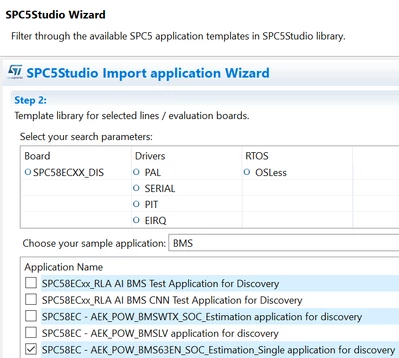
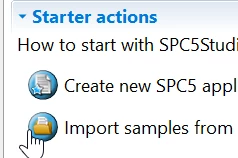
Once you open AutoDevKit Studio import for the AEK-MCU-C4MLIT1 example for BMS, generate the project and open the board view (few screenshots below).


MaxVIZZINI_0-1706296598254.png

MaxVIZZINI_1-1706296667624.png

MaxVIZZINI_2-1706296816141.png

Best Regards,

AutoDevKit Team


2 replies

Erwan YVIN
ST Employee
January 18, 2024

Hello , 

You can try AutodevkitStudio or SPC5Studio (AutodevKit) (PowerPC)

with a combination of AEK_POWBMS63EN / AEK_COM-ISOSPI1 / SPC58EC

There are some nice examples in the application wizard

         Best regards

                                    Erwan


mvenkat86Author
Associate II
January 22, 2024

Hello Erwan,


Thank you for the tools and Battery controller board and communication board.

For the Micro controller board, could you please give some info for interfacing with the above two boards.


BR

Venkat

Max VIZZINI
Max VIZZINIBest answer
Technical Moderator
January 26, 2024

Hi,

Inside AutoDevKit Studio you will get the complete code and information including the wiring information, just by activating the BoardView.

Download AutoDevKit Studio from www.st.com/autodevkitsw 

At the end you need to connect only the AEK-MCU-C4MLIT1 MCU board with the transceiver board AEK-COM-ISOSPI1 by wiring.

Then the ISOSPI1 board is plugged in the USB-like connector directly in the node board AEK-POW-BMS63EN.

Use the AEK-MCU-C4MLIT1 mcu board for SPC58EC microcontroller.

Once you open AutoDevKit Studio import for the AEK-MCU-C4MLIT1 example for BMS, generate the project and open the board view (few screenshots below).


MaxVIZZINI_0-1706296598254.png

MaxVIZZINI_1-1706296667624.png

MaxVIZZINI_2-1706296816141.png

Best Regards,

AutoDevKit Team