
Associate
January 22, 2025
Solved

Unable to program binary image in SPC58NH-DISP board using SPC5Studio

  • January 22, 2025
  • 2 replies
  • 1031 views

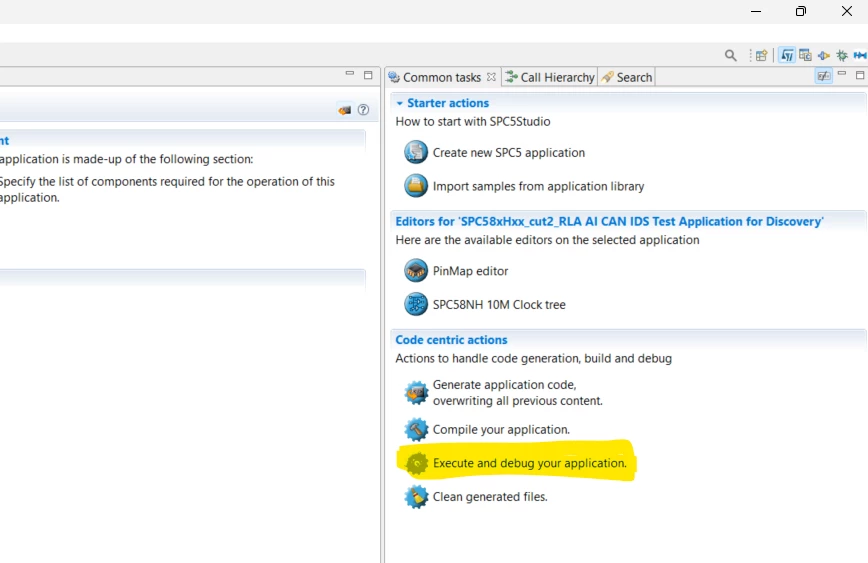
I have SPC58NH-DISP board for my application development. I am trying to program the board using SPC5Studion but I am unable to do it. For me "Execute and Debug Your application" task is disable even if in SPC5Studio UDE plugin is installed. UDE plug in is installed by using this link : "SPC5tools - http://spc5tools.spc5studio.com"".


NOTE: Board is connected and power supplied.


rtaImage.png

Best answer by Erwan YVIN

Hello ,

it is a PLS bug you should associate your file *.wsx on PLS UDE on your windows 

https://community.st.com/t5/automotive-mcus/how-to-use-execute-and-debug-your-application-in-spc5-studio/m-p/320534#M2975

       Best regards

                   Erwan

2 replies

Erwan YVIN
Erwan YVINBest answer
ST Employee
January 27, 2025

Hello ,

it is a PLS bug you should associate your file *.wsx on PLS UDE on your windows 

https://community.st.com/t5/automotive-mcus/how-to-use-execute-and-debug-your-application-in-spc5-studio/m-p/320534#M2975

       Best regards

                   Erwan

Associate
January 28, 2025

This SPC58NH-DISP board is connected with system through USB, But still I am not able to activate the debug session. Do we need to connect the UDE-STK dongle to activate the debug session ?