

JHoll.1
Associate
January 26, 2021
Solved

Unresolved inclusion - SPC5Studio 6.0

  • January 26, 2021
  • 4 replies
  • 1723 views

I have just installed SPC5Studio 6.0 and I have opened GTM DPLL Test Application. I am getting the "Unresolved inclusion" error for

#include "components.h"

#include <build/mcs/mcs0.h>

How do I resolve this? I don't seem to have any folders like the ones given for previous versions.
    This topic has been closed for replies.
    Best answer by Erwan YVIN

    Hello ,

    you are not using the official Make.exe from SPC5Studio 6.0 maybe by hooking your PATH.

    MAKE Version 5.2 Copyright (c) 1987, 2000 Borland (not the correct version)

    Incorrect command line argument: -j8

    please update your gnutools path in eclipse environment

    0693W000007DiwDQAS.png 

    Best Regards

    Erwan

    4 replies

    Erwan YVIN
    ST Employee
    February 2, 2021

    Hello ,

    You should click generate GTM DPLL Test Application in order to generate missing code coming from the GTM configuration.

    (Cf help section)

    Best regards

    Erwan

    JHoll.1
    JHoll.1Author
    Associate
    February 2, 2021

    Thank you. That gets rid of the error for components.h but I still have the "#include <build/mcs/mcs0.h>" error. I don't have a build folder or an mcs0.h file in the project directory, do I need that line? I do have mcs0.mcs in the source folder.

    Build return:

    19:27:14 **** Build of configuration Default for project SPC572Lxx_RLA GTM DPLL Test Application for EFI ****

    make -j8 all 

    MAKE Version 5.2 Copyright (c) 1987, 2000 Borland

    Incorrect command line argument: -j8

    Syntax: MAKE [options ...] target[s]

      -B        Builds all targets regardless of dependency dates

      -Dsymbol[=string] Defines symbol [equal to string]

      -Idirectory    Names an include directory

      -K        Keeps (does not erase) temporary files created by MAKE

      -N        Increases MAKE's compatibility with NMAKE

      -Wfilename    Writes MAKE to filename updating all non-string options

      -Usymbol     Undefine symbol

      -ffilename    Uses filename as the MAKEFILE

      -a        Performs auto-dependency checks for include files

      -c        Caches auto-dependency information

      -e        Ignores redefinition of environment variable macros

      -i        Ignores errors returned by commands

      -l+        Enables use of long command lines

      -m        Displays the date and time stamp of each file

      -n        Prints commands but does not do them

      -p        Displays all macro definitions and implicit rules

      -q        Returns zero if target is up-to-date and nonzero

               if it is not (for use in batch files)

      -r        Ignores rules and macros defined in BUILTINS.MAK

      -s        Silent, does not print commands before doing them

      -? or -h     Prints this message

       Options marked with '+' are on by default. To turn off a default

       option follow it by a '-', for example: -a-

    19:27:14 Build Finished. 0 errors, 0 warnings. (took 327ms)

    Although it states no errors I don't see any hex or elf files.

    Erwan YVIN
    Erwan YVINBest answer
    ST Employee
    February 3, 2021

    Hello ,

    you are not using the official Make.exe from SPC5Studio 6.0 maybe by hooking your PATH.

    MAKE Version 5.2 Copyright (c) 1987, 2000 Borland (not the correct version)

    Incorrect command line argument: -j8

    please update your gnutools path in eclipse environment

    0693W000007DiwDQAS.png 

    Best Regards

    Erwan

    JHoll.1
    JHoll.1Author
    Associate
    February 11, 2021

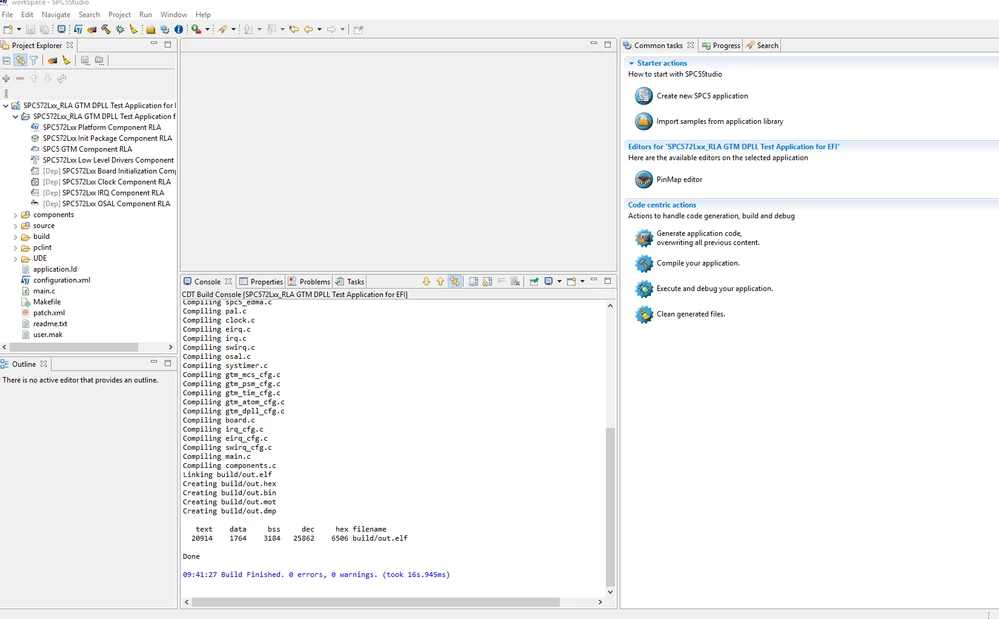
    I have spent some time on this but I still can't get this to work.

    I now the document "Using Hightec toolchain in SPC5Studio.pdf" and I've followed the steps using the folder names that I have for my version of the compiler. so my path now includes the following:

    C:\SPC5Studio-6.0\eclipse\configuration\org.eclipse.osgi\639\0\.cp\gnutools;

    C:\SPC5Studio-6.0\eclipse\plugins\com.st.tools.spc5.tools.gnu.gcc.ppcvle.win32_4.9.4.20200908161514\toolchain\bin;

    C:\SPC5Studio-6.0\eclipse\plugins\com.st.tools.spc5.tools.gnu.gcc.ppcvle.win32_4.9.4.20200908161514\toolchain\powerpc-eabivle\bin;

    C:\SPC5Studio-6.0\eclipse\plugins\com.st.tools.spc5.tools.hightec.win32_1.0.0.201809141314\hightec\bin;

    C:\SPC5Studio-6.0\eclipse\plugins\com.st.tools.spc5.tools.hightec.win32_1.0.0.201809141314\hightec\ppc-ht-eabi\bin

    In the build settings for the platform component I have:

    0693W000008FvPPQA0.png 

    In the Tool Chain Editor I have several options for the toolchain but not the hightec compiler, under current builder I only have the following:

    0693W000008FvQXQA0.png