
Associate II
November 6, 2024
Solved

Automatic Validation on target compilation problem

  • November 6, 2024
  • 2 replies
  • 2561 views

Hello. I have made with ST Edge AI Developer Cloud a model and downloaded the whole project for STM32CubeIDE.


When I do Validate on desktop it works fine and I get expected results.

But Validate on target gives me a compilation error.
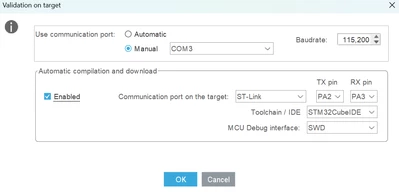
 

DenDanne_0-1730889104446.png


Building project 
Generating project 
Temporary project loaded 
Temporary AI configuration done 
Generating temporary project code 
Building project 
C:/ST/STM32CubeIDE_1.16.1/STM32CubeIDE/plugins/com.st.stm32cube.ide.mcu.externaltools.gnu-tools-for-stm32.12.3.rel1.win32_1.0.200.202406191623/tools/bin/arm-none-eabi-gcc -c -mcpu=cortex-m4 -mfpu=fpv4-sp-d16 -mfloat-abi=hard -DDEBUG -DUSE_HAL_DRIVER -DSTM32G491xx -D -IDrivers/CMSIS/Device/ST/STM32G4xx/Include -IDrivers/CMSIS/Include -IDrivers/STM32G4xx_HAL_Driver/Inc/Legacy -IDrivers/STM32G4xx_HAL_Driver/Inc -IInc -IMiddlewares/ST/AI/Inc -O3 -Wall -fdata-sections -ffunction-sections Drivers/STM32G4xx_HAL_Driver/Src/stm32g4xx_hal.c -o Debug/Drivers/STM32G4xx_HAL_Driver/Src/stm32g4xx_hal.o 
<command-line>: error: macro names must be identifiers 
In file included from Drivers/STM32G4xx_HAL_Driver/Inc/stm32g4xx_hal_rcc.h:27, 
 from Inc/stm32g4xx_hal_conf.h:212, 
 from Drivers/STM32G4xx_HAL_Driver/Inc/stm32g4xx_hal.h:29, 
 from Drivers/STM32G4xx_HAL_Driver/Src/stm32g4xx_hal.c:35: 
Drivers/STM32G4xx_HAL_Driver/Inc/stm32g4xx_hal_def.h:29:10: fatal error: stm32g4xx.h: No such file or directory 
 29 | #include "stm32g4xx.h" 
 | ^~~~~~~~~~~~~ 
compilation terminated. 
make: *** [Makefile:75: Debug/Drivers/STM32G4xx_HAL_Driver/Src/stm32g4xx_hal.o] Error 1 
Automatic build and run failed


So it does not compile successfully with the no such file or directory for stm32g4xx.h
I have made zero changes to the downloaded project from Developer cloud. And when I try and compile the project myself, it does so successfully. 


Best answer by hamitiya

Hello,

Validation process expects your board to be in "Waiting (State 1)" state but it seems that it failed to "Error (State 4)" state.

Interestingly, with the .elf file in your project, it hangs on my board (NUCLEO-G474RE). However, while re-generating and compiling your project (with this tweak) on my side, it performs correctly on the target.

Could you please give it a shot by:
- Opening your project in STM32CubeMX

- Go to "X-CUBE-AI"

- select your network ("network" tab)

- Go to Advanced Settings 

hamitiya_1-1731490741881.png

- Go to "Memory Pools" tab

- Remove "POOL_0_RAM" by clicking "delete" and click on "insert". You should have a new pool named "pool1".

After that, you can either retry a "Validation on target" or generate your project and flash it with STM32CubeProgrammer.


Best regards,

Yanis


2 replies

hamitiya
ST Employee
November 6, 2024

Hello,

Is it possible to share your version of STM32CubeMX and maybe your project ?

It looks like it does not include automatically the HAL from your target.  


Best regards,

Yanis

​In order to give better visibility on the answered topics, please click on 'Accept as Solution' on the reply which solved your issue or answered your question.
DenDanneAuthor
Associate II
November 6, 2024


Hi Yanis,

I have STM32CubeIDE 1.16.1.

Attached is the project that I downloaded from AI Cloud, untouched.


Thanks.


hamitiya
ST Employee
November 7, 2024

Hi,

Since you answered with STM32CubeIDE version, are you using STM32CubeMX embedded in STM32CubeIDE ? If yes, could you please install STM32CubeMX directly and try the same action with the standalone tool ? You can open the IOC file directly in STM32CubeMX.

STM32CubeMX - STM32Cube initialization code generator - STMicroelectronics


As @Tesla DeLorean said, it might be a include path or missing files. However, since it is from the automatic validation on target action, user does not have any action to do to include these files. We were aware of issues when code generation was performed with STM32CubeMX inside STM32CubeIDE, that's why my proposal is to perform it with the standalone tool.

As a second action, you could switch your application from "SystemPerformance" to "Validation", generate a project, compile/flash and do "Validation on target" without automatic compilation.


Best regards,

Yanis

​In order to give better visibility on the answered topics, please click on 'Accept as Solution' on the reply which solved your issue or answered your question.
Associate III
March 13, 2025

Pinagadi_Meghana_0-1741859884912.png

i got the same error.... what should i doo...
i didnt use any edge ai developer cloud... instead i did using mx... but the same error is displaying there...??
please help me through this...