
Associate II
May 17, 2024
Solved

B-L4S5I-IOT01A Board, NanoEdge AI Studio : NanoEdge AI model not compile with board project.

  • May 17, 2024
  • 2 replies
  • 2911 views

To STM,

Subject: NanoEdge AI package not compile with B-L4S5I-IOT01A Board.

Board - B-L4S5I-IOT01A Board

AI application tool - NanoEdge AI Studio

CUBEMX

IDE -  STM32CubeIDE 1.15.1

1. AI model generate from NanoEdge AI Studio for B-L4S5I-IOT01A Board. Package download for deployment.

2. CUBE mx generate code for B-L4S5I-IOT01A Board.

3. NanoEdge AI Studio package include in code.

4. Code compile for variable from header file of NanoEdge AI.

Please see image file - ModelPackInclude2Code

5. Compilation fail on function call of NanoEdge AI.

Please see image file - Cmplitn fail on edge ai fun cal


Please help to include deployment package to B-L4S5I-IOT01A Board code.


Reference :

[1] https://www.youtube.com/watch?v=yXMUv_C5FGk&t=101s
[2] https://stm32ai.st.com/nanoedge-ai/
[3] https://wiki.stmicroelectronics.cn/stm32mcu/wiki/STM32StepByStep:Step4_Sensors_usage#Using_sensors_with_B-L475E-IOT0-
Best answer by Julian E.

Hello,

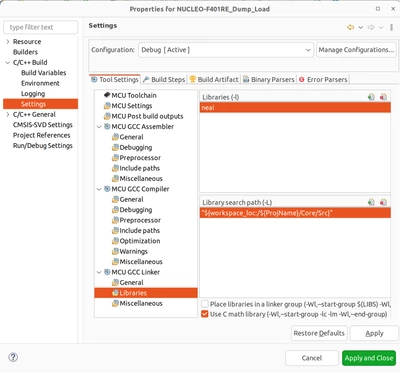
You need to include the library path in the project settings:

  • Right click on your project > Properties
  • Then Click on C/C++ build > Settings
  • Then MCU GCC Linker > Libraries

JulianE_0-1716193133891.png

  • In Libraries (-l) click on the green + icon and type the name of the library without lib (by default the library name is libneai, so type neai)
  • Below in the Library search path (-L), add your path to the library
  • Click Apply and Close


Best regards,

Julian

2 replies

Julian E.
Technical Moderator
May 17, 2024

Hello,


What error do you get exactly? In your screenshot you commented the code and there are only warnings.

If you can, please include your project (as a .zip for example).


Best regards,

Julian

​In order to give better visibility on the answered topics, please click on 'Accept as Solution' on the reply which solved your issue or answered your question.
Associate II
May 20, 2024

- Compilation fail on function call of NanoEdge AI.

Please see image file - compl fail for ai packg


Program  - https://drive.google.com/file/d/16dNmOCJFgMpMOzahzxTpnzNy4Ftat050/view?usp=sharing


Julian E.
Julian E.Best answer
Technical Moderator
May 20, 2024

Hello,

You need to include the library path in the project settings:

  • Right click on your project > Properties
  • Then Click on C/C++ build > Settings
  • Then MCU GCC Linker > Libraries

JulianE_0-1716193133891.png

  • In Libraries (-l) click on the green + icon and type the name of the library without lib (by default the library name is libneai, so type neai)
  • Below in the Library search path (-L), add your path to the library
  • Click Apply and Close


Best regards,

Julian

​In order to give better visibility on the answered topics, please click on 'Accept as Solution' on the reply which solved your issue or answered your question.
Associate II
May 20, 2024

Thank you.