
Associate II
April 3, 2025
Solved

Benchmarks Fail to Run After NEAI 5.0.0/1 Update

  • April 3, 2025
  • 1 reply
  • 816 views

Greetings!

After updating to the latest v5 of NEAI yesterday, benchmarks have failed to cross the initial step of loading in the first library. I suspect this has to do with the number of cores/ threads and memory being allocated to the NEAI process, as the 3221225773 and 3221225794 pwsh codes are dumped in the logs. For reference, my system has a Ryzen 7 4800H and 16 GB of RAM onboard, which hasn't had an issue with running benchmarks in previous versions. 

Updating to the new 5.0.1 version released earlier today hasn't fixed the issues either. I've attached my logs below.

Best answer by Julian E.

Hello @Haze,


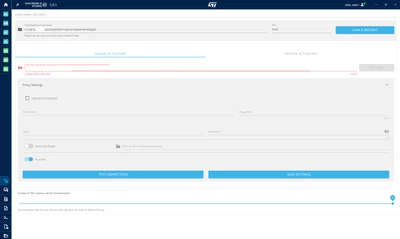
Concerning the slider, it was moved to the settings.

You can access the setting page by clicking the first icon on the bottom left corner.

The slider is at the bottom of the setting page:

JulianE_0-1743671017441.png


For the error itself, we are digging further as it does not seem to be the disk space.


I will let you know when I know more.


Sorry for the inconvenience,

Have a good day,

Julian

1 reply

Julian E.
Technical Moderator
April 3, 2025

Hello @Haze,


Thank you for the logs.


How much disk space do you have on your pc?

The benchmark allocate space per available CPU core. 

In my case, I have around 20 cores used in NanoEdge (check in the option, at the botton) and it allocate around 40GB for the benchmark.


You may not have enough disk space available.

if it seems to be the case, you can reduce the number of cores used in the NanoEdge settings or free up some disk space.


Have a good day,

Julian

​In order to give better visibility on the answered topics, please click on 'Accept as Solution' on the reply which solved your issue or answered your question.
HazeAuthor
Associate II
April 3, 2025

Hi @Julian E. 

I've got over 500 GB free on the same disk NEAI is on, which shouldn't be an issue. However, I don't seem to have the core selection slider during benchmark setup like v4.6. Has this moved to a different location?

Thanks,
Haze

Julian E.
Julian E.Best answer
Technical Moderator
April 3, 2025

Hello @Haze,


Concerning the slider, it was moved to the settings.

You can access the setting page by clicking the first icon on the bottom left corner.

The slider is at the bottom of the setting page:

JulianE_0-1743671017441.png


For the error itself, we are digging further as it does not seem to be the disk space.


I will let you know when I know more.


Sorry for the inconvenience,

Have a good day,

Julian

​In order to give better visibility on the answered topics, please click on 'Accept as Solution' on the reply which solved your issue or answered your question.