
Associate
April 1, 2025
Solved

Can't create new or open existing projects after NanoEdge AI Studio 5 update

  • April 1, 2025
  • 4 replies
  • 1318 views

After upgrading to version 5 of NanoEdge AI Studio, I’m unable to create new projects, and I also can't open projects originally created in version 4.6. Has anyone experienced similar issues?
Best answer by Julian E.

Hello @winmanchen ,


After investigation, there is a bug due a character that is not the same in UTF-8 and GBK (these are encodings).

We found a fix that should correct all your issues (described for the Intel i9 12900 CPU, for the other one, you first need to follow what I described in my previous message)


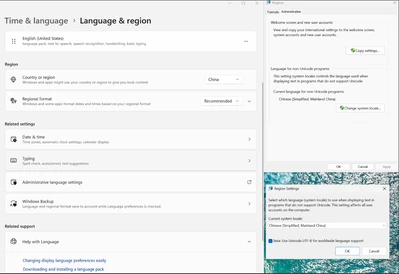
You can activate UTF-8 compatibility with the Chinese version of windows:

JulianE_0-1743520754901.png

Go to Time & Language -> Language & Region -> Administrative language settings -> Change system locale -> and check Beta: Use UTF-8.


Let me know if it worked.


Julian

4 replies

Julian E.
Technical Moderator
April 1, 2025

Hello @winmanchen ,


I a sorry to hear that.

I saw your message on the other similar thread.


In your case, you see your old project but cannot open them, or do you not see them at all as the other user.

Can you send me your logs (nanoedge.log)

You can find them here:

On windows: C/users/YOURUSER/AppData/Roaming/workspaceNanoEdgeAI

On Linux: /local/home/user/.config/workspaceNanoEdgeAi


have a good day,

Julian

​In order to give better visibility on the answered topics, please click on 'Accept as Solution' on the reply which solved your issue or answered your question.
Associate
April 1, 2025

Hi Julian,

Thanks for your support, I’m providing two different log files: one is from a system with an AMD R9 9950X CPU, where NanoEdge AI Studio v5 fails to launch; the other is from a system with an Intel i9 12900 CPU, where the program launches successfully, but I’m unable to create new projects or access projects from version 4.6.

Andrew Neil
Super User
April 1, 2025

@winmanchen wrote:

Has anyone experienced similar issues?


@qqzlqqzlqqzl seems to have:

https://community.st.com/t5/edge-ai/critical-problems-after-nanoedge-update-to-version-5-0-0/td-p/788814

A complex system that works is invariably found to have evolved from a simple system that worked.A complex system designed from scratch never works and cannot be patched up to make it work.
Julian E.
Technical Moderator
April 1, 2025

Can you also send me these logs please:

JulianE_1-1743494941228.png


Thank you

Julian

​In order to give better visibility on the answered topics, please click on 'Accept as Solution' on the reply which solved your issue or answered your question.
Associate
April 1, 2025
Julian E.
Technical Moderator
April 1, 2025

Hello @winmanchen,


Yes, it is this file that we need.


For the issue where NanoEdge is not opening (with your AMD R9 9950X CPU). It is most likely due to an issue that happens sometimes during the install.

It seems that the installer fails to stop all the NanoEdge processes, and it create issues during the install of the new version.


Can you please restart the pc (to stop any potential nanoedge processus).

Then, without opening NanoEdge, uninstall it. 

Then install it again. 


To install it, you can download the .exe from the official website, or it should already have been downloaded from the last update, and you should find it here on windows:  C:\Users\YOUR_USERNAME\AppData\Roaming\nanoedgeaistudio\nanoedgeai_release\NanoEdge-AI-Studio-Setup-5.0.0.exe


For the other problem, that you and another user have, it seems that there are some encoding issues.

We are working on it.


Have a good day,

Julian

​In order to give better visibility on the answered topics, please click on 'Accept as Solution' on the reply which solved your issue or answered your question.
Julian E.
Julian E.Best answer
Technical Moderator
April 1, 2025

Hello @winmanchen ,


After investigation, there is a bug due a character that is not the same in UTF-8 and GBK (these are encodings).

We found a fix that should correct all your issues (described for the Intel i9 12900 CPU, for the other one, you first need to follow what I described in my previous message)


You can activate UTF-8 compatibility with the Chinese version of windows:

JulianE_0-1743520754901.png

Go to Time & Language -> Language & Region -> Administrative language settings -> Change system locale -> and check Beta: Use UTF-8.


Let me know if it worked.


Julian

​In order to give better visibility on the answered topics, please click on 'Accept as Solution' on the reply which solved your issue or answered your question.
Associate
April 2, 2025

Hi Julian,

I really appreciate your help in resolving both problems. And many thanks to your team for providing such a powerful and user-friendly development tool, thank you!

Have a good day,

winmanchen(from Taiwan)