NBlan.1
Associate II
July 11, 2022
Solved

Can't send data through my board

  • July 11, 2022
  • 2 replies
  • 4146 views

Hello,

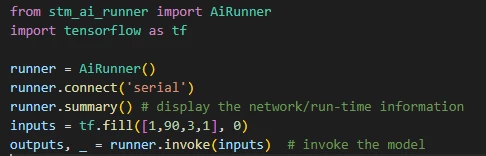
I'm trying to send data and retrieve the output from my stm32f4-DISCO. I'm using a python based code and specifically stm_ai_runner. The code is rather simpler but I can't access the board because even runner.summary() doesn't work. My board is flashed with the network :
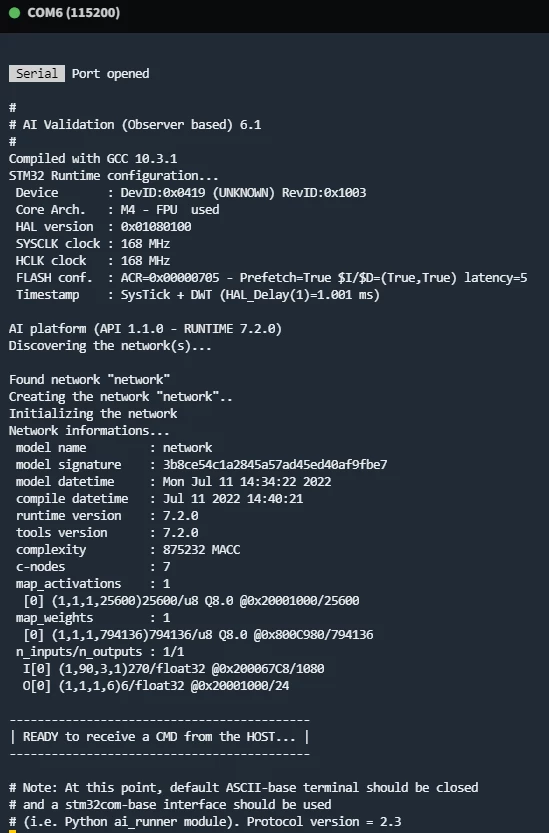
0693W00000QKrV1QAL.pngAnd this is what my code looks like :

0693W00000QKrVzQAL.pngAnd the terminal :

0693W00000QKrWJQA1.pngI thank you in advance,

Numa

This topic has been closed for replies.
Best answer by NBlan.1

I successfully manage to fix the problem, sorry, It was a simple wire pronlem (he was in a bad shape) thanks you so much for your time. Have a nice day.

Regards,

Numa

2 replies

fauvarque.daniel
ST Employee
July 11, 2022

the tensorflow messages that you are seeing are because you don't have a NVIDIA graphics card on your machine. To get rid of those messages you can perform:

pip install tensorflow-cpu==2.9.0

of course the version of tensorflow-cpu must correspond to the version of tensorflow you have on the machine.

Also Tensorflow requires AVX2 enabled CPU, if you have an old machine with AVX2 not supported, tensorflow won't work

If the actual issue is in runner.summary(), the only thing I can think of is that the terminal is still opened and taking the COM port, on windows you can have only one process at a time accessing a COM port.

Regards

Daniel

NBlan.1
NBlan.1Author
Associate II
July 11, 2022

Hello,

Firstly thank for your response.

I do not think that the problem come from the warnings, but I did as you asked and install tensorflow-cpu and my CPU is AVX2 enabled.

The problem must come from the fact that my code can't access via the Port COM 6 but I do not have any terminal still opened when lauching the code. Maybe he's trying to connect to COM 4 ?

Regards,

Numa

fauvarque.daniel
ST Employee
July 11, 2022

you can use the "mode" command to see all the available ports.

Normally it scans all the ports until there is one responding as the target will answer.

you can specify explicitly the com port to use by passing serial:COM6:115200 instead of serial

from stm_ai_runner import AiRunner

runner = AiRunner()

runner.connect('serial:COM6:115200')

runner.connect returns true if the connection is sucessfull.

You can also hit the reset button on the board before to launch the python code

Regards

Daniel

NBlan.1
NBlan.1AuthorBest answer
Associate II
July 12, 2022

I successfully manage to fix the problem, sorry, It was a simple wire pronlem (he was in a bad shape) thanks you so much for your time. Have a nice day.

Regards,

Numa