
Associate III
March 1, 2026
Solved

Cannot integrate manually a generated C AI model with st edge ai core into my STM32CubeIDE

  • March 1, 2026
  • 4 replies
  • 341 views

As the title suggests, I need to integrate manually my neural network C code generated for the first time with st edge ai core (version 3.0.0) into my STM32CubeIDE project .ioc based (versionj 2.0.0). I cannot use X-CUBE-AI neither Cube AI Studio because the first one has been made deprecated and the second one has plenty of bugs. In Cube AI studio, when I try to generate a CubeMX template, I don't why the project is duplicated and gets cancelled when I try to modify the project with CubeMX. I've tried to ask for help for the last problem, but nobody has answered for a solution.

I don't know how to integrate my neural network C code for the first time in a STM32CubeIDE project .ioc based, because the documentation of ST edge AI core describes how to upgrade a model already integrated and generated with X-CUBE-AI, but everyone here says to not use X-CUBE-AI and I don't know what to do.

I need to use the Neural ART Accelerator (so ll aton library is needed).

I'm very dissatisfied for ST edge AI products and for the support provided, I need to deliver soon a project that is edge AI based and I don't know what to do but to not use STM32 products anymore. If I don't get support by tomorrow or after tomorrow, I won't buy other STM32 products in the future and I will leave a very negative feedback for the boards that I've bought.
Best answer by hamitiya

Hello,

Indeed, STM32CubeIDE does not show include folders, it only shows source folders.

It does not show .h files either. It is the default behavior. STM32CubeIDE does not show exactly the file tree you have in your filesystem (example: Core/Src, and Core/Inc) but only where the sources are.

I will check what could be done in order to show the folders when generated by STM32Cube AI Studio.

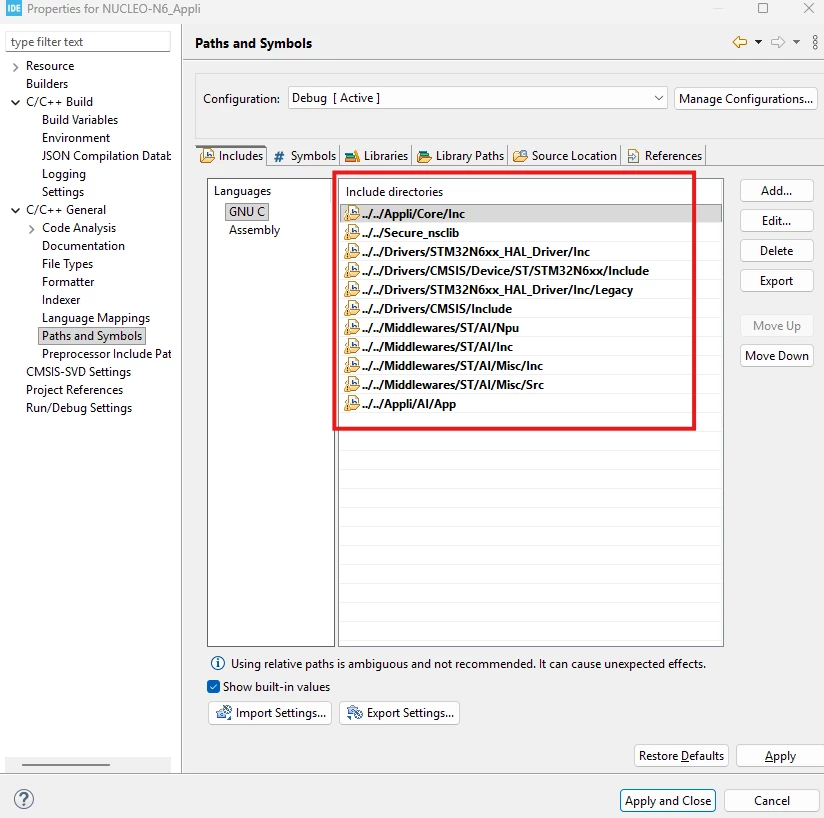
However, you can still check the includes paths by:

- Right-click your Appli project

- C/C++ General > Paths and Symbols

- Includes image.png


Best regards,

Yanis

4 replies

hamitiya
ST Employee
March 2, 2026

Hello @s319189 ,

Usage of X-CUBE-AI is still possible if you want to work on older version of ST Edge AI Core. If working with newer version (3.0.0+), we recommend usage of STM32Cube AI Studio.

Working with STM32N6 Series is not straightforward since you have multiple corner case to handle, starting with usage of External RAM, different memory regions, etc...

You have two solutions:

1) Let STM32Cube AI Studio generate your complete project, including AI

2) Generate only C code and libraries associated to your model from STM32Cube AI Studio, and integrate it in your STM32N6 project.


When you re-generate with STM32CubeMX, you need to uncheck the box in Project Manager > Code Generator >

"Delete previously generated files when not re-generated"

to not erase code / files added by STM32Cube AI Studio.

image.png


I shared with you a NUCLEO project generated by STM32Cube AI Studio.


Best regards,

Yanis


​In order to give better visibility on the answered topics, please click on 'Accept as Solution' on the reply which solved your issue or answered your question.
s319189Author
Associate III
March 2, 2026

The problem is still not solved. The project imported in STM32CubeIDE is duplicated and, when imported, it does not show inc folders with .h files and I need to modify some of them such as main.h

hamitiya
ST Employee
March 2, 2026

Hello,

Could you clarify what you mean by "duplicated"?

I shared with you a project, if you can check that it fits your need.

If you open the project file, availalbe in STM32CubeIDE/.project, it will open STM32CubeIDE with 2 "subprojects":


image.png

"Appli" contains the application you are working with.

FSBL (First Stage Boot Loader) includes mainly clock initialization, External Flash enablement, and jump if you are using "Execute in Place" templates.


 I need to modify some of them such as main.h

Does it mean that you are losing code when re-generating from STM32CubeMX?


Best regards,

Yanis


​In order to give better visibility on the answered topics, please click on 'Accept as Solution' on the reply which solved your issue or answered your question.
s319189Author
Associate III
March 3, 2026


I mean that, when opening the Application or FSBL project inside the folder STM32CubeIDE, there is no Inc folder where Inc files are located as show below:

IMG_7865.jpeg

and when I go to the parent folder of STM32CubeIDE there are the same folders copied!

IMG_7867.jpeg


hamitiya
hamitiyaBest answer
ST Employee
March 3, 2026

Hello,

Indeed, STM32CubeIDE does not show include folders, it only shows source folders.

It does not show .h files either. It is the default behavior. STM32CubeIDE does not show exactly the file tree you have in your filesystem (example: Core/Src, and Core/Inc) but only where the sources are.

I will check what could be done in order to show the folders when generated by STM32Cube AI Studio.

However, you can still check the includes paths by:

- Right-click your Appli project

- C/C++ General > Paths and Symbols

- Includes image.png


Best regards,

Yanis

​In order to give better visibility on the answered topics, please click on 'Accept as Solution' on the reply which solved your issue or answered your question.
s319189Author
Associate III
March 3, 2026

Ok, inside the Appli/App/AI folder I’ve placed my NN .c/.h code files and the AI model appearently works using printf.

Appearently, when files are modified inside STM32CubeIDE folder, they are modified also in the copies in the parent folder of STM32CubeIDE.

March 3, 2026

If you cannot manually integrate the generated C AI model with ST Edge AI Core into STM32CubeIDE, make sure all generated source files are added to the project and the include paths are correctly configured. Also verify memory settings and linker configuration, as missing RAM or Flash allocation can cause errors.

Check the build console for undefined references to identify the issue. Even when working with complex visual data such as 呪術廻戦 manga style content, proper memory and project setup is essential for successful integration.