
Associate
December 12, 2024
Solved

Error analysing LSTM model using X-Cube-AI: ""NOT IMPLEMENTED: Order of dimensions of input cannot be interpreted""

  • December 12, 2024
  • 7 replies
  • 2968 views

As stated, I have problem analyzing the ONNX model ported from a pytorch model. The code of the model is simple as follows:


class LSTM(nn.Module):

 def __init__(self, input_size, hidden_size, num_layers, num_output=1):
 super(LSTM, self).__init__()
 
 self.num_layers = num_layers
 self.input_size = input_size
 self.hidden_size = hidden_size
 self.num_output = num_output
 
 self.lstm = nn.LSTM(input_size=input_size, hidden_size=hidden_size,
 num_layers=num_layers, batch_first=True)
 
 self.fc = nn.Linear(hidden_size, num_output)
 
 def forward(self, x, device='cuda'):
 
 ula, (h_out, _) = self.lstm(x)
 
 out = self.fc(h_out[-1])
 
 return out


 Netron vis:
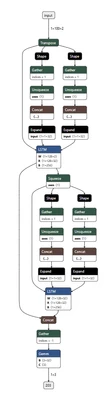
Lemanoise_0-1734007590314.png

I will really appreciate any advice or workarounds. Thank you!

Best answer by Julian E.

Hi everyone,


I did some test on my side and we currently only support LSTM with 1 hidden size and 1 layer. Something like: 

import torch
import torch.nn as nn

# Simple lstm that works

class LSTM(nn.Module):
 def __init__(self, input_size, hidden_size, num_layers, num_output=1):
 super(LSTM, self).__init__()
 self.num_layers = num_layers
 self.input_size = input_size
 self.hidden_size = hidden_size
 self.num_output = num_output

 self.lstm = nn.LSTM(input_size=input_size, hidden_size=hidden_size,
 num_layers=num_layers, batch_first=True, bidirectional=False)
 

 self.fc = nn.Linear(hidden_size, num_output)

 def forward(self, x, device='cuda'):
 ula, (h_out, _) = self.lstm(x)
 out = self.fc(h_out[-1])
 return out

# If not 1 : error
# other parameter we can put anything
input_size = 10 
hidden_size = 1 
num_layers = 1 
num_output = 10 

model = LSTM(input_size, hidden_size, num_layers, num_output)

model.eval()

dummy_input = torch.randn(1, 128, input_size)

onnx_file_path = "simple_lstml.onnx"
torch.onnx.export(model, dummy_input, onnx_file_path, 
 input_names=['input'], output_names=['output'])


I tried to stack multiple LSTM but I had no success. 

I am asking for more information, I will keep you updated


Have a good day,

Julian


7 replies

Julian E.
Technical Moderator
December 12, 2024

Hello @Lemanoise,


Can you attach your onnx model in a .zip file please?


In the meantime, make sure you follow the conditions described in the ONNX Toolbox documentation concerning the LSTM: 


LSTM

Computes a multi-layer long short-term memory (LSTM) RNN to an input sequence (batch=1, timesteps, features)

  • category: recurrent layer
  • input data types: float32
  • output data types: float32

Specific constraints/recommendations:

  • stateless mode support only
  • fused activation: sigmoid
  • fused recurrent activation: sigmoid
  • return_state not supported
  • Only 1 input is allowed for LSTM; the others should be constant and placed into the initializers
  • layout=1 attribute is not supported


https://stedgeai-dc.st.com/assets/embedded-docs/supported_ops_onnx.html


Have a good day, 

Julian


​In order to give better visibility on the answered topics, please click on 'Accept as Solution' on the reply which solved your issue or answered your question.
LemanoiseAuthor
Associate
December 13, 2024

Yeah sure, here is the onnx model. Thank you for your advice and I'll look into it as well. 

Visitor II
December 16, 2024

Hello,I have the same question.Do you slove this question?

LemanoiseAuthor
Associate
December 16, 2024

No not yet, I hope ST staffs will check my model and give us further guidance. 

Julian E.
Julian E.Best answer
Technical Moderator
December 16, 2024

Hi everyone,


I did some test on my side and we currently only support LSTM with 1 hidden size and 1 layer. Something like: 

import torch
import torch.nn as nn

# Simple lstm that works

class LSTM(nn.Module):
 def __init__(self, input_size, hidden_size, num_layers, num_output=1):
 super(LSTM, self).__init__()
 self.num_layers = num_layers
 self.input_size = input_size
 self.hidden_size = hidden_size
 self.num_output = num_output

 self.lstm = nn.LSTM(input_size=input_size, hidden_size=hidden_size,
 num_layers=num_layers, batch_first=True, bidirectional=False)
 

 self.fc = nn.Linear(hidden_size, num_output)

 def forward(self, x, device='cuda'):
 ula, (h_out, _) = self.lstm(x)
 out = self.fc(h_out[-1])
 return out

# If not 1 : error
# other parameter we can put anything
input_size = 10 
hidden_size = 1 
num_layers = 1 
num_output = 10 

model = LSTM(input_size, hidden_size, num_layers, num_output)

model.eval()

dummy_input = torch.randn(1, 128, input_size)

onnx_file_path = "simple_lstml.onnx"
torch.onnx.export(model, dummy_input, onnx_file_path, 
 input_names=['input'], output_names=['output'])


I tried to stack multiple LSTM but I had no success. 

I am asking for more information, I will keep you updated


Have a good day,

Julian


​In order to give better visibility on the answered topics, please click on 'Accept as Solution' on the reply which solved your issue or answered your question.
LemanoiseAuthor
Associate
December 16, 2024

Thank you! I have tried the one-layer case and it succeeded. Please keep sharing further information on multi-layer case if any :)

Julian E.
Technical Moderator
December 16, 2024

Hello  @Lemanoise ,


Using tensorflow, I could use multiple LSTM one after the other (which I did not succeed to do with pytorch).
It may be useful for you:


import tensorflow as tf
from tensorflow.keras.models import Model
from tensorflow.keras.layers import Input, LSTM, Dense


input_layer = Input(shape=(100, 2), batch_size=1)

lstm1= LSTM(32, activation='relu', stateful=True,return_sequences=True)(input_layer)

lstm2 = LSTM(32, activation='relu', stateful=True,return_sequences=True)(lstm1)

output_layer = Dense(units=3, activation='linear')(lstm2)

# Create the model
model = Model(inputs=input_layer, outputs=output_layer)

# Print the model summary
model.summary()

# Compile the model
model.compile(optimizer='adam', loss='mean_squared_error')


model.save('tf_lstm.h5')


Be careful to follow these instructions while using it:

JulianE_1-1734366676509.png

https://stedgeai-dc.st.com/assets/embedded-docs/keras_lstm_stateful.html 


Have a good day,

Julian

​In order to give better visibility on the answered topics, please click on 'Accept as Solution' on the reply which solved your issue or answered your question.
LemanoiseAuthor
Associate
December 18, 2024

Thank you very much!

Julian E.
Technical Moderator
December 20, 2024

Hello @Lemanoise,


I should know more about how to use LSTM properly with ST Edge AI Core on the start of next year.

But for the moment I managed to use more than one hidden size with pytorch by not using the batch_first option:


import torch
import torch.nn as nn

class LSTM(nn.Module):
 def __init__(self, input_size, hidden_size, num_layers, num_output=1):
 super(LSTM, self).__init__()
 self.num_layers = num_layers
 self.input_size = input_size
 self.hidden_size = hidden_size
 self.num_output = num_output

 self.lstm = nn.LSTM(input_size=input_size, hidden_size=hidden_size,
 num_layers=num_layers, batch_first=False)

 self.fc = nn.Linear(hidden_size, num_output)

 def forward(self, x, device='cuda'):

 ula, (h_out, _) = self.lstm(x) 
 out = self.fc(h_out[-1]) 
 return out

# If not 1 : error
# other we can put anything
input_size = 10
hidden_size = 10
num_layers = 1
num_output = 10

model = LSTM(input_size, hidden_size, num_layers, num_output)

model.eval()

dummy_input = torch.randn(1, 128, input_size) # Batch size 1, Sequence length 128, Input size 10

onnx_file_path = "simple_lstml.onnx"
torch.onnx.export(model, dummy_input, onnx_file_path, 
 input_names=['input'], output_names=['output'])


It may help you


Have a good day,

Julian

​In order to give better visibility on the answered topics, please click on 'Accept as Solution' on the reply which solved your issue or answered your question.