

Question
error when analyzing the .onnx model in stm32cubeMX by stm32cube.AI
Hi, Thanks for your attention. I am analyzing the .onnx format model but an error occurs. I try to reinstall the stm32cubeMX but it doesn't help.
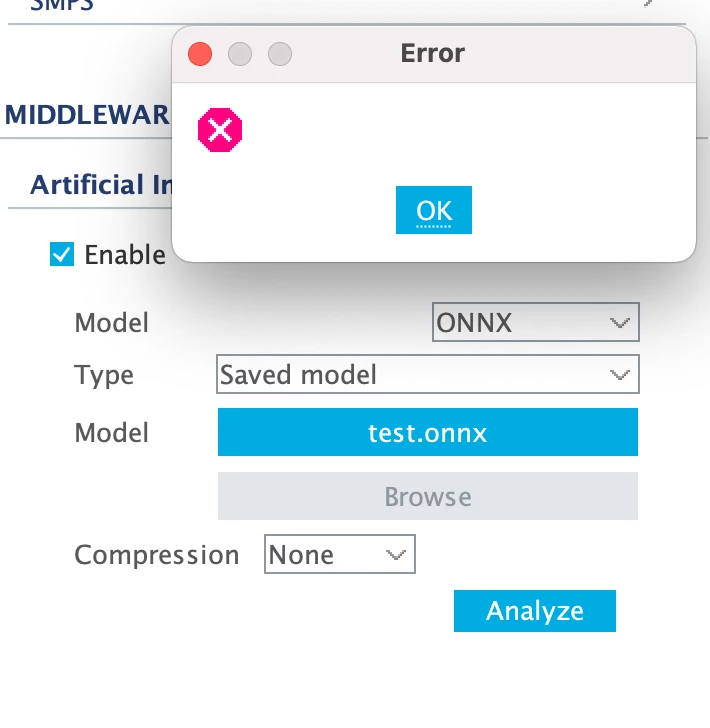 The part of architecture is:

Here is the log information. Can you help me with this problem? @Romain LE DONGE @jean-michel.d @fauvarque.daniel Thanks very much!
2022-07-08 15:39:51,314 [INFO] BoardInfo:879 - No configuration file found for board P-NUCLEO-WB55
2022-07-08 15:39:51,316 [INFO] DbBoards:156 - Kit is not supported: P-NUCLEO-WB55
2022-07-08 15:39:51,319 [INFO] BoardInfo:879 - No configuration file found for board STEVAL-BFA001V1B
2022-07-08 15:39:51,320 [INFO] DbBoards:156 - Kit is not supported: STEVAL-BFA001V1B
2022-07-08 15:39:51,321 [INFO] BoardInfo:879 - No configuration file found for board STEVAL-BFA001V2B
2022-07-08 15:39:51,321 [INFO] DbBoards:156 - Kit is not supported: STEVAL-BFA001V2B
2022-07-08 15:39:51,404 [INFO] DbBoards:160 - Found 176 boards, 173 are supported
2022-07-08 15:39:51,408 [INFO] ApiDb:418 - Load user favorites file /Users/name/.stm32cubemx/favorites.boards.txt: 0 item(s)
2022-07-08 15:39:51,408 [INFO] ApiDb:422 - User favorites Boards=[]
2022-07-08 15:39:51,409 [INFO] DbBoards:189 - Set 0 / 0 favorites Boards
2022-07-08 15:39:56,930 [INFO] ExtendedFilter:65 - Artificial Intelligence: enable filter
2022-07-08 15:39:56,938 [INFO] McuExtendedFiltersManager:86 - Reset MCU extended filter: Artificial Intelligence
2022-07-08 15:40:11,418 [INFO] AInterface:235 - ModelName:network; files:[/Users/name/STM32Cube/test.onnx]; type:ONNX; compression:None
2022-07-08 15:40:11,434 [INFO] AInterface:515 - workspaceTempDir: /var/folders/y8/7c4vvzbj2l1dw7trnz05b52m0000gn/T/mxAI_workspace5038345178307913369027895421033696
2022-07-08 15:40:11,438 [INFO] AInterface:1065 - Setting Env: /Users/name/STM32Cube/Repository//Packs/STMicroelectronics/X-CUBE-AI/7.2.0/Utilities/mac
2022-07-08 15:40:11,440 [INFO] AInterface:1122 - Custom PATH variable: /Users/name/STM32Cube/Repository//Packs/STMicroelectronics/X-CUBE-AI/7.2.0/Utilities/mac:/bin:/usr/bin:/usr/sbin:/sbin:/Users/name/STM32Cube/Repository//Packs/STMicroelectronics/X-CUBE-AI/7.2.0/Utilities/mac/node/bin
2022-07-08 15:40:11,500 [INFO] CmdLine:100 - Command: /Users/name/STM32Cube/Repository//Packs/STMicroelectronics/X-CUBE-AI/7.2.0/Utilities/mac/stm32ai analyze --name network -m /Users/name/STM32Cube/test.onnx --type onnx --compression none --verbosity 1 --workspace /var/folders/y8/7c4vvzbj2l1dw7trnz05b52m0000gn/T/mxAI_workspace5038345178307913369027895421033696 --output /Users/name/.stm32cubemx/network_output --allocate-outputs
2022-07-08 15:40:12,022 [INFO] CmdLine:132 - stm32ai exit with status: 132
2022-07-08 15:40:12,025 [ERROR] CmdLine:135 - stm32ai return with an error