

SKim.9
Associate II
July 1, 2022
Question

Hard fault interrupt on ai_network_run( ) funtion.

  • July 1, 2022
  • 7 replies
  • 4489 views

Hi,

I created my own model and tried to import it into the STM32L476 MCU.

When I execute the ai_network_run( ) function, I got the hard fault interrupt.

Here is the function below.

( I refered the code from here :

https://wiki.st.com/stm32mcu/wiki/AI:How_to_perform_motion_sensing_on_STM32L4_IoTnode)

static void AI_Run(float *pIn, float *pOut)
{
 ai_i32 batch;
 ai_error err;
 
 /* Update IO handlers with the data payload */
 ai_input[0].data = AI_HANDLE_PTR(pIn);
 ai_output[0].data = AI_HANDLE_PTR(pOut);
 
 batch = ai_network_run(network, ai_input, ai_output);
 
 if (batch != 1)
 {
 err = ai_network_get_error(network);
 printf("AI ai_network_run error - type=%d code=%d\r\n", err.type, err.code);
 Error_Handler();
 }
}

I have checked the 'ai_input' and 'ai_output' values and they all pointed well.
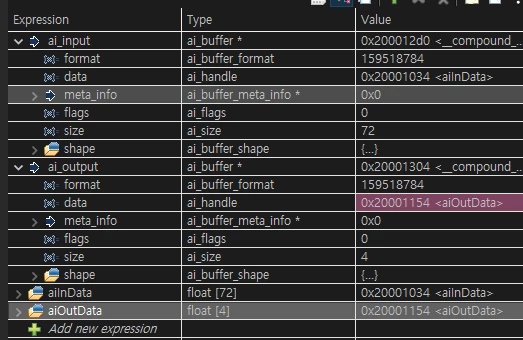
0693W00000QKFSYQA5.png 

Here is the main loop.

while (1)
{
	AccelReadValues(0x32, 6);
 
	x = ((AccelData[1] << 8) | AccelData[0]);
	y = ((AccelData[3] << 8) | AccelData[2]);
	z = ((AccelData[5] << 8) | AccelData[4]);
 
	ACC_Value_Raw.AccX = (x * .039);
	ACC_Value_Raw.AccY = (y * .039);
	ACC_Value_Raw.AccZ = (z * .039);
 
	HAL_Delay(50);
 
	aiInData[write_index++] = ACC_Value_Raw.AccX;
	aiInData[write_index++] = ACC_Value_Raw.AccY;
	aiInData[write_index++] = ACC_Value_Raw.AccZ;
 
 // AI_NETWORK_IN_1_SIZE = (24 * 3 * 1)
	if (write_index >= AI_NETWORK_IN_1_SIZE)
	{
	 printf("Running inference\r\n");
 
	 AI_Run(aiInData, aiOutData);
 
	 /* Output results */
	 for (uint32_t i = 0; i < AI_NETWORK_OUT_1_SIZE; i++)
	 {
	 	printf("%8.6f ", aiOutData[i]);
	 }
 
	 uint32_t class = argmax(aiOutData, AI_NETWORK_OUT_1_SIZE);
	 printf(": %d - %s\r\n", (int) class, activities[class]);
	 write_index = 0;
	}
 
	//MX_X_CUBE_AI_Process();
 }

I read the X, Y, and Z of the accelerometer sensor data.

Do you have any ideas on how I could handle this situation?

Thanks,

This topic has been closed for replies.

7 replies

Matthieu
ST Employee
July 2, 2022

Hello,

Your code looks good to me. Which version of X-CUBE-AI are you running, the 7.1 ?

Best Regards,

Matthieu

SKim.9
SKim.9Author
Associate II
July 3, 2022

Yes, I am using v7.1.

And I used Keras 2.6.0 when I made my model.

Thanks,

SangMin Kim

Laurent
ST Employee
July 4, 2022

Hello,

Have you configured & enabled CRC ( __HAL_RCC_CRC_CLK_ENABLE();)?

Best regards,

L.

SKim.9
SKim.9Author
Associate II
July 5, 2022

Yes I did,

Please check my main.c file​

/* USER CODE END Header */
/* Includes ------------------------------------------------------------------*/
#include "main.h"
#include "app_x-cube-ai.h"
#include "ai_platform.h"
#include "network.h"
#include "network_data.h"
 
/* accelerometer module address*/
#define adxl_address 0x53<<1
 
typedef struct
{
 float AccX; /* acc x axes [g] */
 float AccY; /* acc y axes [g] */
 float AccZ; /* acc z axes [g] */
} DATA_input_t;
 
CRC_HandleTypeDef hcrc;
I2C_HandleTypeDef hi2c1;
UART_HandleTypeDef huart2;
 
uint8_t AccelData[6];
uint8_t chipid = 0;
int16_t x, y, z;
 
static DATA_input_t ACC_Value_Raw;
 
const char* activities[AI_NETWORK_OUT_1_SIZE] = {
 "0V", "2V", "4V", "3V"
};
 
ai_handle network;
 
float aiInData[AI_NETWORK_IN_1_SIZE];
float aiOutData[AI_NETWORK_OUT_1_SIZE];
 
ai_u8 activations[AI_NETWORK_DATA_ACTIVATIONS_SIZE];
ai_buffer * ai_input;
ai_buffer * ai_output;
 
void SystemClock_Config(void);
static void MX_GPIO_Init(void);
static void MX_CRC_Init(void);
static void MX_I2C1_Init(void);
void MX_USART2_UART_Init(void);
 
static void AI_Init(void);
static void AI_Run(float *pIn, float *pOut);
static uint32_t argmax(const float * values, uint32_t len);
 
/* Write the value into corresponding register address*/
void AccelWrite (uint8_t reg, uint8_t value)
{
 uint8_t data[2];
 data[0] = reg;
 data[1] = value;
 HAL_I2C_Master_Transmit(&hi2c1, adxl_address, data, 2, 100);
}
 
/* Read the values from corresponding register address*/
void AccelReadValues (uint8_t reg, uint8_t numberofbytes)
{
 HAL_I2C_Mem_Read(&hi2c1, adxl_address, reg, 1, (uint8_t *) AccelData,
 numberofbytes, 100);
}
 
/*Read the address of chip */
void AccelReadAddress(uint8_t reg)
{
 HAL_I2C_Mem_Read(&hi2c1, adxl_address, reg, 1, &chipid, 1, 100);
 
}
 
void AccelInit(void)
{
 AccelReadValues(0x00, 1);
 AccelWrite(0x2d, 0x00); // reset all bits
 AccelWrite(0x2d, 0x08); // power_cntl measure and wake up 8hz*/
 AccelWrite(0x31, 0x00); // data_format range= +- 2g
 
}
 
int main(void)
{
 HAL_Init(); 
 SystemClock_Config();
 
 MX_GPIO_Init();
 MX_CRC_Init();
 MX_I2C1_Init();
 __HAL_RCC_CRC_CLK_ENABLE();
 MX_X_CUBE_AI_Init();
 
 AccelInit();
 AI_Init();
 
 uint32_t write_index = 0;
 
 while (1)
 {
	AccelReadValues(0x32, 6);
 
	x = ((AccelData[1] << 8) | AccelData[0]);
	y = ((AccelData[3] << 8) | AccelData[2]);
	z = ((AccelData[5] << 8) | AccelData[4]);
 
	ACC_Value_Raw.AccX = (x * .039);
	ACC_Value_Raw.AccY = (y * .039);
	ACC_Value_Raw.AccZ = (z * .039);
 
	HAL_Delay(50);
 
	aiInData[write_index++] = ACC_Value_Raw.AccX;
	aiInData[write_index++] = ACC_Value_Raw.AccY;
	aiInData[write_index++] = ACC_Value_Raw.AccZ;	
 
	if (write_index >= AI_NETWORK_IN_1_SIZE)
	{
	 AI_Run(aiInData, aiOutData);
 
	 /* Output results */
	 for (uint32_t i = 0; i < AI_NETWORK_OUT_1_SIZE; i++)
	 {
	 	printf("%8.6f ", aiOutData[i]);
	 }
 
	 uint32_t class = argmax(aiOutData, AI_NETWORK_OUT_1_SIZE);
	 printf(": %d - %s\r\n", (int) class, activities[class]);
	 write_index = 0;
	}
 
	//MX_X_CUBE_AI_Process();
 }
}


Laurent
ST Employee
July 5, 2022

All looks good to me ,

may be another hint : did you try to increase the stack size even more ?

L.

SKim.9
SKim.9Author
Associate II
July 5, 2022

Yes, I increased the stack size from 0x800 to 0x8000.

I am using the Nucleo-L476RG board now,

Matthieu
ST Employee
July 6, 2022

Last thing we could check is your AI_Init() function. Which MEMS Nucleo shield are you using ?

SKim.9
SKim.9Author
Associate II
July 7, 2022

I am not using the MEMS Nucleo shield.

I am using the ADXL345 sensor module.

I connected it with my Nucleo Board via I2C.

Matthieu
ST Employee
July 7, 2022

I checked again the WiKi example which is working fine. Can you share your AI_Init function ?

SKim.9
SKim.9Author
Associate II
July 7, 2022

Okay, Here is my AI_Init and AI_Run function.

I didn't modify any code from the WIKI page.

static void AI_Init(void)
{
 ai_error err;
 
 /* Create a local array with the addresses of the activations buffers */
 const ai_handle act_addr[] = { activations };
 /* Create an instance of the model */
 err = ai_network_create_and_init(&network, act_addr, NULL);
 if (err.type != AI_ERROR_NONE) {
 printf("ai_network_create error - type=%d code=%d\r\n", err.type, err.code);
 Error_Handler();
 }
 ai_input = ai_network_inputs_get(network, NULL);
 ai_output = ai_network_outputs_get(network, NULL);
}
static void AI_Run(float *pIn, float *pOut)
{
 ai_i32 batch;
 ai_error err;
 
 /* Update IO handlers with the data payload */
 ai_input[0].data = AI_HANDLE_PTR(pIn);
 ai_output[0].data = AI_HANDLE_PTR(pOut);
 
 printf("------------------\n");
 batch = ai_network_run(network, ai_input, ai_output);
 printf("a----------------\n");
 if (batch != 1) {
 err = ai_network_get_error(network);
 printf("AI ai_network_run error - type=%d code=%d\r\n", err.type, err.code);
 Error_Handler();
 }
}

Laurent
ST Employee
July 19, 2022

Hello

I have implemented the wiki on a set up as close as yours : Nucleo-L476RG + IKS01A3 with the LSM6DS0 accelerometer

and all run fine without any hardfault ...

by the way, did you try to run the provided model in the wiki (https://github.com/STMicroelectronics/stm32ai/raw/master/AI_resources/HAR/model.h5) ?

best regards

L.

Laurent
ST Employee
July 19, 2022

Also, one question, in your main , do you initialize the AI twice ?

...

MX_X_CUBE_AI_Init();

AccelInit();

AI_Init();

...

I think that MX_X_CUBE_AI_Init() is code generated for application template ... but you are using AI_Init() provided by the wiki.