

HardFault_Handler issue when implementing st_yolo_x_nano on STM32N6570-DK
Hello,
At my workplace, we have purchased two STM32N6570-DK boards to implement our computer vision models. We are currently trying to implement the "st_yolo_x_nano 480x480x3" model from the ModelZoo.
We followed these two links, strictly respecting the versions indicated for both STM32CubeIDE and STEdge:
How to run AI models from Model Zoo on STM32N6
Introduction to Edge AI on STM32N6 (This second link uses STEdge 2.2, as per the reference).
The Issue: Every time I attempt to debug, the same thing happens: the program enters a HardFault_Handler(). This occurs due to an invalid/null pointer error returned by the function LL_ATON_Output_Buffers_Info() in buffers_info[0].scale.
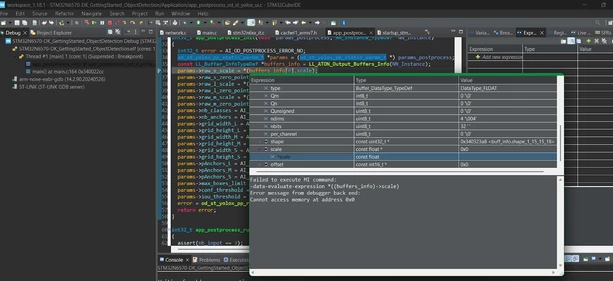
The error happens specifically when it reaches line 36 of the code. According to the debugger, it cannot access memory at address 0x0.
Technical Details:
Configuration: The app_Config.h file being used is the one provided in the ModelZoo.
 /**
 ******************************************************************************
 * @file app_config.h
 * @author GPM Application Team
 *
 ******************************************************************************
 * @attention
 *
 * Copyright (c) 2023 STMicroelectronics.
 * All rights reserved.
 *
 * This software is licensed under terms that can be found in the LICENSE file
 * in the root directory of this software component.
 * If no LICENSE file comes with this software, it is provided AS-IS.
 *
 ******************************************************************************
 */

#ifndef APP_CONFIG
#define APP_CONFIG

#include "arm_math.h"

#define USE_DCACHE

/*Defines: CMW_MIRRORFLIP_NONE; CMW_MIRRORFLIP_FLIP; CMW_MIRRORFLIP_MIRROR; CMW_MIRRORFLIP_FLIP_MIRROR;*/
#define CAMERA_FLIP CMW_MIRRORFLIP_NONE

#define ASPECT_RATIO_CROP (1) /* Crop both pipes to nn input aspect ratio; Original aspect ratio kept */
#define ASPECT_RATIO_FIT (2) /* Resize both pipe to NN input aspect ratio; Original aspect ratio not kept */
#define ASPECT_RATIO_FULLSCREEN (3) /* Resize camera image to NN input size and display a maximized image. See Doc/Build-Options.md#aspect-ratio-mode */
#define ASPECT_RATIO_MODE ASPECT_RATIO_CROP

/* Model Related Info */
#define POSTPROCESS_TYPE POSTPROCESS_OD_ST_YOLOX_UI

#define NN_WIDTH (480)
#define NN_HEIGHT (480)
#define NN_BPP 3

#define COLOR_BGR (0)
#define COLOR_RGB (1)
#define COLOR_MODE COLOR_RGB

/* Classes */
#define NB_CLASSES (1)
#define CLASSES_TABLE const char* classes_table[NB_CLASSES] = {\
 "person"}\

/* I/O configuration */
/* Postprocessing ST_YOLO_X configuration */
#define AI_OD_ST_YOLOX_PP_NB_CLASSES (1)
#define AI_OD_ST_YOLOX_PP_L_GRID_WIDTH (60)
#define AI_OD_ST_YOLOX_PP_L_GRID_HEIGHT (60)
#define AI_OD_ST_YOLOX_PP_L_NB_INPUT_BOXES (AI_OD_ST_YOLOX_PP_L_GRID_WIDTH * AI_OD_ST_YOLOX_PP_L_GRID_HEIGHT)
#define AI_OD_ST_YOLOX_PP_M_GRID_WIDTH (30)
#define AI_OD_ST_YOLOX_PP_M_GRID_HEIGHT (30)
#define AI_OD_ST_YOLOX_PP_M_NB_INPUT_BOXES (AI_OD_ST_YOLOX_PP_M_GRID_WIDTH * AI_OD_ST_YOLOX_PP_M_GRID_HEIGHT)
#define AI_OD_ST_YOLOX_PP_S_GRID_WIDTH (15)
#define AI_OD_ST_YOLOX_PP_S_GRID_HEIGHT (15)
#define AI_OD_ST_YOLOX_PP_S_NB_INPUT_BOXES (AI_OD_ST_YOLOX_PP_S_GRID_WIDTH * AI_OD_ST_YOLOX_PP_S_GRID_HEIGHT)
#define AI_OD_ST_YOLOX_PP_NB_ANCHORS (3)
static const float32_t AI_OD_ST_YOLOX_PP_L_ANCHORS[2*AI_OD_ST_YOLOX_PP_NB_ANCHORS] = {30.000000, 30.000000, 4.200000, 15.000000, 13.800000, 41.999999};
static const float32_t AI_OD_ST_YOLOX_PP_M_ANCHORS[2*AI_OD_ST_YOLOX_PP_NB_ANCHORS] = {15.000000, 15.000000, 2.100000, 7.500000, 6.900000, 21.000000};
static const float32_t AI_OD_ST_YOLOX_PP_S_ANCHORS[2*AI_OD_ST_YOLOX_PP_NB_ANCHORS] = {7.500000, 7.500000, 1.050000, 3.750000, 3.450000, 10.500000};
#define AI_OD_ST_YOLOX_PP_IOU_THRESHOLD (0.5)
#define AI_OD_ST_YOLOX_PP_CONF_THRESHOLD (0.6)
#define AI_OD_ST_YOLOX_PP_MAX_BOXES_LIMIT (100)

/* Display */
#define WELCOME_MSG_1 "st_yolo_x_nano_480_1.0_0.25_3_st_int8.tflite"
#define WELCOME_MSG_2 "Model Running in STM32 MCU internal memory"

#endif
Hardware Setup: The STM32N6570-DK is connected via USB-C (PD) to my laptop.
What could be causing this?
Thank you very much in advance for your help.