

Junde
Senior III
June 20, 2024
Solved

How to use NanoEdgeAI?

  • June 20, 2024
  • 2 replies
  • 1149 views

Hi all,

Based on the tutorials, I am trying to create an AI lib using NanoEdgeAI.

The lib seems created successfully, see attachment.

But when I add it to the MDK project and compiler it, some errors like below is present:
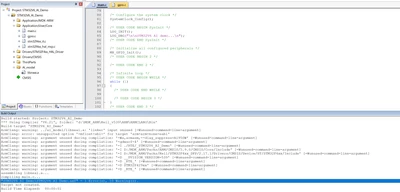
Junde_0-1718879073778.png

When I remove the libneai.a, the project can be compiler normally.

Could you tell me what I was wrong?

Thanks.
 

Best answer by Junde

Hi @LVALV.1 

Thanks for your reply.

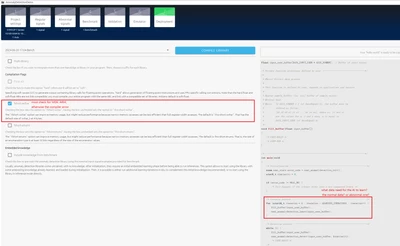
It is said we need change the name ".a" to ".lib" for MDK compiler.

And we must check the "fshort-wchar" option for MDK-ARM to compiler and linker successful.

Junde_0-1718934630493.png

One more, what kind of data need prepared for the AI lib learning?

Just the normal data is enough?

Thank you.


2 replies

LVALV.1
ST Employee
June 20, 2024

Hello Junde, 


How do you link the library ? 

It looks like there is a typo in your linker, I can see in your log arm-arm-none-eabi


Have a nice day


Junde
JundeAuthorBest answer
Senior III
June 21, 2024

Hi @LVALV.1 

Thanks for your reply.

It is said we need change the name ".a" to ".lib" for MDK compiler.

And we must check the "fshort-wchar" option for MDK-ARM to compiler and linker successful.

Junde_0-1718934630493.png

One more, what kind of data need prepared for the AI lib learning?

Just the normal data is enough?

Thank you.


LVALV.1
ST Employee
June 21, 2024

Hello, 


Learning is usefull to create your model directly on your embedded device. You should learn all the beahviours that are nominal for your setup. 

More information on the documentation : https://wiki.st.com/stm32mcu/wiki/AI:NanoEdge_AI_Library_for_anomaly_detection_(AD)#Learning


To correctly link a static library in your project, you can follow this topic : 
https://community.st.com/t5/stm32-mcus/how-to-add-external-libraries-in-keil-mdk-arm-an-example-using-x/ta-p/646624


And documentation from your IDE. 


Thank you