Solved
How to use the extended Flash on X-CUBE-AI
I'm running low on FLASH, and I'm confused about extensions.May i ask if there are any routines or tutorials available?

I'm running low on FLASH, and I'm confused about extensions.May i ask if there are any routines or tutorials available?
Hello
In order to use external flash with X-CUBE-AI, you can find in X-CUBE-AI panel:
- Advanced Settings
- "External Flash" tab
And you can set the external flash start address and how you should split your weights. Different methods exist like a separate bin with your weights.
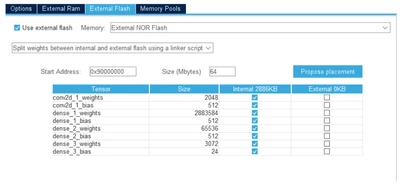
You can find more details here (page 21)
Getting started with X-CUBE-AI Expansion Package for Artificial Intelligence (AI) - User manual
Best regards
Yanis
Enter your E-mail address. We'll send you an e-mail with instructions to reset your password.