
Associate II
August 16, 2025
Question

Issue with the STM32N6570-DK knowledge base article

  • August 16, 2025
  • 4 replies
  • 1630 views

Hi @Julian E. 


While following along the tutorial:

How to build an AI application from scratch on the... - STMicroelectronics Community

after selecting the x-cube-ai package a described, I see that the default is enabled for fsbl and I cannot change that to application in the UI. Tried deselecting fsbl first, but it doesn't work.

Then I downloaded your ioc and there it is set to applciation - but this cannot be changed to anything else (for example to fsbl) - basically the checkboxes cannot be changed.

Have you seen this?

What am I doing wrong?

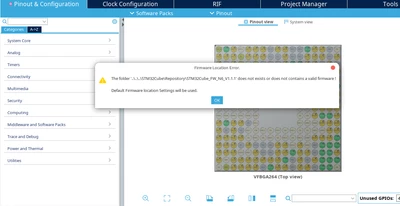
Also, I get this warning:
SM19X_0-1755334734819.png


I have installed all the firmwares by first downloading as zip and then installing from local in CubeMX

SM19X_1-1755334828632.png

I have downloaded v1.1.1, v1.1.0 and v1.2.0 as well as the patch file from ST website and still get the same warning


Update 17/08/25:

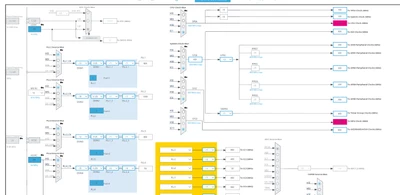
With the downloaded ioc file, I see some clock config errors as:
SM19X_0-1755425159793.png

Is this okay?

Also - please explain what should be the input to validation dataset for the AI suite UI.

I went ahead and generated code anyway, even though there were some warning about wrong configurations


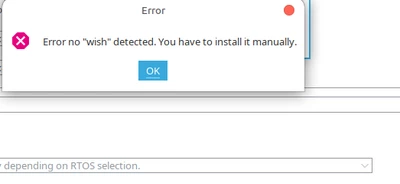
I also keep getting these from the AI window
SM19X_0-1755425410157.png


- NPU not-selectable in the RIF tab (using the DK_tuto.ioc)

SM19X_0-1755427875997.png


Best Regards

4 replies

Julian E.
Technical Moderator
August 18, 2025

Hello @SM19X,


I see that you updated your message, what is your exact current status?


The last issue, NPU not selectable may not be blocking.


I will try to replicate the other things you describe.

In the meantime, can you tell me which version of each tool you are using. Thanks


Have a good day,

Julian

​In order to give better visibility on the answered topics, please click on 'Accept as Solution' on the reply which solved your issue or answered your question.
SM19XAuthor
Associate II
August 19, 2025

Hi @Julian E. ,


The current status is that there are several steps not matching with the demo and I don't know how to proceed.

I have tried to compile every step and all possible details into a single document for your easy reference.

Please see the attached document detailing this.

I am trying on a Linux Mint 22 OS.

Best Regards

Julian E.
Technical Moderator
August 19, 2025

Hello @SM19X,


Thank you for your detailed document.

I will look for a linux pc and replicate the process.


I'll keep you updated.


Have a good day,

Julian

​In order to give better visibility on the answered topics, please click on 'Accept as Solution' on the reply which solved your issue or answered your question.
Senior
September 4, 2025

Hi @Julian E. ,

I can confirm that in STM32CubeMX 6.15.0 on Windows OS, at some point the clock configuration is considered invalid, and the tool insists on lowering the clocks — CPU from 800 MHz to 600 MHz, and NPU from 1000 MHz to 800 MHz.

What is the reason for this behavior? It is very very undesirable in real applications.


SM19X_0-1755425159793.png


Senior
September 4, 2025

Hi all,

>I can confirm that in STM32CubeMX 6.15.0 on Windows OS, at some point the clock configuration is considered invalid, and the tool insists on lowering the clocks — CPU from 800 MHz to 600 MHz, and NPU from 1000 MHz to 800 MHz.


STM32CubeMX somehow disables the overdrive mode. The manual recovery is required.

ERROR_0-1756998890238.png


Julian E.
Technical Moderator
September 5, 2025

Hello @ERROR,


Yes, for some reason, this parameter tends to change on its own. I have no idea why, I will report it in an internal ticket.


Have a good day,

Julian

​In order to give better visibility on the answered topics, please click on 'Accept as Solution' on the reply which solved your issue or answered your question.