Hello @slodh ,
If you have an already existing CubeMX project. Open your .ioc file with cubeMX and add X-Cube-AI as you would for a new project:
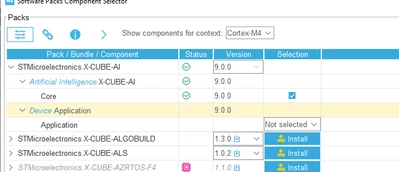
Then:
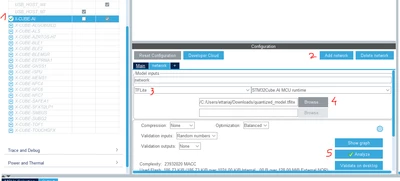
- Click cubeAI in the middleware and software packs
- Click add network
- Select as tflite
- Look for your model
- Analyse the model
Then you generate the Code.
Because you activated X-Cube-AI, you can access the documentation by clicking help>X-Cube-AI Documentation:
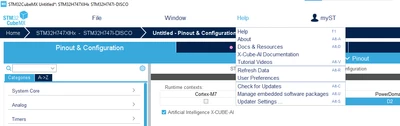
In there, in the Embedded Inference Client API, you will find a getting started - Minimal application code.
I think that you can start by adding that to your main.c and see how it goes first.
Another thing you can do is use ST Edge AI Developer Cloud to generate a working application in a few click and look at it to see how it is made. To do so:
- Go to ST Edge AI Developer Cloud
- Import your tflite model
- Pass/skip everystep until the last one
- Select the NUCLEO-H755ZI-Q as it also has a STM32H755
- Click to generate the STM32CubeIDE project
The code generate simply integrate the model given and do an inference with a random input (of the size of the input in the model) and output through serial, some information like the inference time.
I hope it helps.
Julian
