Associate II
June 21, 2025
Solved

ML Model Input Buffer problem

  • June 21, 2025
  • 2 replies
  • 623 views

Hello,
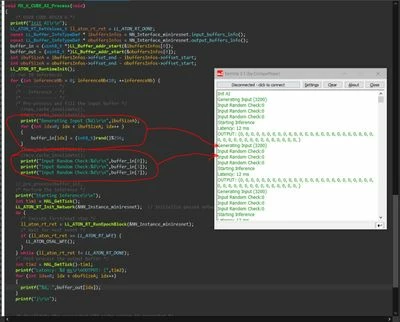
I am working on a NUCLEO-N657X0-Q and i'm trying to fill the runtime input buffer of an NPU accelerated miniresnet model with random data in order to verify that it is working, however, the buffer remains unaffected and filled with zeroes.
Do I have to do something different before/after filling (like invalidate some kind of cache?)
I am attaching a snippet of the code and the UART output aswell as the model analysis text.
I am using the external flash to store the model @ 0x71000000 (n6-extflash profile). The npuRAM5 (0x342e0000) is also used and project is setup as LRun.

The base code was generated by STM32CubeMX GUI


Thanks
Tasos
 

BufferFillFail.JPG

Best answer by PedroDeOliveira

Hello Tasos,

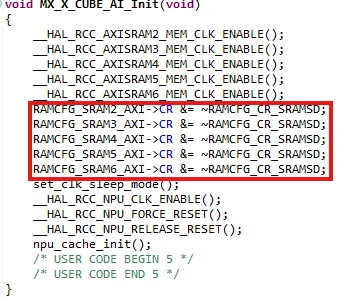
As mentioned by Julian, this error concerns the RAM configuration generated by CubeMX. The RAM sections are initialized but they're not turned on. To be able to properly write on the input buffer, add these following lines of code into your project:


PedroDeOliveira_0-1751463624388.png


They simply turn on the RAM that you've previously enabled. You can add them into the CubeMX Cube AI Init function, as shown above. To make it easier for you, copy it from the text below:

RAMCFG_SRAM2_AXI->CR &= ~RAMCFG_CR_SRAMSD;

RAMCFG_SRAM3_AXI->CR &= ~RAMCFG_CR_SRAMSD;

RAMCFG_SRAM4_AXI->CR &= ~RAMCFG_CR_SRAMSD;

RAMCFG_SRAM5_AXI->CR &= ~RAMCFG_CR_SRAMSD;

RAMCFG_SRAM6_AXI->CR &= ~RAMCFG_CR_SRAMSD;

Moreover, you might also encounter false inference values if your RIF is not correctly configured. Therefore,
in CubeMX RIF initialization function (SystemIsolation_Config) add the following line of code if you don't have it
already:

HAL_RIF_RISC_SetSlaveSecureAttributes(RIF_RISC_PERIPH_INDEX_NPU, RIF_ATTRIBUTE_PRIV | RIF_ATTRIBUTE_SEC);

This shall solve your problem.

Best regards,
Pedro.


2 replies

Julian E.
Technical Moderator
July 1, 2025

Hello @Unfgr,


It seems that there is issue in the way Cube MX handles the N6.

In your case, X Cube AI does not properly configure the memory used by the buffer, I think it is not activated.


We will come back to you soon to explain you what to do.


Sorry for the inconvenience and thank you for the remark.


Have a good day,

Julian

​In order to give better visibility on the answered topics, please click on 'Accept as Solution' on the reply which solved your issue or answered your question.
UnfgrAuthor
Associate II
July 1, 2025

Thanks @Julian E. 

I though so...

take a look at the following post aswell, more info/analysis there (same problem different approach)

https://community.st.com/t5/stm32cubemx-mcus/stm32cubemx-amp-neural-art-atonbuf-axisram5-raw-files/td-p/813915


PedroDeOliveiraBest answer
ST Employee
July 2, 2025

Hello Tasos,

As mentioned by Julian, this error concerns the RAM configuration generated by CubeMX. The RAM sections are initialized but they're not turned on. To be able to properly write on the input buffer, add these following lines of code into your project:


PedroDeOliveira_0-1751463624388.png


They simply turn on the RAM that you've previously enabled. You can add them into the CubeMX Cube AI Init function, as shown above. To make it easier for you, copy it from the text below:

RAMCFG_SRAM2_AXI->CR &= ~RAMCFG_CR_SRAMSD;

RAMCFG_SRAM3_AXI->CR &= ~RAMCFG_CR_SRAMSD;

RAMCFG_SRAM4_AXI->CR &= ~RAMCFG_CR_SRAMSD;

RAMCFG_SRAM5_AXI->CR &= ~RAMCFG_CR_SRAMSD;

RAMCFG_SRAM6_AXI->CR &= ~RAMCFG_CR_SRAMSD;

Moreover, you might also encounter false inference values if your RIF is not correctly configured. Therefore,
in CubeMX RIF initialization function (SystemIsolation_Config) add the following line of code if you don't have it
already:

HAL_RIF_RISC_SetSlaveSecureAttributes(RIF_RISC_PERIPH_INDEX_NPU, RIF_ATTRIBUTE_PRIV | RIF_ATTRIBUTE_SEC);

This shall solve your problem.

Best regards,
Pedro.