
Associate II
April 16, 2025
Solved

Not able to build the generated c code from developer zone in Cube IDE

  • April 16, 2025
  • 5 replies
  • 1887 views

I am Working with the board NUCLEO-N657X0-Q, I need to generate a c code of the Ai model Run in the Board, for that I generated a c code for the STM32N6570-DK to run in my board from St developer zone. Unfortunately i cant build the project file in CUBE IDE i cant figure out what is the problem. 
Best answer by Julian E.

Hello @VinaySankar,


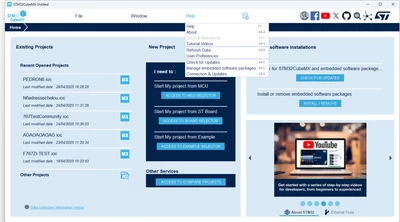
You probably have to update CubeMX:

Click Help > Check for Update

JulianE_0-1747827982074.png


Or you can install the update using a .zip.

Click Install package as you did, then from local and select the zip from the X Cube AI 10.1.0 that you can download here:

https://www.st.com/en/embedded-software/x-cube-ai.html


Have a good day,

Julian


5 replies

Julian E.
Technical Moderator
April 17, 2025

Hello @VinaySankar,


As you probably know, we have AI application examples for the DK board but not the Nucleo.

I would suggest you use the example application of the DK: STM32N6-AI - AI software ecosystem for STM32N6 with Neural-ART accelerator - STMicroelectronics

And the basic application example for the nucleo: STM32CubeN6 - STM32Cube MCU Package for STM32N6 series (HAL, CMSIS devices, and examples running on ST boards) - STMicroelectronics

(in STM32Cube_FW_N6_V1.1.0\Projects\NUCLEO-N657X0-Q)


There are currently bugs in X Cube AI for the Nucleo, the new version should drop around end of April


Have a good day,

Julian

​In order to give better visibility on the answered topics, please click on 'Accept as Solution' on the reply which solved your issue or answered your question.
Associate II
May 7, 2025

Hi @Julian E. , @SlothGrill ,

As mentioned in the message 

#There are currently bugs in X Cube AI for the Nucleo, the new version should drop around end of April
Is the release out for use.

Thanks,

Vinay

Associate II
May 20, 2025

Hi @SlothGrill , @Julian E. ,

Is the New release of X-Cube Ai for Nucleo out or ready to use. 
Can you please update on the same about the revised dates of release of the X-Cube Ai

Thanks,

Vinay Sankar

Associate II
April 30, 2025

Hi @Julian E. 

I am generating an AI model in C through CubeMX and Xcube AI. As I was having trouble generating only the model, So I converted it by selecting an example code. I chose the example code of GPIO LED, enabled Xcube AI, uploaded the models, and generated the project file. While building the project file in Cube IDE, I encountered errors. The errors are listed below.

ERRORS:

../Src/aiValidation_ATON.c:48:10: fatal error: ai_io_buffers.h: No such file or directory
make: *** [Src/subdir.mk:79: Src/aiValidation_ATON.o] Error 1
make: *** Waiting for unfinished jobs....
../Src/app_x-cube-ai.c:89:43: error: 'RIF_RISC_PERIPH_INDEX_NPU' undeclared (first use in this function)
../Src/app_x-cube-ai.c:89:70: error: 'RIF_ATTRIBUTE_PRIV' undeclared (first use in this function)
../Src/app_x-cube-ai.c:89:91: error: 'RIF_ATTRIBUTE_SEC' undeclared (first use in this function)
make: *** [Src/subdir.mk:79: Src/app_x-cube-ai.o] Error 1

SlothGrill
ST Employee
April 30, 2025

Hello @VinaySankar ,

I am not sure to understand your whole process for generating your final project that does not compile.

You say you use the example code of GPIO LED, but maybe a correct project to build would be a validation project for ai models.

Could you share your initial errors (from the message dated ‎2025-04-16 10:42 PM), this may be an easier way to start with.

Just in case you are interested, if you download STEdgeAI-Core - Artificial intelligence (AI) optimizer technology for STMicroelectronics products - STMicroelectronics, you can find extra "examples" and "documentation" related to ai (in particular, there is an "hello world" example that just does an inference, based on the "network.c" you generated.


If you want to fix your errors (which may be a bit more complex) The errors you have are related to the fact that:

  • ai_io_buffers.h is missing: this file is specific to the validation project (try to generate a validation project first to see what it looks like)

  • Missing macros related to RIF/RISAF (on some versions of MX, it seems that the HAL config file generated does not include rif-related includes, this is what causes the issue): manually change the hal_conf.h file and be sure it defines the HAL_RIF_MODULE_ENABLED macro + be sure to add hal-files related to that.
  • (the app_x-cube-ai.c tries to automatically open all the risaf that can be used during inference)


Let us know if it helps,

cheers.


SlothGrill
ST Employee
May 26, 2025

Hello
Also, while working with Nucleo using a "Discovery-kit" project, be careful of the following things, as Nucleo boards do not have an external SRAM connected to XSPI1:

  • Do not try to "memory-map" the memory connected to XSPI1 (i.e. do not memory-map external ram)
    • -> Do not try to read/write external RAM !
  • If XSPI1 is not initialized/clocked, do not try to configure the RISAF associated to it (RISAF11)

Both actions may result in the behaviour you are observing.

Associate II
May 27, 2025

Hi @SlothGrill,

I have not made any changes in the memory area iam using it as default case. I'll just describe the way I build the create the project file.

Select Board Selector >> Select NUCLEO-N657X0-Q board.

In the .ioc file 

Middleware and software packs >> enable Xcube AI 10.1.0 >> Select Xcube Ai 

Now a popup will come that the clock configuration is wrong and correct is automatically.

selected the automatic method and corrected the clock configuration.

Select the model (selected the model from st modelzoo) >> validate the model -> success >> Tried validation on target "Invalid firmware " this error arrised the log is attached above.

these are the steps that I done to create the project file.

Thanks, 

Vinay

SlothGrill
ST Employee
May 27, 2025

Hello
can you share the full (cubeide) project with us ? 


Cheers.

SlothGrill
ST Employee
June 16, 2025

Hello 
Sorry, i was somewhere else.
On my side, if i test your project, everything fails at line MX_ICACHE_Init();


Are you sure you need to use ICACHE (Texture Cache)  ? 


If you want to use instruction cache, this is something different (look at the CPU configs in MX).


Could you try and remove this IP of your configuration if you don't use it (or clock it correctly) and tell me if it fixes some of your issues ?