
Associate II
March 26, 2025
Solved

NOT IMPLEMENTED: Gemm with channel first A input is not supported

  • March 26, 2025
  • 1 reply
  • 629 views

Some errors occurred during the model conversion process. I have provided my model file below. 

Cube-AI report :NOT IMPLEMENTED: Gemm with channel first A input is not supported

It seems to be caused by an inability to handle the transposed data, but how do I resolve this issue? Or is the transpose operator unusable?

Best answer by Julian E.

Hello @Nephalem ,


Yes indeed, it is hard to tell.

In the X Cube AI menu, you can click setting and set --verbosity 3:
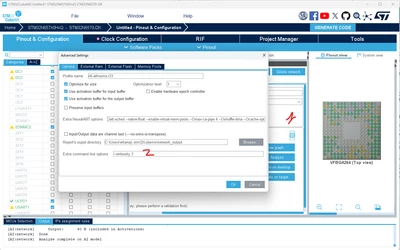
JulianE_0-1743081526859.png


But I don't think it is enough.

What you should do is use stedgeai.exe manually.


When you do a validate in X Cube AI, it literally does:

stedgeai.exe generate --model your_model --target stm32n6 --st-neural-art

So you can open a bash terminal and do this manually but you also need to first do:

export _DEBUG=2

to have more logs.


Have a good day,

Julian

1 reply

Julian E.
Technical Moderator
March 26, 2025

Hello @Nephalem,


It seems there is also an issue with the Gemm layers in your model.

If we take a look at the first one:

JulianE_0-1743001041122.png

With:

  • A is (1, 144)
  • B is (128, 144)
  • C is (128) (broadcasted)
  • Y is (1, 128)

And:

  • transA=0 → A is not transposed (remains 1x144).
  • transB=1 → B is transposed before multiplication (B changes from 128x144 to 144x128).
  • alpha=1 → No scaling on the A * B^T product.
  • beta=1 → The bias (C) is added as is.

So, your operation effectively becomes: 𝑌=(𝐴×𝐵𝑇)+𝐶


You can try to replace the Gemm layers by with basic layers such as transpose, matmul and add.
Something like this:

import torch

# Define the inputs
A = torch.randn(1, 144) # Shape (1, 144)
B = torch.randn(128, 144) # Shape (128, 144)
C = torch.randn(128) # Shape (128,)

# Perform equivalent Gemm operation using matmul, transpose, and add
Y = torch.matmul(A, B.T) + C # B.T gives shape (144, 128), matmul gives (1, 128)

# Print result shape to verify
print(Y.shape) # Should be (1, 128)


Please double check with the Gemm pytorch documentation that this is correct.


Have a good day,

Julian


​In order to give better visibility on the answered topics, please click on 'Accept as Solution' on the reply which solved your issue or answered your question.
NephalemAuthor
Associate II
March 27, 2025

Hello @Julian E. 


Following your instructions, I solved that problem, but now I've encountered a new issue。

TOOL ERROR: list index out of range

I have a few other questions. For example, how can I make CUBE-AI print longer debug logs? It's really hard to tell exactly which array is causing the out-of-bounds error from just this single line of error message. Thank you, and I hope you have a great day

Julian E.
Julian E.Best answer
Technical Moderator
March 27, 2025

Hello @Nephalem ,


Yes indeed, it is hard to tell.

In the X Cube AI menu, you can click setting and set --verbosity 3:

JulianE_0-1743081526859.png


But I don't think it is enough.

What you should do is use stedgeai.exe manually.


When you do a validate in X Cube AI, it literally does:

stedgeai.exe generate --model your_model --target stm32n6 --st-neural-art

So you can open a bash terminal and do this manually but you also need to first do:

export _DEBUG=2

to have more logs.


Have a good day,

Julian

​In order to give better visibility on the answered topics, please click on 'Accept as Solution' on the reply which solved your issue or answered your question.