
Associate II
March 17, 2025
Solved

Static Library Usage in STM32N6 Series

  • March 17, 2025
  • 1 reply
  • 496 views

Hello,

I am currently working on STM32N6570-DK. I want to create static library from files inside of Application layer and then I will create user memory and code section inside of my project. Therefore, users will develop their own graphic and I/O configurations for product.

When I created new N6 project, I can not enable static library option. Hence, my questions are:

1) Can I use static library inside of N6 project?

2) Can I create static library for N6 as other mcu groups?

Best Regards,
BK
Best answer by Julian E.

Hello @B.Kaya ,


There is no restriction concerning the N6.

You can use static libraries inside N6 project (our AI demo uses CubeAI static libraries)

You can create static libraries for N6 as other mcu.


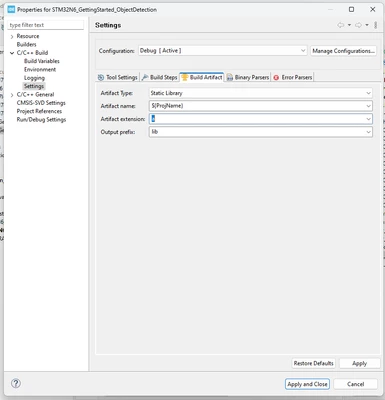
I am not an expert regarding static libraries but in a N6 project in STM32CubeIDE:

  • Right-click on your project in the Project Explorer and select Properties.
  • Go to C/C++ Build > Settings.
  • Under the Tool Settings tab, navigate to MCU GCC Linker > General.
  • Change the Artifact Type to Static Library.
  • Ensure the Artifact Extension is set to .a.

JulianE_0-1742288755941.png


Have a good day,

Julian

1 reply

Julian E.
Julian E.Best answer
Technical Moderator
March 18, 2025

Hello @B.Kaya ,


There is no restriction concerning the N6.

You can use static libraries inside N6 project (our AI demo uses CubeAI static libraries)

You can create static libraries for N6 as other mcu.


I am not an expert regarding static libraries but in a N6 project in STM32CubeIDE:

  • Right-click on your project in the Project Explorer and select Properties.
  • Go to C/C++ Build > Settings.
  • Under the Tool Settings tab, navigate to MCU GCC Linker > General.
  • Change the Artifact Type to Static Library.
  • Ensure the Artifact Extension is set to .a.

JulianE_0-1742288755941.png


Have a good day,

Julian

​In order to give better visibility on the answered topics, please click on 'Accept as Solution' on the reply which solved your issue or answered your question.