Associate III
August 2, 2024
Solved

STEVAL-STWINBX1 datalogger V2.2.0 - Python GUI does not work

  • August 2, 2024
  • 2 replies
  • 1473 views

I am using the STEVAL-STWINBX1 development board with the FP-SNS-DATALOG2 software V2.2.0.

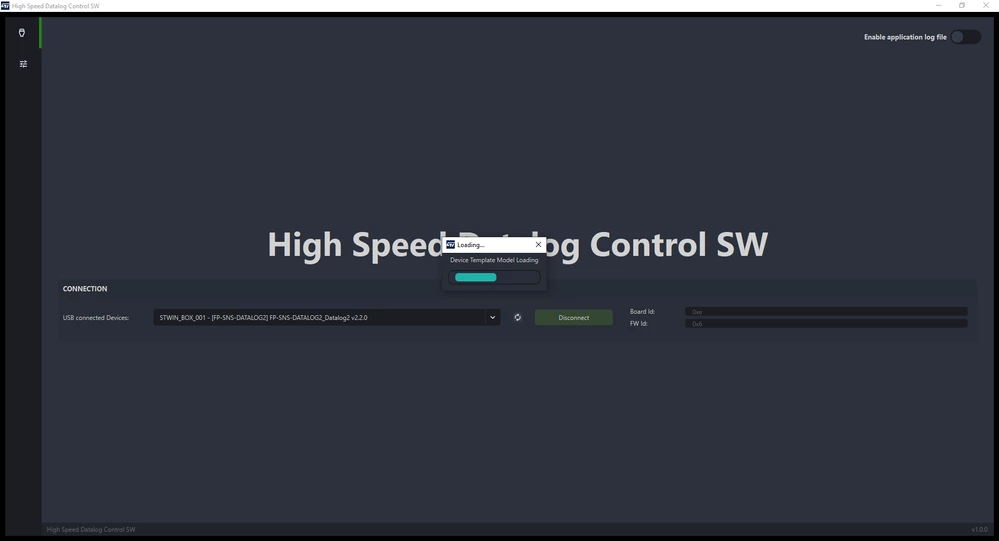
When I try to connect using the Python GUI tool, it gets stuck at "Device Template Model Loading"....

johngj_0-1722592833105.png

I reverted back to V2.1.1 and the GUI tool works.

Is there a bug in this new release V2.2.0 ?


Best answer by matteo_ronchi

Hello @johngj,

Looking at your screenshot, it seems that you are using an old GUI version (maybe the one within FP-SNS-DATALOG2 v2.1.1) with the latest version of the FW v2.2.0.

To solve your issue, please update your installed version of the HSDPython_SDK by running the HSDPython_SDK_install.bat installer script found in your STM32CubeFunctionPack_DATALOG2_V2.2.0\Utilities\HSDPython_SDK folder.

At the end of the installation process, your installed Python package versions should be the following:

  • st_pnpl v2.3.0
  • st_dtdl_gui v2.3.0
  • st_hsdatalog v3.3.0

You can check this by launching the python -m pip list command. To ensure you start from a clean environment, I suggest you create and activate a virtual environment before launching the installer script.

Best regards,
Matteo

2 replies

matteo_ronchiBest answer
ST Employee
August 6, 2024

Hello @johngj,

Looking at your screenshot, it seems that you are using an old GUI version (maybe the one within FP-SNS-DATALOG2 v2.1.1) with the latest version of the FW v2.2.0.

To solve your issue, please update your installed version of the HSDPython_SDK by running the HSDPython_SDK_install.bat installer script found in your STM32CubeFunctionPack_DATALOG2_V2.2.0\Utilities\HSDPython_SDK folder.

At the end of the installation process, your installed Python package versions should be the following:

  • st_pnpl v2.3.0
  • st_dtdl_gui v2.3.0
  • st_hsdatalog v3.3.0

You can check this by launching the python -m pip list command. To ensure you start from a clean environment, I suggest you create and activate a virtual environment before launching the installer script.

Best regards,
Matteo
johngjAuthor
Associate III
August 6, 2024

Many thanks Matteo, that fixed the problem :)