
AM-adben
Associate II
January 13, 2025
Solved

STM32N6 and X-CUBE-AI problems: "TOOL ERROR: List index out of range"

  • January 13, 2025
  • 1 reply
  • 3351 views

Hello,

I am facing some strange errors when trying to analyze any TFLite model. The errors are occurring in the following situations:

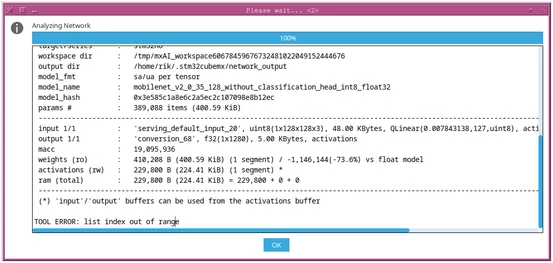
Situation 1: STM32Cube.AI MCU Runtime

When analyzing a TFLite model, it fails and shows an error message: "TOOL ERROR: List index out of range."
1.png

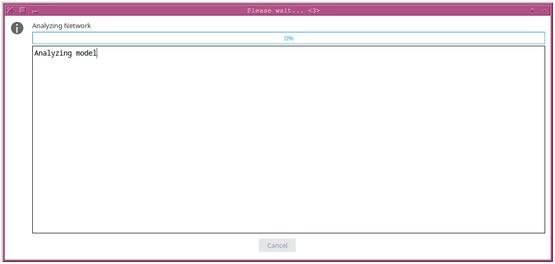
Situation 2: STM32Cube.AI Neural-ART Runtime

After clicking on the Analyze button, it's stuck at 0%. Nothing else happens, even after I wait for 30 minutes.
2.png

I am using:

CubeIDE version: 1.17.0
X-CUBE-AI version: 9.0.0 and 9.1.0

Please note that all those TFLite models work fine with CubeIDE 1.16.0, X-CUBE-AI 9.0.0, and STM32H7A3.

I am attaching 2 tflite models for your reference.
Best answer by hamitiya

Hello @AM-adben ,

Could you please verify again your version of X-CUBE-AI ?

Neural-ART Runtime should only be available from X-CUBE-AI version 10.0.0.

Did you install the runtime through STM32CubeMX or STEdgeAI-Core installer ?


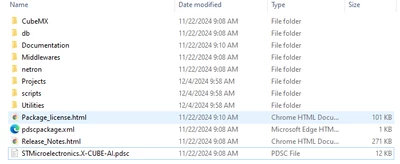
My first suggestion would be to uninstall X-CUBE-AI through STM32CubeMX, and install it again. After that, verify the content available in C:\Users\your_username\STM32Cube\Repository\Packs\STMicroelectronics\X-CUBE-AI\10.0.0.

You should have this file tree:

hamitiya_0-1736839842963.png


Best regards,

Yanis


1 reply

hamitiya
hamitiyaBest answer
ST Employee
January 14, 2025

Hello @AM-adben ,

Could you please verify again your version of X-CUBE-AI ?

Neural-ART Runtime should only be available from X-CUBE-AI version 10.0.0.

Did you install the runtime through STM32CubeMX or STEdgeAI-Core installer ?


My first suggestion would be to uninstall X-CUBE-AI through STM32CubeMX, and install it again. After that, verify the content available in C:\Users\your_username\STM32Cube\Repository\Packs\STMicroelectronics\X-CUBE-AI\10.0.0.

You should have this file tree:

hamitiya_0-1736839842963.png


Best regards,

Yanis


​In order to give better visibility on the answered topics, please click on 'Accept as Solution' on the reply which solved your issue or answered your question.
AM-adben
AM-adbenAuthor
Associate II
January 24, 2025

Sorry for the late reply as I was on leave.

I installed X-CUBE-AI version 10.0.0 which was not availabe in CubeMX earlier when I made this post. Anyway, now I can analyze the model using "STM32Cube.AI MCU Runtime" option. But, "STM32Cube.AI Neural-ART Runtime" requires STEdgeAI-NPU package which I don't have access to. I requested for this package earlier. Today I requested again. Without it, I can't use the NPU.

hamitiya
ST Employee
January 24, 2025

Hello @AM-adben 

You are right, STEdgeAI-NPU package is required in order to use Neural-ART Runtime. 

If the request was done more than 2 days ago, could you please check in your mailbox if this mail did not go in spam folder ?


Best regards,

Yanis

​In order to give better visibility on the answered topics, please click on 'Accept as Solution' on the reply which solved your issue or answered your question.