
Associate III
July 5, 2024
Solved

STWINBX1 datalogger - crashes when using device_config.json on SD card

  • July 5, 2024
  • 3 replies
  • 3369 views

Why does the datalogger crash when I put a device_config.json file on the SD card ?

I created the device_config.json file using the Python GUI tool, saved it to the computer and then copied it to the root folder of the SD card. 

The only changes I made was to the accelerometers where I changed the range to 4g (with the exception of IIS2ICLX which was left at 3g).

I put the SD card in the STWINBX1 and pressed the RESET button.

When I try to start the log (by pressing the USER button) the software seems to crash.

The green LED (LED_1) stays in the state when the USER button was pressed (i.e. permanently on or off).

The board has to be reset, but then the same happens again if I try to start a log.

When I try to access the log files on the SD card on the computer, I get an error saying the directory is corrupt, so this probably shows that the software is crashing...
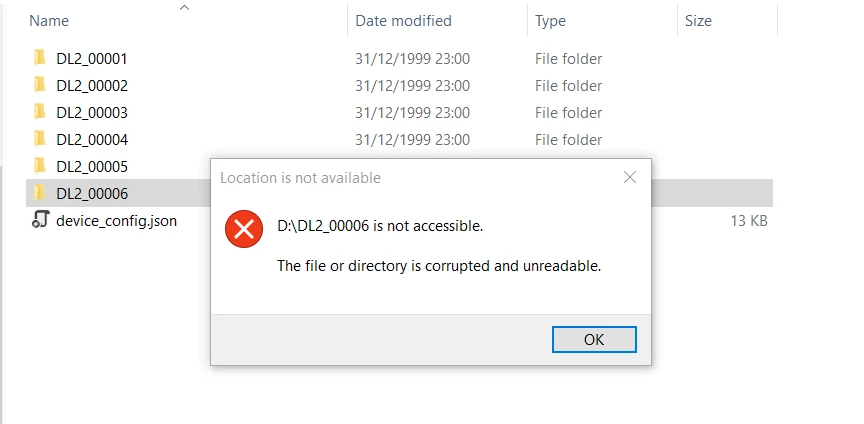
johngj_0-1720188455528.png

I cannot delete the folders, so I have to reformat the SD card.

I have attached a copy of the device_config.json file (note I had to rename the extension to .txt in order to attach).


Best answer by SimonePradolini

Hello @johngj 

I confirm that I found and fixed the issue in the FW. v2.2.0 will work as expected.

As described in the User Manual, we suggested some SD card part number that we fully tested. We can't guarantee that any kind of SD card can support the amount of data we are logging.

The manual contains also a detailed explanation for the SD card failing and a procedure to test your SD card if you still don't want to use one of the suggested ones.


Best regards

Simone

3 replies

SimonePradolini
Technical Moderator
July 8, 2024

Hello @johngj 

I'll replicate your setup to find the issue. For sure, I'll integrate the bugfix in the upcoming FP-SNS-DATALOG2 v2.2.0.

In the meantime, which sd card are you using? FP-SNS-DATALOG2 User Manual includes a list of tested and suggested sd card part number and a troubleshooting paragraph.


Best regards

Simone

In order to give better visibility on the answered topics, please click on 'Accept as Solution' on the reply which solved your issue or answered your question.
johngjAuthor
Associate III
July 10, 2024

The SD card is a 2GB Transcend card, part number TS2GUSD...

https://uk.rs-online.com/web/p/sd-cards/1871643 

https://docs.rs-online.com/3ea7/0900766b816fae97.pdf 


SimonePradolini
SimonePradoliniBest answer
Technical Moderator
July 17, 2024

Hello @johngj 

I confirm that I found and fixed the issue in the FW. v2.2.0 will work as expected.

As described in the User Manual, we suggested some SD card part number that we fully tested. We can't guarantee that any kind of SD card can support the amount of data we are logging.

The manual contains also a detailed explanation for the SD card failing and a procedure to test your SD card if you still don't want to use one of the suggested ones.


Best regards

Simone

In order to give better visibility on the answered topics, please click on 'Accept as Solution' on the reply which solved your issue or answered your question.
ST Employee
August 6, 2024

Hello @johngj,

Have you tried saving the "device_config.json" file using the latest Python GUI (the one within FP-SNS-DATALOG2 v2.2.0)?

Best regards,

Matteo

johngjAuthor
Associate III
August 6, 2024

Yes I used the latest Python GUI and saved the config file to SD card

If I use the Python GUI to start/stop the log, it doesnt crash

If I use USR button or phone app to start/stop the log, it crashes

SimonePradolini
Technical Moderator
August 16, 2024

Hello @johngj 

I can't reproduce your error. I'm testing DATALOG2 v2.2.0 with different device_config.json files in the root of the SD card and log never crashed. Can you share the new device_config.json you built up using the Python GUI?

Are you still using the not suggested and not officially supported 2GB Transcend card? Have you already done the test procedure I explained before?

Please, respect those guidelines and test newly your setup before coming back to us.


Best regards

Simone

In order to give better visibility on the answered topics, please click on 'Accept as Solution' on the reply which solved your issue or answered your question.