KSOdin2
Associate III
July 20, 2023
Solved

Updated CubeAI can't find Runtime

  • July 20, 2023
  • 1 reply
  • 4527 views

I've updated my code to CubeAI 8.1. The middleware is still deleted... but I can add it manually. However when I build the code I gett the error:

Description Resource Path Location Type
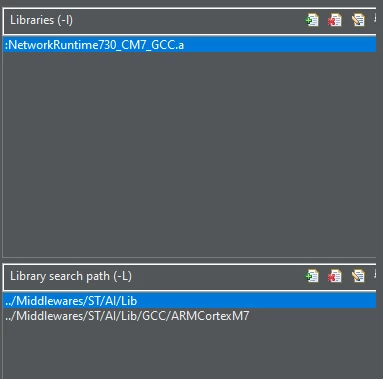
cannot find -l:NetworkRuntime730_CM7_GCC.a AI_FILES_GENERATOR C/C++ Problem

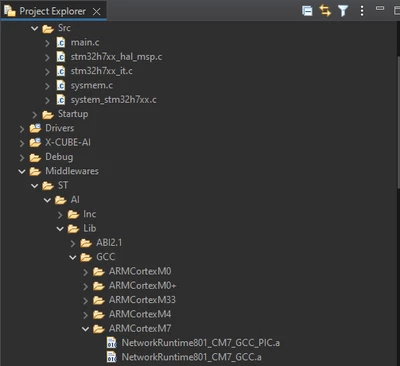
However, the file is there in Middlewares and the library paths have been generated. I have even added a library path to where this file is located and still it does not work.

I have created a new project with STM32CubeIDE with the latest CubeAI and the problem is still there.

Tool settings>Libraries
KSOdin2_0-1689857782573.png

Error:

KSOdin2_1-1689857823405.png

File in the project:

KSOdin2_2-1689857862226.png


Thank you for any help


This topic has been closed for replies.
Best answer by KSOdin2

The generated code is looking for a file called "NetworkRuntime730_CM7_GCC", but the middleware version is "NetworkRuntime801_CM7_GCC". This was why it could not be found. I am unsure how this happened, as this was with a new project.

As it was not working, I downgraded the version to 7.3.0 and copied over 8.0.1. This is why there is a discrepancy.

1 reply

KSOdin2
KSOdin2AuthorBest answer
Associate III
July 20, 2023

The generated code is looking for a file called "NetworkRuntime730_CM7_GCC", but the middleware version is "NetworkRuntime801_CM7_GCC". This was why it could not be found. I am unsure how this happened, as this was with a new project.

As it was not working, I downgraded the version to 7.3.0 and copied over 8.0.1. This is why there is a discrepancy.