

wb0gaz
Associate III
July 21, 2025
Solved

Finding (to add) category for "My Subscriptions - STMicroelectronics" (for occasional email updates)

  • July 21, 2025
  • 1 reply
  • 541 views

My st.com user log-in includes a feature called "My Subscriptions". That causes it to occasionally send an email with updates that are relevant to me per subscriptions managed at:

https://www.st.com/content/my_st_com/en/my-space/my-preferences/my-subscriptions.html

This page allows me to remove existing subscriptions, but is silent on how to find new subscription categories I'd like to add (and I don't know how the existing subscriptions were added over time, but they're generally useful.)

In particular, I'd appreciate announcements of new stm32 series microcontrollers and microprocessors (hence why I'm posting this inquiry here with a label "documentation").

How do I do this?

Thanks!
 

Best answer by Lina_DABASINSKAITE

Hello @wb0gaz

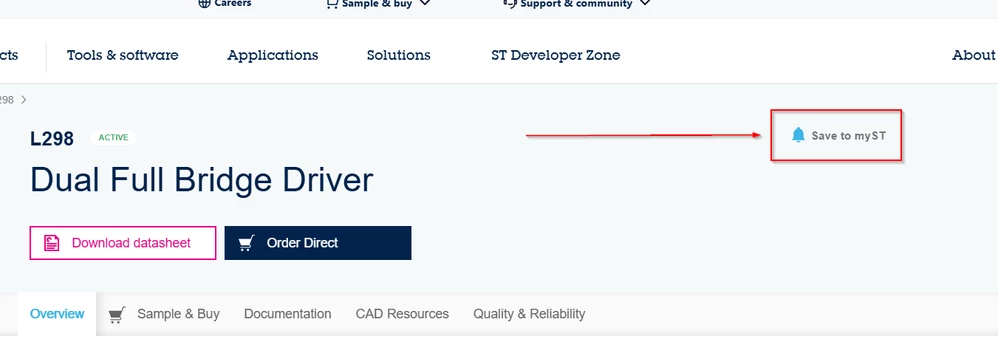
To add subscriptions, follow these steps on the respective page or category you wish to follow:

  • On any page (such as RPN - product name, family, class, subclass, etc.) where you see the Bell: Save to myST option, you can add the page as a favorite. See below: 

Lina_DABASINSKAITE_0-1753694095824.png

Notification types:

  • RPN (product name) page notifications: You will be notified of any new technical document related to this RPN.
  • Above RPN (product name) notifications: You will be notified of any new RPN belonging to this product tree node.

I hope this information is helpful.

Let me know if you have any questions.

Lina

1 reply

Lina_DABASINSKAITE
Community Manager
July 22, 2025

Hi @wb0gaz

Thanks for sharing this. I have passed this feedback with a respective team and will let you know once I have news on this. 

Regards,
Lina

​In order to give better visibility on the answered topics, please click on 'Accept as Solution' on the reply which solved your issue or answered your question.
wb0gaz
wb0gazAuthor
Associate III
July 26, 2025

Thank you, Lina - I will watch for reply in this forum topic about possible procedure I have missed, or new procedure that enables this capability. Either way, it will be nice to add new topics of interest!


Dave


Lina_DABASINSKAITE
Community Manager
July 28, 2025

Hello @wb0gaz

To add subscriptions, follow these steps on the respective page or category you wish to follow:

  • On any page (such as RPN - product name, family, class, subclass, etc.) where you see the Bell: Save to myST option, you can add the page as a favorite. See below: 

Lina_DABASINSKAITE_0-1753694095824.png

Notification types:

  • RPN (product name) page notifications: You will be notified of any new technical document related to this RPN.
  • Above RPN (product name) notifications: You will be notified of any new RPN belonging to this product tree node.

I hope this information is helpful.

Let me know if you have any questions.

Lina

​In order to give better visibility on the answered topics, please click on 'Accept as Solution' on the reply which solved your issue or answered your question.