
Senior II
June 23, 2023
Solved

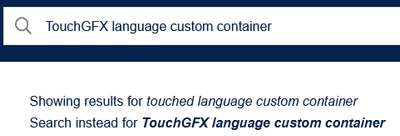
Search doesn't know important keywords and changes them automatically "TouchGFX" will be "touched"

  • June 23, 2023
  • 2 replies
  • 2619 views

I just did a search with "touchgfx language custom container" because text language will not change inside custom containers on the current screen when calling Texts::setLanguage()*. The search engine isn't aware of the existance of TouchGFX and replaces it:
tdecker_1-1687510585374.png

Edit:
* my fault, I use txtLabel.setWildcard(TypedText(id).getText() in the Containers and then there is of course no language information left


Best answer by Lina_DABASINSKAITE

Legacy message: ‎2023-06-26 11:40 PM

Hello,


I have disabled the autocorrect in Search field and the problem should not come up again.  Please let me know if it is working for you now. 

Thanks,
Lina

2 replies

Amelie ACKERMANN
Community Manager
June 23, 2023

Hello @t.decker

Just checking if your edit to the post means that the issue has been resolved, or is there still something we can look into?

Thanks,
Amelie

t.deckerAuthor
Senior II
June 26, 2023

Hello @Amelie ACKERMANN,

I found out why the language of my TouchGFX Containers didn't change. But topic of this question was about the search engine replacing the keyword "TouchGFX" with "touched" as you can see in the attached screenshot.

Lina_DABASINSKAITE
Community Manager
July 5, 2023

Legacy message: ‎2023-06-26 11:40 PM

Hello,


I have disabled the autocorrect in Search field and the problem should not come up again.  Please let me know if it is working for you now. 

Thanks,
Lina

​In order to give better visibility on the answered topics, please click on 'Accept as Solution' on the reply which solved your issue or answered your question.
t.deckerAuthor
Senior II
July 5, 2023

Hi @Lina_DABASINSKAITE,

yes search is now working as expected. Thank you! :)