

waclawek.jan
Super User
February 9, 2024
Question

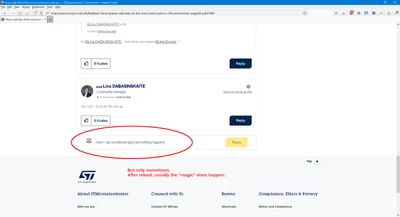
Sometimes the editor magic does not happen
  • February 9, 2024
  • 8 replies
  • 3909 views

waclawekjan_0-1707494331486.png


This is something I haven't seen in last couple of months, but appeared and happens relatively often since last week or two.

#updates_are_not_universally_good_thing

#unnecessary_javascriptoiding_is_a_bad_thing

JW

8 replies

February 13, 2024

Hi @waclawek.jan ,
Thanks for sharing your experience. I was able to replicate it and reported the issue.
Best,
Adam

waclawek.jan
Super User
February 17, 2024

Hi @unknown Adam,

In the last few days the problem got worse - I now have to reload a post several times, until the edit line's "magic" starts to "magic".

What now?

Can't the editor window simply be displayed unconditionally, without any "magic", like in normal fora?

JW

March 6, 2024

Hi @waclawek.jan ,

Can you please try updating your browser to the latest version and clear the cache? Please let us know if it solved the problem as it did in our case.

Best,

Adam

waclawek.jan
Super User
March 7, 2024

Hi Adam @unknown ,

I've just cleared cache and site data because of a different thread, and then tried to answer one of the regular posts and look what just happened (or, more precisely, did not happen):

waclawekjan_0-1709824319412.png

Win10, FF123.0.

JW

March 18, 2024

Hi @waclawek.jan , @Andrew Neil , @Tesla DeLorean ,

Thank you for the additional information, which will be used to re-investigate this case.

Best,

Adam

Andrew Neil
Super User
March 7, 2024

I had it happen this morning.

Google Chrome Version 122.0.6261.111 (Official Build) (64-bit) on Win 11.

A complex system that works is invariably found to have evolved from a simple system that worked.A complex system designed from scratch never works and cannot be patched up to make it work.
Tesla DeLorean
Guru
March 7, 2024

Still happening randomly, some times works, some times not. I can fill a whole line sometimes and it still doesn't fire up. Other times it does, but then have to be careful about it catching up to where I'm at.

I realize it's not working, and either abort, or finish my thought, and copy the line I've typed and go back to the top to hit Reply.

Some times Reply button's are laggy, and I have go deeper into the pane to get the cursor.

Using Google Chrome, several machines, and always within one or two versions of the most current release.

Honestly what I'd like to see is it just acts as a "lightweight" pane, without all the formatting clutter, so I can just type..

Tips, Buy me a coffee, or three.. PayPal VenmoUp vote any posts that you find helpful, it shows what's working..
waclawek.jan
Super User
March 9, 2024

Hi @unknown ,

new data point: if the "magic" did not happen, clicking on "Reply" on any other post results in two editor panes to open.

JW

Andrew Neil
Super User
April 4, 2024

This seems to have got much worse lately - it seems lately that "the editor magic" never happens on that 'Reply' button.

After using any other 'Reply' button in the thread, that one does seem to remember what it's supposed to do.


See also: https://community.st.com/t5/feedback-forum/st-website-getting-worse/td-p/657943

A complex system that works is invariably found to have evolved from a simple system that worked.A complex system designed from scratch never works and cannot be patched up to make it work.
Andrew Neil
Super User
April 15, 2024

@Andrew Neil wrote:

After using any other 'Reply' button in the thread, that one does seem to remember what it's supposed to do.


Actually, it seems that the yellow one is "dimmed":

AndrewNeil_0-1713174054948.png

It has let me click in the box, and the box border has gone bold - so it's recognised my click, and set the focus - but it doesn't present the composition window, and doesn't allow me to type anything. It doesn't even give a caret in the box.


But If I click on the blue 'Reply' button, I  get two composition windows!

AndrewNeil_1-1713174228797.png

First is the one for the blue reply button to the specific post; second is the one for the yellow button


EDIT

@waclawek.jan did mention the two-window thing earlier.


NXP seem to be using the same forum software. On there, they have a "quick reply" which, IIRC, doesn't present a full composition window - it's just a quick "type in the box".

Maybe this forum is trying to do that, but failing?

A complex system that works is invariably found to have evolved from a simple system that worked.A complex system designed from scratch never works and cannot be patched up to make it work.
Lina_DABASINSKAITE
Community Manager
April 15, 2024

Hello all, 

Thank you for your reports on this issue.

After investigation, it has been identified as a bug. I will update you once I have more information to share about the fix. 

I am sorry for this inconvenience,
Lina


​In order to give better visibility on the answered topics, please click on 'Accept as Solution' on the reply which solved your issue or answered your question.
Lina_DABASINSKAITE
Community Manager
March 18, 2025

Hello all, 

This issue has been fixed. Let us know if you still face it on your end. 

Thank you,
Lina

​In order to give better visibility on the answered topics, please click on 'Accept as Solution' on the reply which solved your issue or answered your question.