Andrew Neil
Super User
December 31, 2025
Question

What is the point of the 'Spoiler' tag?

  • December 31, 2025
  • 1 reply
  • 272 views

eg, here:

AndrewNeil_2-1767178150924.png


It often seems to be used by "accident" by beginners.

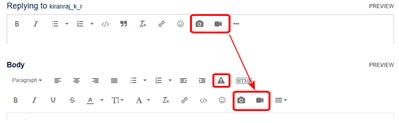
In this case possibly because, in the "extended" toolbar, it's in the place where 'insert image' was on the "basic" toolbar:

AndrewNeil_1-1767178118498.png


1 reply

Lina_DABASINSKAITE
Community Manager
January 23, 2026

Hi @Andrew Neil ,

Thanks for sharing this. I apologize for the delayed response.

In online communities, a spoiler tag is used to hide a sensitive content behind this clickable overlay so it's no exposed immediately in discussions. Can you share examples of content where you are unsure about the use of a spoiler tag? We will review these examples.

I see your point regarding the placement in the toolbar once extending that could the misuse. I will look into adjust the location of this button. Let me know if this would help. 

Regards,
Lina

​In order to give better visibility on the answered topics, please click on 'Accept as Solution' on the reply which solved your issue or answered your question.
Andrew Neil
Super User
February 10, 2026

@Lina_DABASINSKAITE wrote:

Can you share examples of content where you are unsure about the use of a spoiler tag? 


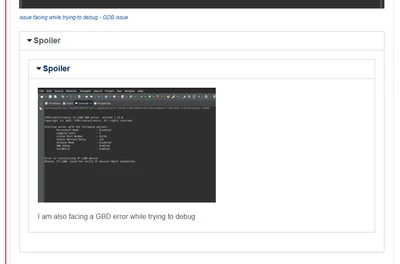
Here's one just now:

AndrewNeil_0-1770753447498.png

https://community.st.com/t5/stm32-mcus-embedded-software/how-to-configure-xcore407i-stm32-board-ethernet-in-stm32cubeide/td-p/878379

Again, it seems that the poster meant to use the Image button:

AndrewNeil_1-1770753499301.png


A complex system that works is invariably found to have evolved from a simple system that worked.A complex system designed from scratch never works and cannot be patched up to make it work.
Lina_DABASINSKAITE
Community Manager
February 17, 2026

Thanks @Andrew Neil

@KeshaV, can you confirm if you have use of spoiler tag was intended or by accident? 

Thanks,
Lina

​In order to give better visibility on the answered topics, please click on 'Accept as Solution' on the reply which solved your issue or answered your question.