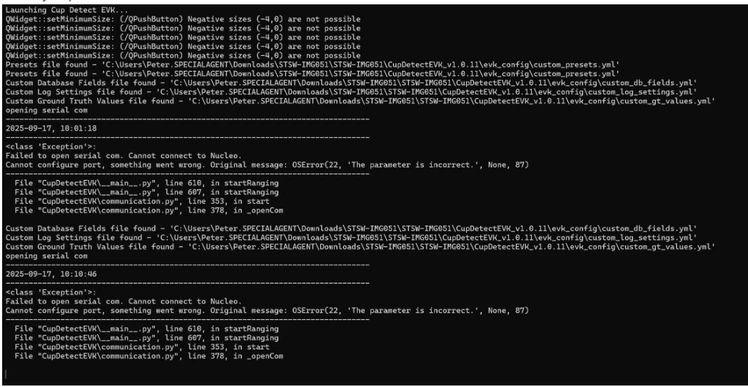
Sorry if this takes a couple of posts to figure this out.
I started with a brand-new PC. A Lenovo, but I doubt that matters. And after my retirement, I needed one anyway.
And I tried to download the GUI - STSW-IMG041 - always the best place to start.
I had issues - with McAfee - it simply would not believe I wanted to download a program and run it. So, I removed McAfee. I like to think I know enough to only download known software.
Upshot is - that worked.
I know it's not the final thing you want, but it proves the serial port and the D: drive connection. So, the USB is good.
And also note the GUI installs the STLink software which is the Serial port over USB. And that might be what you are missing. (Although you said you saw it.)
I then downloaded the cup detect STSW-IMG051). One has to be careful to extract the zip into a different directory as Windows tries to actually run stuff out of the .zip file. This is another place to fail.
I copied the .bin file from the FW directory into the NOD_F401RE (D: ) drive, and then executed the CupDetectEVK.
Here I have to admit to having an issue. I did NOT stop the GUI, and the sensor can only have one master.
But once I stopped the GUI, I restarted the CupDetectEVK and it worked just fine.
One actually hates the 'it works for me', so I have another idea.
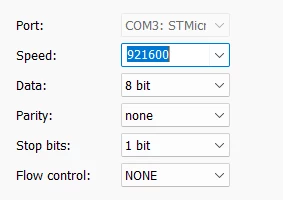
Download 'tera term' or any other serial emulation app.
Set it to:
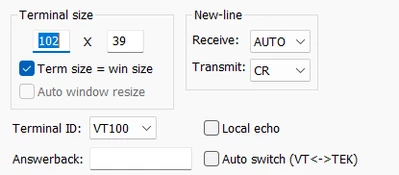
And use an 'auto' newline as in:
hitting the black button on your Nucleo board will get it to reboot and you should see:

Do you see that?
Next type 'help' - this will give you the list of commands:
(There is no echo, you will need the local-echo feature or just live without it.)
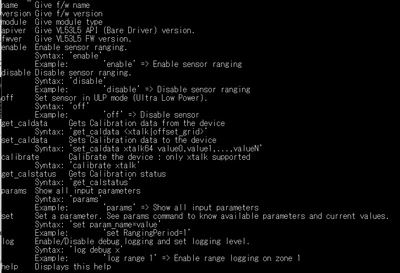
The enable command starts it running and you get:
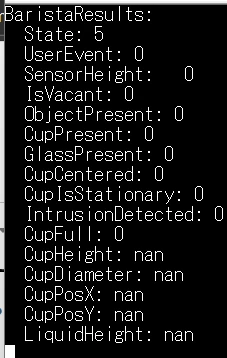
If this all works, then you have a PC problem.
Remember to kill Tera Term before you run the app.
Good luck,
- john