

jagauthier
Associate III
August 11, 2021
Solved

STM32CubeMX not generating code correctly

  • August 11, 2021
  • 7 replies
  • 4716 views

I am trying to explore X-CUBE-TOF1 and I have several VL53L3CX breakout boards. I'm using the latest CubeMX and IDE (6.3.0 and 1.7, respectively) and therefor downloaded both the 2.0.0 and 1.0.0 X-CUBE-TOF1 cube modules.

I've selected the following software packs:
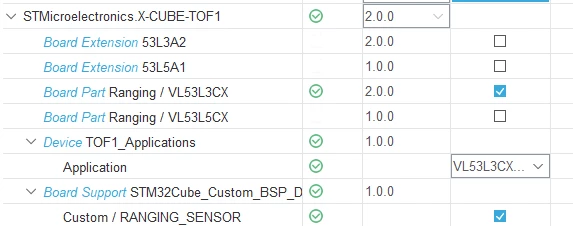
0693W00000D2CIIQA3.pngThe performed the following configurations:
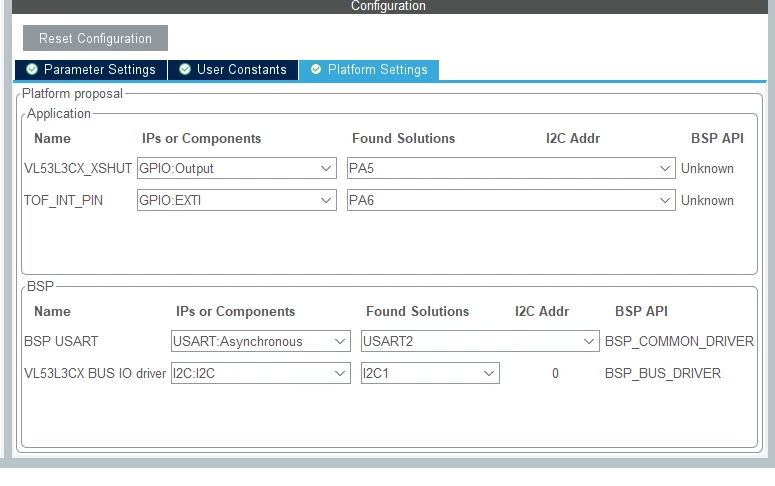
0693W00000D2CINQA3.png 

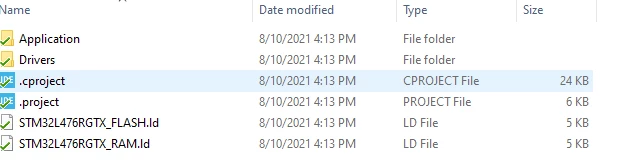
After generating the code, the directory is completely empty.

0693W00000D2CISQA3.pngRemoving the software pack results in a properly generated project (but without the software packs, obviously)
0693W00000D2CIhQAN.png 

How can I generate starter code to use with the VL53L3CX breakout boards?
This topic has been closed for replies.
Best answer by Houda GHABRI

Hi @Community member​ ,

After checking your ioc received by private message , I confirm there is an issue when generating project using STM32CubeIDE as toolchain.

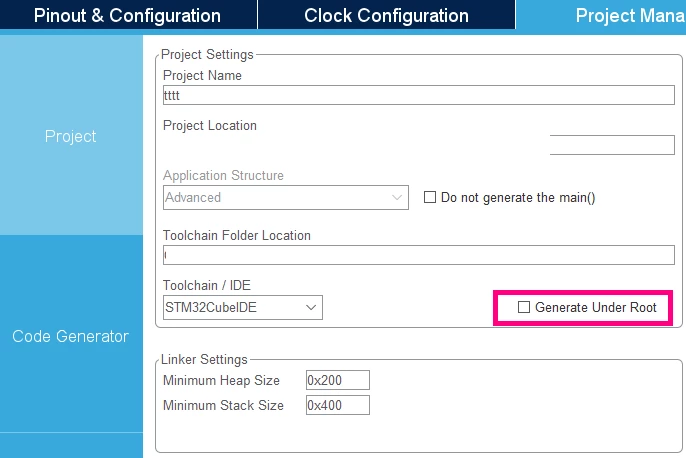
This issue is already raised internally and the recommendation is to generate project with "Under Root" option(ideally from scratch).

The project will be generated correctly under the main project folder.

0693W00000Dpf8UQAR.pngHope this helps you.

If your question is answered, please close this topic by choosing Select as Best. This will help other users find that answer faster.

Houda

7 replies

Houda GHABRI
ST Employee
August 16, 2021

Hi JGaut.1 ,

Using CubeMX 6.3.0 and CubeIDE 1.7 I'm not able to reproduce this issue , may be I miss something in your scenario .

0693W00000D2YxNQAV.pngCan you please send me your ioc to check?

Houda

jagauthier
Associate III
August 16, 2021

Sure! I sent you a direct message with the file attached.

Julien NGUYEN
ST Employee
August 17, 2021

Hi JGaut.1

Before trying to generate the project from scratch I would suggest you to use the pre-compiled project available here below when you installed the CUBE-TOF1 pack

C:\Users\nguyenph\STM32Cube\Repository\Packs\STMicroelectronics\X-CUBE-TOF1\2.0.0\Projects\NUCLEO-F401RE\Examples\53L3A2\53L3A2_MultiSensorRanging.

You can either flash the Nucleo F401RE with the binary file or open the project with KEIL, IAR or STM32IDECube. Let me know if it works. Thanks. Julien.

jagauthier
Associate III
August 17, 2021

I was able to get NUCLEO-L476RG\Examples\53L3A2\53L3A2_SimpleRanging working with my L476 Nucleo board.

But that's not my target board, nor is the F401. So, I needed to build that project from scratch.

In the meanwhile, I was able to get a project working by jumping through some hoops. But now I don't remember what they all are.

I might have started a new project for an L432 and imported the ioc from the L476.

But either way, generating the project from scratch for any MCPU should work.

Houda GHABRI
Houda GHABRIBest answer
ST Employee
August 18, 2021

Hi @Community member​ ,

After checking your ioc received by private message , I confirm there is an issue when generating project using STM32CubeIDE as toolchain.

This issue is already raised internally and the recommendation is to generate project with "Under Root" option(ideally from scratch).

The project will be generated correctly under the main project folder.

0693W00000Dpf8UQAR.pngHope this helps you.

If your question is answered, please close this topic by choosing Select as Best. This will help other users find that answer faster.

Houda

jagauthier
Associate III
August 18, 2021

Perfect, thank you for the response! I should be able to move the project where I want after that.

I appreciate the time you took to find this answer.

Julien NGUYEN
ST Employee
August 18, 2021

Thanks Houda for your investigations.