

ANSHUMAN TRIPATHI
Visitor II
June 28, 2018
Question

BlueNRG-2 | Unable to debug over STLINK/V2 | Multiple Issue

  • June 28, 2018
  • 9 replies
  • 4480 views
Posted on June 28, 2018 at 13:48

Hi All,

Please help I'm stuck with this, I am currently having some difficulties while programming and debugging the BlueNRG-2 ''STEVAL-IDB008V2'' over STLink/v2.

PROBLEM FACED : When trying to debug and flash the code using TrueStudio getting following error message

Failure at line:13 in 'Target Software Startup Scripts'. Please edit the debug configuration settings. Error writing data to flash0690X0000060PHjQAM.jpg
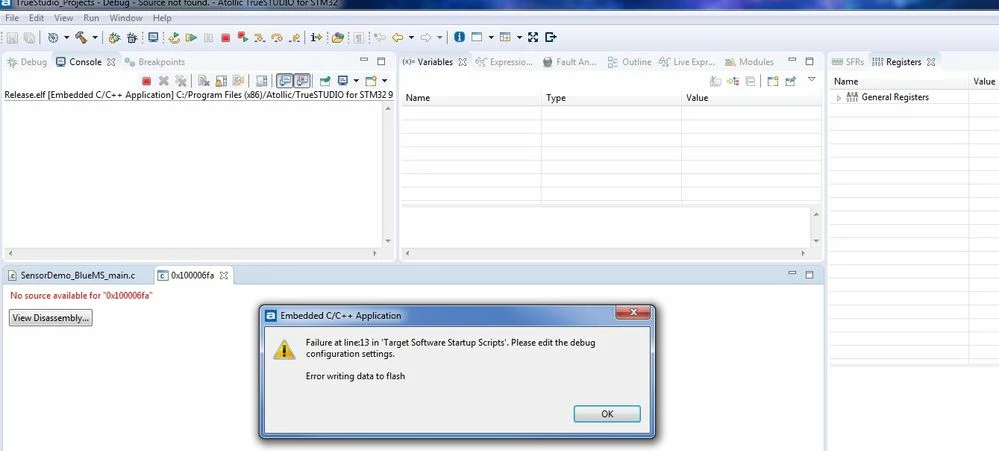
Details:

Board : STEVAL-IDB008V2

BlueNRG2 Part Number :[/b] BLE232ES

IDE Version : Version: 9.0.1, Build id: 20180420-1214

Project : Imported from BlueNRG-2 Navigator Examples

Example : BLE_SensorDemo_BlueMSapp

Build Status : Success

Hardware Test : OK - Tested by flashing code using :

1. BlueNRG-2 Navigator over USB-Serial, and

2. BlueNRG-1 ST-Link Utility over STLINK/V2.

Additional Information:

Console Message while debugging

Atollic TrueSTUDIO gdbserver for ST-Link. Version 4.2.2 (WIN32 2018-02-26 16:20:21 15675)

Copyright (c) 2018, STMicroelectronics. All rights reserved.

Starting server with the following options:

Persistant Mode : Disabled

LogFile Name : debug_log.txt

Logging Level : 31

Listen Port Number : 61234

Status Refresh Delay : 15s

Verbose Mode : Enabled

SWD Debug : Enabled

Atollic TrueSTUDIO gdbserver for ST-Link. Version 4.2.2 (WIN32 2018-02-26 16:20:21 15675)

Hardware watchpoint supported by the target

STM32 device: Flash size =256

Enter STM32_AppReset() function

NVIC_DFSR_REG = 0x00000009

XPSR = 0xC1000000

ST_LINK Major version =2 Jtag version =31

ST_LINK VID=1155 PID=14152

ST_LINK device status: HALT_MODE

ST_LINK detects target voltage =3.24 Volt

ST-Link device initialization OK

Waiting for debugger connection...

Waiting for connection on port 61234...

Accepted connection on port 61234...

Debugger connected

ST_LINK device status: HALT_MODE

Reading 0x4 bytes of memory from addr 0x100006fa

Reading 0x2 bytes of memory from addr 0x100006fa

Enter STM32_AppReset() function

NVIC_DFSR_REG = 0x00000009

XPSR = 0xC1000000

Flash erase: Address= 0x10040000, Length=92160

Flash write: Address= 0x10040000, Length=192

Programming flash..

STM32 device: flash programming successful 0x10040000

Flash write completed in 0.198000 seconds, 0.946970kB/s

Flash write: Address= 0x100400c0, Length=2944

Programming flash..

STM32 device: flash programming successful 0x100400c0

Flash write completed in 0.301000 seconds, 9.551495kB/s

Flash write: Address= 0x10040c40, Length=2960

Programming flash..

STM32 device: flash programming successful 0x10040c40

Flash write completed in 0.305000 seconds, 9.477459kB/s

Flash write: Address= 0x100417d0, Length=2944

Programming flash..

STM32 device: flash programming successful 0x100417d0

Flash write completed in 0.304000 seconds, 9.457237kB/s

Flash write: Address= 0x10042350, Length=2944

Programming flash..

STM32 device: flash programming successful 0x10042350

Flash write completed in 0.307000 seconds, 9.364821kB/s

Flash write: Address= 0x10042ed0, Length=2944

Programming flash..

STM32 device: flash programming successful 0x10042ed0

Flash write completed in 0.311000 seconds, 9.244373kB/s

Flash write: Address= 0x10043a50, Length=1896

Programming flash..

STM32 device: flash programming successful 0x10043a50

Flash write completed in 0.275000 seconds, 6.732954kB/s

Flash write: Address= 0x100441b8, Length=108

Programming flash..

STM32 device: flash programming successful 0x100441b8

Flash write completed in 0.202000 seconds, 0.522123kB/s

Flash write: Address= 0x10044224, Length=48

Programming flash..

STM32 device: flash programming successful 0x10044224

Flash write completed in 0.264000 seconds, 0.177557kB/s

Flash write: Address= 0x10044254, Length=124

Programming flash..

STM32 device: flash programming successful 0x10044254

Flash write completed in 0.204000 seconds, 0.593597kB/s

Flash write: Address= 0x100442d0, Length=66

Programming flash..

STM32 device: flash programming successful 0x100442d0

Flash write completed in 0.214000 seconds, 0.301183kB/s

Flash write: Address= 0x10044312, Length=16

Flash write completed in 0.057000 seconds, 0.274123kB/s

Reading 0x20 bytes of memory from addr 0xf0000fd0

Reading 0x4 bytes of memory from addr 0xffffffff

Reading 0x4 bytes of memory from addr 0xffffffff

Enter STM32_AppReset() function

NVIC_DFSR_REG = 0x0000000B

XPSR = 0xC1000000

Startup Scripts -> Target Software Startup Scripts

♯ Set flash parallelism mode to 32, 16, or 8 bit when using STM32 F2/F4 microcontrollers

♯ Uncomment next line, 2=32 bit, 1=16 bit and 0=8 bit parallelism mode

&sharpmonitor flash set_parallelism_mode 2

♯ Set character encoding

set host-charset CP1252

set target-charset CP1252

♯ Reset to known state

monitor reset

♯ Load the program executable

load

♯ Reset the chip to get to a known state. Remove ''monitor reset'' command

♯ if the code is not located at default address and does not run by reset.

monitor reset

♯ Enable Debug connection in low power modes (DBGMCU->CR)

set *0xE0042004 = (*0xE0042004) | 0x7

♯ Set a breakpoint at main().

tbreak main

♯ Run to the breakpoint.

continue

#bluenrg-2 #ide #bluenrg #ble #truestudio #stlinkv2
This topic has been closed for replies.

9 replies

Tesla DeLorean
Guru
August 10, 2018

Sorry, bumping old zombie unanswered questions off my feed

Tips, Buy me a coffee, or three.. PayPal VenmoUp vote any posts that you find helpful, it shows what's working..
Dilbert K
Associate III
September 13, 2018

I just start with this board and having same issue...

Using both IAR and ST-Link Utility, could not connect to the EV board.

btw, I am using the cable come with the STLink... any mod require ??

Dilbert K
Associate III
September 13, 2018

OK...got it working in IAR after few reset...

After lower the frequency in BlueNRG-1 ST-Link Utility also works now.

Dilbert K
Associate III
September 14, 2018

Correction : further debug, even IAR would not work running debugger for project "BLE_SensorDemo_BlueMSapp"... Anyone able to get ST release working with debugger ??

Winfred LU
ST Employee
April 29, 2019

Hi Dilbert,

Did you debug with the default DK "BLE_SensorDemo_BlueMSapp" project?

Probably it was because the device entering standby state, which disabled SWD pins (IO9 and IO10).

To recover this situation, the following options are recommended:

1) Disable deep sleep by changing call to BlueNRG_Sleep() as follow:

  • BlueNRG_Sleep(SLEEPMODE_NOTIMER, 0, 0) -—> BlueNRG_Sleep(SLEEPMODE_CPU_HALT, 0, 0);
  • In this mode, CPU will never goes to sleep and debug access is always granted. Application has to be modified and execution time may be different

2) Use a GPIO to wakeup the system and grant access to the debugger. User may need to change the call to BlueNRG_Sleep() as follow:

  • BlueNRG_Sleep(SLEEPMODE_NOTIMER, 0, 0); -—> BlueNRG_Sleep(SLEEPMODE_NOTIMER, WAKEUP_IO13,(WAKEUP_IOx_LOW << WAKEUP_IO13_SHIFT_MASK)); /* Example for wakeup on IO13 low level */
  • When debugger access is wanted, user should force the wakeup I/O (IO13 in the example) low and then use the “Attach to running target�? in the debugger. 

Please refer to BlueNRG-1,2 Debugging Tips for more details:

C:\Program%20Files%20(x86)\STMicroelectronics\BlueNRG-1_2%20DK%203.1.0\Docs\BlueNRG-1_Debugging_Guidelines\BlueNRG-1_Debugging_Guidelines.html

Best Regards,

Winfred

Xavier B.
Associate
January 9, 2019

Anyone? I am facing the same issue using Keil uVision 5

ASchu.4
Associate II
April 27, 2019

Hi!

Any updates? Just developed a board with bluenrg-232 and after the first programming cycle, i can't program, erase etc anymore.. I use Keil 5, programmed the MCU-s with BlueNRG-1 ST-link utility. Somewhere i read buy a Segger J-link, and it will solve the problem.

Winfred LU
ST Employee
April 29, 2019

Hi Schulcz,

It sounds like the same issue,

that after your firstly programming, the device entered sleep or standby state, which disabled SWD pins (IO9 and IO10).

Could you please try:

  • Put the IO7 pin high and then reset the BlueNRG-1,2 device

This action will make UART bootloader activate and allow you to program again.

The following options are also recommended for debugging:

1) Disable deep sleep by changing call to BlueNRG_Sleep() as follow:

  • BlueNRG_Sleep(SLEEPMODE_NOTIMER, 0, 0) -—> BlueNRG_Sleep(SLEEPMODE_CPU_HALT, 0, 0);
  • In this mode, CPU will never goes to sleep and debug access is always granted. Application has to be modified and execution time may be different

2) Use a GPIO to wakeup the system and grant access to the debugger. User may need to change the call to BlueNRG_Sleep() as follow:

  • BlueNRG_Sleep(SLEEPMODE_NOTIMER, 0, 0); -—> BlueNRG_Sleep(SLEEPMODE_NOTIMER, WAKEUP_IO13,(WAKEUP_IOx_LOW << WAKEUP_IO13_SHIFT_MASK)); /* Example for wakeup on IO13 low level */
  • When debugger access is wanted, user should force the wakeup I/O (IO13 in the example) low and then use the “Attach to running target�? in the debugger. 

Please refer to BlueNRG-1,2 Debugging Tips for more details:

C:\Program%20Files%20(x86)\STMicroelectronics\BlueNRG-1_2%20DK%203.1.0\Docs\BlueNRG-1_Debugging_Guidelines\BlueNRG-1_Debugging_Guidelines.html

Best Regards,

Winfred

ASchu.4
Associate II
April 29, 2019

Hi Winfred,

At first thanks for your answer. I made a custom board, with other USART pins. I just tried the GPIO Toggle project(without any energy management functions), and i bricked two processort.

I Will try to put the processor into bootloader mode, but can i acces the M0 via SWD in bootloader moder?

Another question: if i have an external pullup resistor on IO7 for I2C the processor always will go into bootoader mode?

Bests,

Attila

KTarc
Associate II
August 13, 2019

Hi

the funy things is, Segger JLINK EDU works without any tricks, why? It is able to start debuging, no matter of the CPU state. STLINk should be able too.

BR

KWT

Winfred LU
ST Employee
August 14, 2019

Possibly it is because that the Reset pin is controlled properly.

Please refer to Target | Settings | Mode in ST-Link utility,

For the mode "Connect with Pre-Reset", it is useful in many cases like when the target contains a code that disables the JTAG/SWD pins.

0690X00000A9XPlQAN.png

MRey.1
Associate III
January 28, 2021

I know it's old, but were you able to solve this problem? I'm facing the same now

Winfred LU
ST Employee
January 29, 2021

Please try to erase the flash firstly.

MRey.1
Associate III
January 29, 2021

Thanks for the response. I tried to erase it with Keil and BLUENRG-X Flasher, it says that it erased successfully, but it still can't be read

0693W000007DEXrQAO.pngBesides, if I try to erase by pages, it fails, so I believe it can't actually erase the chipI've also tried resetting with BOOT in high, but there were no differences so far

0693W000007DEZ4QAO.png