FAQ: How to configure the STUSB47 on a custom board ?
The STUSB47 GUI (STSW-STUSB001) is an easy tool to configure quickly the STUSB47 evaluation board.
But if you don't use the ST Evaluation board, and you want instead to configure the STUSB47 on a custom board, the tool will not work because it is using the micro-USB connector located on the STUSB47 eval board ( and not the USB connector located on the Nucleo board).
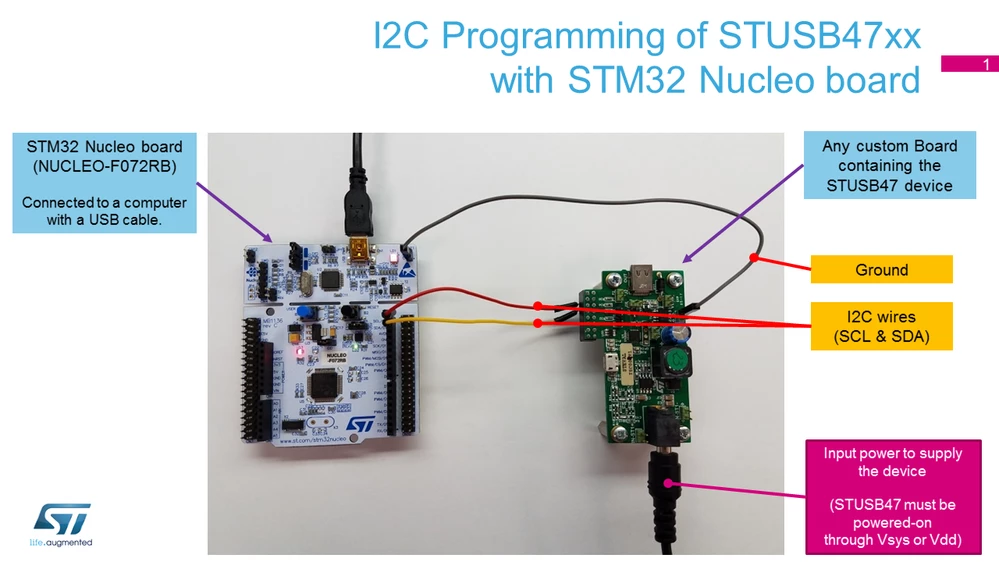
You can still use the STM32-Nucleo-Board and the GUI to configure easily any STUSB47 device, as long as you have access to the I2C interface of the chip (see picture below).
For this purpose, you'll need a specific version of STM32 firmware and the GUI (the uart version), to be able to connect using the default USB connector (CN1) of the Nucleo board, and the Virtual COM port (VCP) interface.
The software is in attachment.
- STUSB47 GUI with VCP (uart)
Best Regards.