

a28j
Associate
November 9, 2020
Question

"no device detected" in BlueNRG GUI, using X-NUCLEO-BNRG2A1

  • November 9, 2020
  • 8 replies
  • 3867 views

Hi, I use a X-NUCLEO-BNRG2A1 with a NUCLEO-L476RG .

I try to use the BlueNRG GUI for the Virtual_COM_Port application. I copy directly the binary file into the "NUCLEO" device. 

But when I open the Port on GUI, it is displayed "no device detected" then ""no firmware detected on the motherboard"

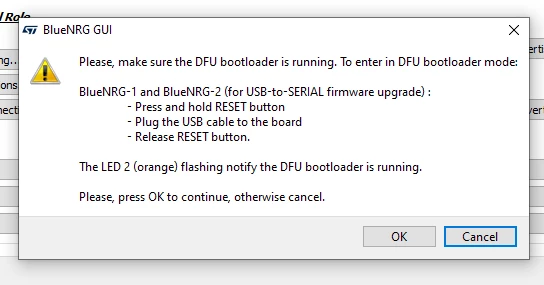
When I update the motherboard under tools menu this message is displayed (on the picture)

I try but the LED does nothing.

Then I choose the file USB_to_SERIAL.hex, but it displays "No DFU board found".

Can anyone provide a hint how to get BlueNRG GUI working ?
0693W000005AortQAC.png

This topic has been closed for replies.

8 replies

paul19
Associate III
May 12, 2021

Same problem here.

I successfully built and transferred Virtual_COM_Port with STM32CubeIDE, but then I'm unable to open the port ("no device detected" error).

Did you find a solution @a28j​ ?

Silvio
ST Employee
May 14, 2021

Hello,

before opening the serial connection, please set the Serial Port Baud Rate to 115200 (from Settings -> Set Baud Rate).

BR

Silvio

GShie.1
Visitor II
August 30, 2021

I'm facing the same issue. Did anyone find a solution? @paul19​ @a28j​ 

Note: @Silvio​ Baud rate is not the issue as DFU is not using the serial port.

Silvio
ST Employee
August 30, 2021

Hello,

with Nucleo-L476RG and X-NUCLEO-BNRG2A1 the reference application to use the BlueNRG GUI is the Virtual_COM_Port available in the X-CUBE-BLE2 package.

Hence, you should load the pre-built binary file (under X-CUBE-BLE2\Projects\NUCLEO-L476RG\Applications\Virtual_COM_Port\Binary) on the Nucleo-L476RG board, launch the BlueNRG GUI, set the Serial Port Baud Rate to 115200 (from Settings -> Set Baud Rate), select the the correct COM port and open the connection.

BR

Silvio

paul19
Associate III
August 30, 2021

@GShie.1​, various methods to communicate with the the X-NUCLEO-BNRG2A1 through the Nucleo-L476RG are described in AN5651. For me, all those methods have failed, including the one based on Virtual_COM_Port. I've finally succeeded in flashing my X-NUCLEO-BNRG2A1 using an external ST-LINK V2 (see this thread).

Winfred LU
ST Employee
August 31, 2021

Good to know it works with an external ST-Link V2.

Maybe some procedure was missing when using a STM32 Nucleo board.

For example, It is quite easy to forget to remove CN2 jumpers.

GShie.1
Visitor II
August 30, 2021

Actually I'm having this issue with the STEVAL-IDB008V2 not the X-NUCLEO. I can upload the DTM_UART.hex as described in the documentation but the GUI software is then unable to connect to the device in DFU mode after displaying the popup shown above (the LED is flashing). I tried installing the driver with C:\Program Files (x86)\STMicroelectronics\BlueNRG-1_2 DK 3.2.1\PCDriver\DFU\dpinst_amd64.exe but it doesn't appear to install, maybe that is the issue. I'll try with ST-Link.

Thanks

Winfred LU
ST Employee
August 31, 2021

Do you mean DL2 is flashing? If so, the onboard STM32 has been in DFU mode already. This can be doubly checked in Device Manager, under Universal Serial Bus controllers there would be a STM Device in DFU Mode.

Please just flash the MCU with USB_to_SERIAL.hex

GShie.1
Visitor II
August 31, 2021

0693W00000DlftmQAB.png0693W00000DlftwQAB.pngYes, it is in DFU mode and showing in device manager but the software can't find it.

RComp.1
Visitor II
April 15, 2022

I have a similar issue using the board STEVAL-IDB009V1, when I try to open it on BlueNRG gui, I get an error message "No device detected". I can program it with BlueNRG-2 Navigator so I don't really know where is the problem.

0693W00000Ly4F4QAJ.png 

agaspar
Associate
October 6, 2022

I had this same problem.

I am telling how I solved, even if it is a bit late.

I could not do it with a nucleo.

1.- Instead I used a STLinkV2 like this (stmicroelectronics / st-link-v2 icd-programmer-for-stm8-stm32 sorry I am not allowed to use links). I have not tried with this (st-link-v2 for bluepill) but probably it is the same. In my case, this device DOES NOT provide supply, so I used another 5 Volts supply and connected to pins 5V and GND of CN6 (see User Manual UM2667, page 4)

2.- I made the connections described in page 14 of (X-NUCLEO-BNRG2A1_QUICK_START_GUIDE en.x-nucleo-bnrg2a1_quick_start_guide.pdf)

3.- I put a jumper in J15, and removed supply. Wait some seconds and then supply again.

4.- Then I used RF-Flasher,

  • Select tab SWD,
  • tick the connected interfaces,
  • erase Mass,
  • select image file = DTM_SPI.hex (this is the one that allowed the bluetooth connection)
  • Flash

5.- After that, remove supply, remove jumper in J15 and supply again.

Hope it helps someone