STEVAL-IDB008V1M - ST-Link-V2 debug with Atollic True Studio
Hi,
my name is Mario and i have some troubles while debugging a program for the STEVAL-IDB008V1M eval board.
Configuration
STEVAL-IDB008V1M evaluation board
Atollic TrueSTUDIO Version: 9.3.0
In the Atollic IDE, I installed the ST-Link Utility.
I compiled the original example "BLE Remote Control" (provided with STEVAL-IDB008V1M board) by means of Atollic.
I found on the net the followinf piece of advice:
----
It will force BlueNRG-2 DIO7 to "1" before doing a reset so that BlueNRG-2 will remain in bootloader.
When trying to flash from any IDEs, you must force DIO7 to "1" before doing a HW reset or a power on / power off.
----
and I applied it.
RESULTS
In the above conditions, the debug results are null and disappointing:
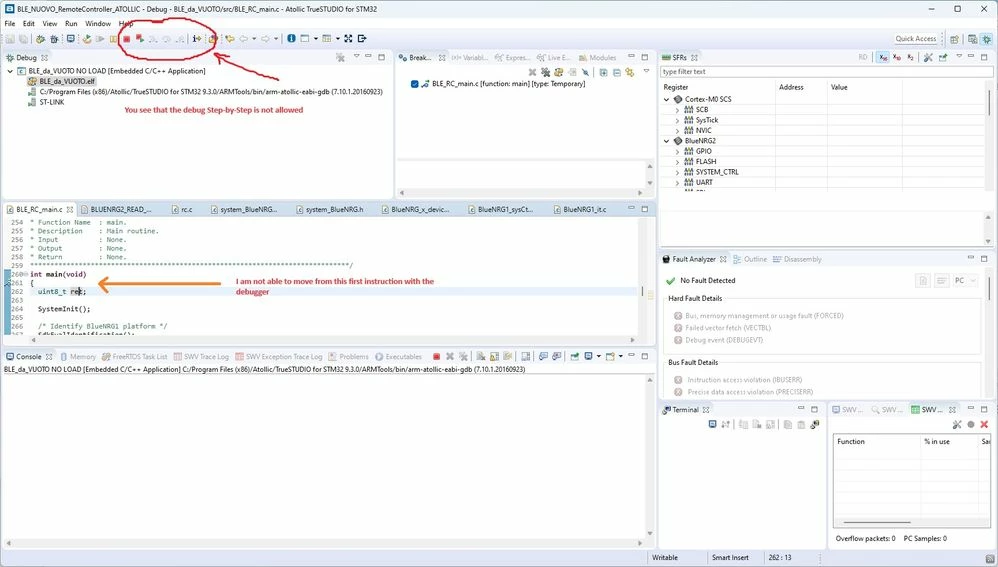
for few seconds the connection with debugger seems working but it diseppears quickly: the debug process is not able to start.
This is the message I got on the console
STMicroelectronics ST-LINK GDB server. Version 5.1.0
Copyright (c) 2018, STMicroelectronics. All rights reserved.
Starting server with the following options:
Persistent Mode : Disabled
Logging Level : 1
Listen Port Number : 61234
Status Refresh Delay : 15s
Verbose Mode : Disabled
SWD Debug : Enabled
Waiting for debugger connection...
Debugger connected
Target is not responding, retrying...
Target is not responding, retrying...
Target is not responding, retrying...
Target is not responding, retrying...
Target is not responding, retrying...
Target is not responding, retrying...
Target is not responding, retrying...
Target is not responding, retrying...
Target is not responding, retrying...
Target is not responding, retrying...
Error! Failed to read target status
Debugger connection lost.
Shutting down...
You see below a picture of the debug window: the standard step by step debug is not allowed.
I kindly ask for your help.
Best Regards,
Mario Sandri