

idolezal
Associate II
August 1, 2022
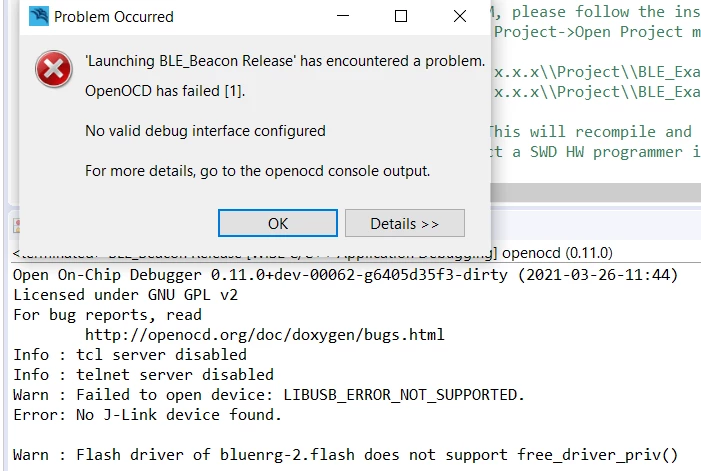
Question

WiSE Studio does not connect to J-Link
  • August 1, 2022
  • 4 replies
  • 2774 views

0693W00000QMd9UQAT.pngWiSE Studio does not connect to Segger J-Link, although Atollic TrueStudio and J-Link Commander do. Could it be in a different driver? Why different?

I am evaluating the BlueNRG-2 eval board that is working under TrueStudio (that cannot compile an SDK example), but I stopped at non-connecting J-Link.

This topic has been closed for replies.

4 replies

Pavel A.
Super User
August 1, 2022

Before starting debugger in "Wise studio", disconnect from the J-LINK in Atollic,

idolezal
idolezalAuthor
Associate II
August 1, 2022

Of course, both TrueStudio and J-Link Commander were closed when the connection in Wise was tested.

Pavel A.
Super User
August 1, 2022

How does it look in device manage? Any 3rd party filter drivers in the device stack?

See https://stackoverflow.com/questions/17350177/libusb-open-returns-libusb-error-not-supported-on-windows-7

idolezal
idolezalAuthor
Associate II
August 2, 2022

Thanks, Pavel.

Although I did not fully understand your answer, the link pointed me to Zadig I used once. Switching to WinUSB driver has solved the problem.

Another issue is that J-Link within WiSE setting is not able to halt CPU (any reset mode option) so download/debugging does not work.

Khojah
Visitor II
August 9, 2022

build your project then use a flasher to flash your hex file through UART that the best solution for me

idolezal
idolezalAuthor
Associate II
August 11, 2022

Yes, it works, but debugging/stepping is not possible without JTAG/SWD adapter.

Pavel A.
Super User
August 11, 2022

Well, since that "WiSE studio" is ST software, let's tag this as bug report.