ST Employee
August 28, 2023

How LSM6DSV16X enables sensor fusion low power (SFLP) algorithm

  • August 28, 2023
  • 38 replies
  • 33050 views

Summary      

The LSM6DSV16X device is the first 6-axis IMU that supports data fusion in a MEMS sensor. Sensor fusion is widely used in drones, wearables, TWS, AR/VR and other products. The sensor fusion algorithm can accurately identify the posture of objects in space motion. The LSM6DSV16X integrates a data fusion function, which aims to reduce the user’s algorithm development process and improve product competitiveness. This allows customers to quickly develop applications. The LSM6DSV16X adopts gyroscope dynamic calibration, greatly improving the stability of the algorithm and providing excellent performance.


1. How to compute data fusion based on an IMU?

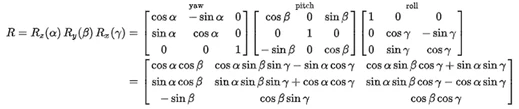
Rotation matrices can be obtained from these three examples using matrix multiplication. For example, the product:
 

DeniseSANFILIPPO_0-1692960637154.png

Represents a rotation whose yaw, pitch, and roll angles are α, β and γ, respectively. More formally, it is an intrinsic rotation whose Tait–Bryan angles are α, β, γ, about axes z, y, x, respectively. Similarly, the product:

 

DeniseSANFILIPPO_1-1692960655994.png


2. What is the SFLP algorithm in the LSM6DSV16X?

A sensor fusion low-power (SFLP) block is available in the LSM6DSV16X for generating the following data based on the accelerometer and gyroscope data processing:

  1. Game rotation vector, which provides a quaternion representing the attitude of the device.
  2. Gravity vector, which provides a three-dimensional vector representing the direction of gravity.
  3. Gyroscope bias, which provides a three-dimensional vector representing the gyroscope bias.

Sensor fusion performance and time required to reach steady state
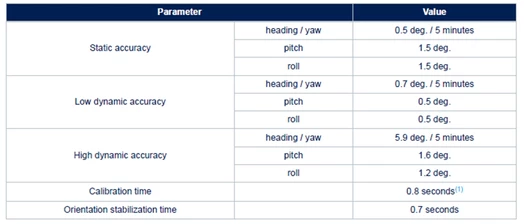
DeniseSANFILIPPO_2-1692960700823.png


3. SFLP demo and tools

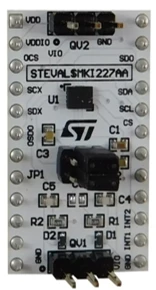
The hardware setup is STEVAL-MKI109V3 and DIL24 adapter board STEVAL-MKI227KA.
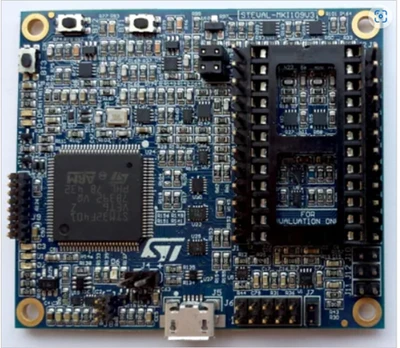
STEVAL-MKI109V3STEVAL-MKI109V3DIL24 adapterDIL24 adapter


The software used is Unico-GUI.
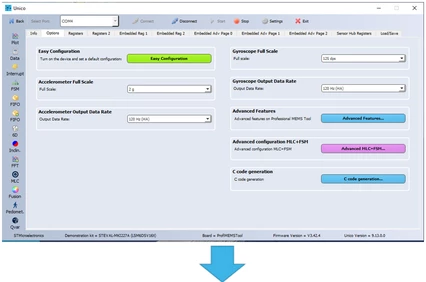
DeniseSANFILIPPO_10-1692961168327.png


DeniseSANFILIPPO_8-1692961003433.png


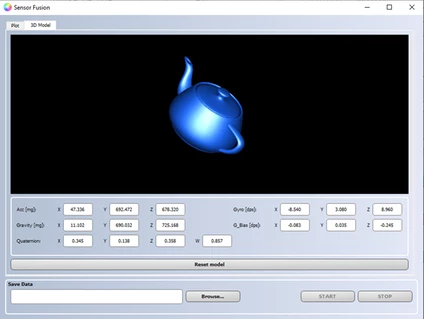
When you shake the demo board, the image follows the actual position displayed. SFLP has integrated quaternion, so customers can directly get quaternion and convert it into euler angles.


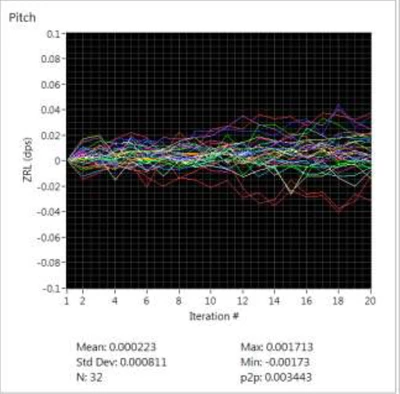
4. Yaw angle automatic calibration flow

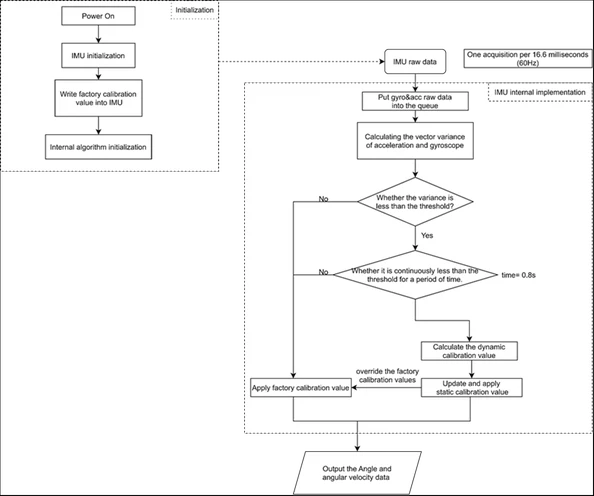
Due to the long-term operation of the gyroscope, the integration error caused by zero deviation becomes increasingly large. The yaw angle may experience significant drift due to lack of calibration of the magnetometer. To solve this problem, the SFLP algorithm adopts a dynamic self-calibration method to ensure yaw angle stability.
 

DeniseSANFILIPPO_11-1692961221302.png    


5. Automatic calibration flow


DeniseSANFILIPPO_12-1692961257945.png


6. How to configure the SFLP?

Coordinates:
Pitch rotation around the X-axisΩP
Roll rotation around the Y-axis ΩR
Heading/Yaw rotation around the Z-axisΩY
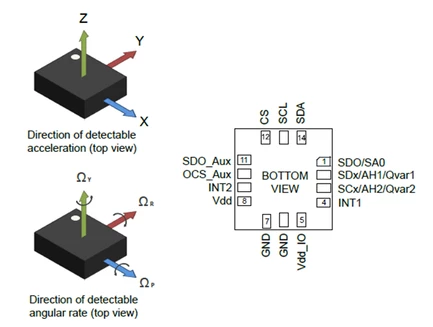
DeniseSANFILIPPO_14-1692961343963.png
  • Game rotation vector, which provides a quaternion representing the attitude of the device.
  • Gravity vector, which provides a three-dimensional vector representing the direction of gravity.
  • Gyroscope bias, which provides a three-dimensional vector representing the gyroscope bias.    

SFLP Register description:

Register bit config

Bit description

SFLP_GAME_EN

Enables SFLP

SFLP_GBIAS_FIFO_EN

Enables Gbias in FIFO mode

SFLP_GRAVITY_FIFO_EN

Enables gravity vector in FIFO mode

SFLP_GAME_FIFO_EN

Enables game rotation vector in FIFO mode

SFLP_GAME_ODR_[2:0]

Configures SFLP ODR

SFLP data format:


TAG

X_L

X_H

Y_L

Y_H

Z_L

Z_H

Axis format

Game rotation vector

13h

X

Y

Z

Half precision floating-point

Gyroscope bias       

16h

X

Y

Z

int16_t (raw, 125 dps sensitivity)              

Gravity vector           

17h

X

Y

Z

int16_t (raw, 2 g sensitivity)     

Code configuration:

 /* Check device ID */
 lsm6dsv16x_device_id_get(&dev_ctx, &whoamI);

 if (whoamI != LSM6DSV16X_ID)
 while (1);

 /* Restore default configuration */
 lsm6dsv16x_reset_set(&dev_ctx, LSM6DSV16X_RESTORE_CTRL_REGS);
 do {
 lsm6dsv16x_reset_get(&dev_ctx, &rst);
 } while (rst != LSM6DSV16X_READY);

 /* Enable Block Data Update */
 lsm6dsv16x_block_data_update_set(&dev_ctx, PROPERTY_ENABLE);
 /* Set full scale */
 lsm6dsv16x_xl_full_scale_set(&dev_ctx, LSM6DSV16X_4g);
 lsm6dsv16x_gy_full_scale_set(&dev_ctx, LSM6DSV16X_2000dps);

 /*
 * Set FIFO watermark (number of unread sensor data TAG + 6 bytes
 * stored in FIFO) to FIFO_WATERMARK samples
 */
 lsm6dsv16x_fifo_watermark_set(&dev_ctx, FIFO_WATERMARK);

 /* Set FIFO batch of sflp data */
 fifo_sflp.game_rotation = 1;
 fifo_sflp.gravity = 1;
 fifo_sflp.gbias = 1;
 lsm6dsv16x_fifo_sflp_batch_set(&dev_ctx, fifo_sflp);

 /* Set FIFO mode to Stream mode (aka Continuous Mode) */
 lsm6dsv16x_fifo_mode_set(&dev_ctx, LSM6DSV16X_STREAM_MODE);

 /* Set Output Data Rate */
 lsm6dsv16x_xl_data_rate_set(&dev_ctx, LSM6DSV16X_ODR_AT_30Hz);
 lsm6dsv16x_gy_data_rate_set(&dev_ctx, LSM6DSV16X_ODR_AT_30Hz);
 lsm6dsv16x_sflp_data_rate_set(&dev_ctx, LSM6DSV16X_SFLP_30Hz);

 lsm6dsv16x_sflp_game_rotation_set(&dev_ctx, PROPERTY_ENABLE);

More details about SFLP software are available on the GitHub repo sensor-fusion-code.


Conclusion

In this article, we described the principles of sensor fusion in the context of an inertial measurement unit and how to use sensor fusion in the LSM6DSV16X device.  The LSM6DSV16X integrates a complete set of acceleration and gyroscope algorithms in the sensor. This allows customers to obtain high-precision fusion algorithm results without specifying specific algorithm implementations.

Customers can use STEVAL-MKI109V3 and LSM6DSV16X to evaluate the SFLP performance and how to configure SFLP on the demo board. Users can quickly deploy algorithms, test, and evaluate performance.

You may also be interested in reading the following knowledge article: How to save power with LSM6DSV16X by leveraging on its adaptive self-configuration with MLC and FSM 

38 replies

Explorer
September 30, 2024

Hi @Denise SANFILIPPO ,

does the SFLP uses the accelerometer offset registers (X_OFS_USR, Y_OFS_USR, Z_OFS_USR)?

Any chance you upgrade the algorithm by adding a magnetometer in the future?

Thanks

ST Employee
October 14, 2024

Hi @vincent3 ,

The SFLP does not use the accelerometer offset registers. 
At the moment, there are no plans to update the algorithm with the addition of a magnetometer.

By the way you can consider ST 6-axis IMU embedding ISPU, such as LSM6DSO16IS: you can find an example of 9-axis sensor fusion algorithm on the official GitHub which considers not only accelerometer and gyroscope data but also magnetometer data.

Associate II
October 19, 2024

I am using a STM32F401RE board with the X-NUCLEO-IKS4A1 expansion board. I wrote the following code to get the quaternion values ​​and display them in MEMS Studio or Unicleo-GUI but after uploading the project to the board I cannot see the quaternion data on MEMS Studio or Unicleo-GUI. Am I doing something wrong?


"

/* USER CODE BEGIN Header */

#define SENSOR_BUS hi2c1

// Definizione del bus I2C (adattato per Nucleo STM32F401RE)

/* USER CODE END Header */

/* Includes ------------------------------------------------------------------*/

#include "main.h"

#include "app_mems.h"

#include "lsm6dsv16x_reg.h" // Include driver del sensore

#include <stdio.h>

#include <string.h>


// Dichiarazioni delle funzioni

int32_t LSM6DSV16X_FIFO_Get_Data(stmdev_ctx_t *ctx, uint8_t *data);

int32_t LSM6DSV16X_FIFO_Get_Tag(stmdev_ctx_t *ctx, uint8_t *tag);


static int32_t platform_write(void *handle, uint8_t reg, uint8_t *bufp, uint16_t len);

static int32_t platform_read(void *handle, uint8_t reg, uint8_t *bufp, uint16_t len);

static void platform_delay(uint32_t ms);


/* Private includes ----------------------------------------------------------*/

/* USER CODE BEGIN Includes */

/* USER CODE END Includes */


/* Private typedef -----------------------------------------------------------*/

/* USER CODE BEGIN PTD */


/* USER CODE END PTD */


/* Private define ------------------------------------------------------------*/

/* USER CODE BEGIN PD */


#define FIFO_WATERMARK 32

/* USER CODE END PD */


/* Private macro -------------------------------------------------------------*/

/* USER CODE BEGIN PM */


/* USER CODE END PM */


/* Private variables ---------------------------------------------------------*/

CRC_HandleTypeDef hcrc;

RTC_HandleTypeDef hrtc;

TIM_HandleTypeDef htim3;


/* USER CODE BEGIN PV */


static uint8_t whoamI;

static uint8_t tx_buffer[1000]; // Buffer per la trasmissione UART


extern I2C_HandleTypeDef hi2c1; // Dichiarazione del gestore I2C


static stmdev_ctx_t dev_ctx; // Definizione del contesto del sensore


// Variabili per il FIFO e per i quaternioni

static lsm6dsv16x_fifo_status_t fifo_status;

static lsm6dsv16x_fifo_sflp_raw_t fifo_sflp; // Creazione di un'istanza della struttura per le impostazioni del FIFO

float quaternion[4]; // Array per i dati del quaternione: w, x, y, z


/* USER CODE END PV */


/* Private function prototypes -----------------------------------------------*/

void SystemClock_Config(void);

static void MX_GPIO_Init(void);

static void MX_DMA_Init(void);

static void MX_CRC_Init(void);

static void MX_RTC_Init(void);

/* USER CODE BEGIN PFP */

static void tx_com( uint8_t *tx_buffer, uint16_t len );

static void sflp2q(float quat[4], uint16_t sflp[3]);

/* USER CODE END PFP */


/* Private user code ---------------------------------------------------------*/

/* USER CODE BEGIN 0 */


/* USER CODE END 0 */


/**

* @brief The application entry point.

* @retval int

*/

int main(void)

{

/* USER CODE BEGIN 1 */


/* USER CODE END 1 */


/* MCU Configuration--------------------------------------------------------*/

HAL_Init();

SystemClock_Config();


MX_GPIO_Init();

MX_DMA_Init();

MX_CRC_Init();

MX_RTC_Init();

MX_MEMS_Init();


/* USER CODE BEGIN 2 */


// Inizializzazione I2C per il sensore

dev_ctx.write_reg = platform_write; // Assegna la funzione di scrittura

dev_ctx.read_reg = platform_read; // Assegna la funzione di lettura

dev_ctx.mdelay = platform_delay;

dev_ctx.handle = &SENSOR_BUS; // Il tuo gestore I2C


/* Verifica l'ID del sensore */

lsm6dsv16x_device_id_get(&dev_ctx, &whoamI);

if (whoamI != LSM6DSV16X_ID) {

while (1); // Il sensore non è riconosciuto, fermati

}


// Ripristina la configurazione predefinita

lsm6dsv16x_reset_t rst;

lsm6dsv16x_reset_set(&dev_ctx, LSM6DSV16X_RESTORE_CTRL_REGS);

do {

lsm6dsv16x_reset_get(&dev_ctx, &rst);

} while (rst != LSM6DSV16X_READY);


// Abilita l'aggiornamento dei dati

lsm6dsv16x_block_data_update_set(&dev_ctx, PROPERTY_ENABLE);


// Imposta i range di full scale

lsm6dsv16x_xl_full_scale_set(&dev_ctx, LSM6DSV16X_4g);

lsm6dsv16x_gy_full_scale_set(&dev_ctx, LSM6DSV16X_2000dps);


// Imposta la FIFO watermark (numero di TAG di dati del sensore non letti + 6 byte memorizzati in FIFO) sui campioni FIFO_WATERMARK

lsm6dsv16x_fifo_watermark_set(&dev_ctx, FIFO_WATERMARK);


// Imposta batch FIFO di dati sflp

fifo_sflp.game_rotation = 1;

fifo_sflp.gravity = 0;

fifo_sflp.gbias = 0;

lsm6dsv16x_fifo_sflp_batch_set(&dev_ctx, fifo_sflp);


// Abilita il FIFO e impostalo in modalità streaming

lsm6dsv16x_fifo_mode_set(&dev_ctx, LSM6DSV16X_STREAM_MODE);


// Imposta ODR per accelerometro e giroscopio

lsm6dsv16x_xl_data_rate_set(&dev_ctx, LSM6DSV16X_ODR_AT_30Hz); // ODR dell'accelerometro

lsm6dsv16x_gy_data_rate_set(&dev_ctx, LSM6DSV16X_ODR_AT_30Hz); // ODR del giroscopio

lsm6dsv16x_sflp_data_rate_set(&dev_ctx, LSM6DSV16X_SFLP_30Hz);

lsm6dsv16x_sflp_game_rotation_set(&dev_ctx, PROPERTY_ENABLE);


/* USER CODE END 2 */


/* Infinite loop */

/* USER CODE BEGIN WHILE */

while (1)

{

// Controlla lo stato del FIFO

lsm6dsv16x_fifo_status_get(&dev_ctx, &fifo_status);


if (fifo_status.fifo_th == 1) {

// Leggi i dati dal FIFO

uint16_t num_samples = fifo_status.fifo_level;


while (num_samples--) {

lsm6dsv16x_fifo_out_raw_t raw_data;

lsm6dsv16x_fifo_out_raw_get(&dev_ctx, &raw_data);


// Se i dati sono del Game Rotation Vector

if (raw_data.tag == LSM6DSV16X_SFLP_GAME_ROTATION_VECTOR_TAG) {

// Converti i dati grezzi in quaternioni

sflp2q(quaternion, (uint16_t *)&raw_data.data[0]);


// Invia i dati via UART

snprintf((char *)tx_buffer, sizeof(tx_buffer), "Q1: %f, Q2: %f, Q3: %f, Q4: %f\n",

quaternion[0], quaternion[1], quaternion[2], quaternion[3]);

tx_com(tx_buffer, strlen((char const *)tx_buffer));

}

}

}

}

/* USER CODE END WHILE */

}


/**

* @brief System Clock Configuration

* @retval None

*/

void SystemClock_Config(void)

{

RCC_OscInitTypeDef RCC_OscInitStruct = {0};

RCC_ClkInitTypeDef RCC_ClkInitStruct = {0};

__HAL_RCC_PWR_CLK_ENABLE();

__HAL_PWR_VOLTAGESCALING_CONFIG(PWR_REGULATOR_VOLTAGE_SCALE2);

RCC_OscInitStruct.OscillatorType = RCC_OSCILLATORTYPE_HSI|RCC_OSCILLATORTYPE_LSI;

RCC_OscInitStruct.HSIState = RCC_HSI_ON;

RCC_OscInitStruct.HSICalibrationValue = RCC_HSICALIBRATION_DEFAULT;

RCC_OscInitStruct.LSIState = RCC_LSI_ON;

RCC_OscInitStruct.PLL.PLLState = RCC_PLL_ON;

RCC_OscInitStruct.PLL.PLLSource = RCC_PLLSOURCE_HSI;

RCC_OscInitStruct.PLL.PLLM = 16;

RCC_OscInitStruct.PLL.PLLN = 336;

RCC_OscInitStruct.PLL.PLLP = RCC_PLLP_DIV4;

RCC_OscInitStruct.PLL.PLLQ = 7;

if (HAL_RCC_OscConfig(&RCC_OscInitStruct) != HAL_OK)

{

Error_Handler();

}

RCC_ClkInitStruct.ClockType = RCC_CLOCKTYPE_HCLK|RCC_CLOCKTYPE_SYSCLK

|RCC_CLOCKTYPE_PCLK1|RCC_CLOCKTYPE_PCLK2;

RCC_ClkInitStruct.SYSCLKSource = RCC_SYSCLKSOURCE_PLLCLK;

RCC_ClkInitStruct.AHBCLKDivider = RCC_SYSCLK_DIV1;

RCC_ClkInitStruct.APB1CLKDivider = RCC_HCLK_DIV2;

RCC_ClkInitStruct.APB2CLKDivider = RCC_HCLK_DIV1;

if (HAL_RCC_ClockConfig(&RCC_ClkInitStruct, FLASH_LATENCY_2) != HAL_OK)

{

Error_Handler();

}

}


/**

* @brief CRC Initialization Function

* @PAram None

* @retval None

*/

static void MX_CRC_Init(void)

{

hcrc.Instance = CRC;

if (HAL_CRC_Init(&hcrc) != HAL_OK)

{

Error_Handler();

}

}


/**

* @brief RTC Initialization Function

* @PAram None

* @retval None

*/

static void MX_RTC_Init(void)

{

hrtc.Instance = RTC;

hrtc.Init.HourFormat = RTC_HOURFORMAT_24;

hrtc.Init.AsynchPrediv = 127;

hrtc.Init.SynchPrediv = 255;

hrtc.Init.OutPut = RTC_OUTPUT_DISABLE;

hrtc.Init.OutPutPolarity = RTC_OUTPUT_POLARITY_HIGH;

hrtc.Init.OutPutType = RTC_OUTPUT_TYPE_OPENDRAIN;

if (HAL_RTC_Init(&hrtc) != HAL_OK)

{

Error_Handler();

}

}


/**

* @brief TIM3 Initialization Function

* @PAram None

* @retval None

*/

void MX_TIM3_Init(void)

{

TIM_ClockConfigTypeDef sClockSourceConfig = {0};

TIM_MasterConfigTypeDef sMasterConfig = {0};

htim3.Instance = TIM3;

htim3.Init.Prescaler = 0;

htim3.Init.CounterMode = TIM_COUNTERMODE_UP;

htim3.Init.Period = 65535;

htim3.Init.ClockDivision = TIM_CLOCKDIVISION_DIV1;

htim3.Init.AutoReloadPreload = TIM_AUTORELOAD_PRELOAD_DISABLE;

if (HAL_TIM_Base_Init(&htim3) != HAL_OK)

{

Error_Handler();

}

sClockSourceConfig.ClockSource = TIM_CLOCKSOURCE_INTERNAL;

if (HAL_TIM_ConfigClockSource(&htim3, &sClockSourceConfig) != HAL_OK)

{

Error_Handler();

}

sMasterConfig.MasterOutputTrigger = TIM_TRGO_RESET;

sMasterConfig.MasterSlaveMode = TIM_MASTERSLAVEMODE_DISABLE;

if (HAL_TIMEx_MasterConfigSynchronization(&htim3, &sMasterConfig) != HAL_OK)

{

Error_Handler();

}

}


/**

* Enable DMA controller clock

*/

static void MX_DMA_Init(void)

{

__HAL_RCC_DMA1_CLK_ENABLE();

HAL_NVIC_SetPriority(DMA1_Stream5_IRQn, 0, 0);

HAL_NVIC_EnableIRQ(DMA1_Stream5_IRQn);

}


/**


static void MX_GPIO_Init(void)

{

GPIO_InitTypeDef GPIO_InitStruct = {0};

__HAL_RCC_GPIOC_CLK_ENABLE();

__HAL_RCC_GPIOH_CLK_ENABLE();

__HAL_RCC_GPIOA_CLK_ENABLE();

__HAL_RCC_GPIOB_CLK_ENABLE();

GPIO_InitStruct.Pin = B1_Pin;

GPIO_InitStruct.Mode = GPIO_MODE_IT_FALLING;

GPIO_InitStruct.Pull = GPIO_NOPULL;

HAL_GPIO_Init(B1_GPIO_Port, &GPIO_InitStruct);

HAL_NVIC_SetPriority(EXTI15_10_IRQn, 0, 0);

HAL_NVIC_EnableIRQ(EXTI15_10_IRQn);

}


/* USER CODE BEGIN 4 */


static int32_t platform_write(void *handle, uint8_t reg, uint8_t *bufp, uint16_t len)

{

return HAL_I2C_Mem_Write(handle, LSM6DSV16X_I2C_ADD_L, reg, I2C_MEMADD_SIZE_8BIT, bufp, len, 1000);

}


static int32_t platform_read(void *handle, uint8_t reg, uint8_t *bufp, uint16_t len)

{

return HAL_I2C_Mem_Read(handle, LSM6DSV16X_I2C_ADD_L, reg, I2C_MEMADD_SIZE_8BIT, bufp, len, 1000);

}


static void platform_delay(uint32_t ms)

{

HAL_Delay(ms);

}


static void tx_com(uint8_t *tx_buffer, uint16_t len)

{

HAL_UART_Transmit(&huart2, tx_buffer, len, 1000);

}

static uint32_t npy_halfbits_to_floatbits(uint16_t h)

{

uint16_t h_exp, h_sig;

uint32_t f_sgn, f_exp, f_sig;


h_exp = (h&0x7c00u);

f_sgn = ((uint32_t)h&0x8000u) << 16;

switch (h_exp) {

case 0x0000u: /* 0 or subnormal */

h_sig = (h&0x03ffu);

/* Signed zero */

if (h_sig == 0) {

return f_sgn;

}

/* Subnormal */

h_sig <<= 1;

while ((h_sig&0x0400u) == 0) {

h_sig <<= 1;

h_exp++;

}

f_exp = ((uint32_t)(127 - 15 - h_exp)) << 23;

f_sig = ((uint32_t)(h_sig&0x03ffu)) << 13;

return f_sgn + f_exp + f_sig;

case 0x7c00u: /* inf or NaN */

/* All-ones exponent and a copy of the significand */

return f_sgn + 0x7f800000u + (((uint32_t)(h&0x03ffu)) << 13);

default: /* normalized */

/* Just need to adjust the exponent and shift */

return f_sgn + (((uint32_t)(h&0x7fffu) + 0x1c000u) << 13);

}

}


static float_t npy_half_to_float(uint16_t h)

{

union { float_t ret; uint32_t retbits; } conv;

conv.retbits = npy_halfbits_to_floatbits(h);

return conv.ret;

}


static void sflp2q(float quat[4], uint16_t sflp[3])

{

float sumsq = 0;


quat[0] = npy_half_to_float(sflp[0]);

quat[1] = npy_half_to_float(sflp[1]);

quat[2] = npy_half_to_float(sflp[2]);


for (uint8_t i = 0; i < 3; i++)

sumsq += quat[i] * quat[i];


if (sumsq > 1.0f) {

float n = sqrtf(sumsq);

quat[0] /= n;

quat[1] /= n;

quat[2] /= n;

sumsq = 1.0f;

}


quat[3] = sqrtf(1.0f - sumsq);

}


/* USER CODE END 4 */


void Error_Handler(void)

{

__disable_irq();

while (1)

{

}

}


"

ST Employee
October 22, 2024

Hello @marti3110,

I did a quick check of your code: it is printing the output values to serial terminal so you should use a serial terminal to see the quaternions.

Associate II
October 23, 2024

@Denise SANFILIPPO I managed to visualize the quaternions through the output terminal and saved the data.

The commans I used are:

"

fifo_sflp.game_rotation = 1;

fifo_sflp.gravity = 1;

fifo_sflp.gbias = 1;

lsm6dsv16x_fifo_sflp_batch_set(&dev_ctx, fifo_sflp);

lsm6dsv16x_fifo_mode_set(&dev_ctx, LSM6DSV16X_STREAM_MODE);

lsm6dsv16x_xl_data_rate_set(&dev_ctx, LSM6DSV16X_ODR_AT_30Hz); // ODR dell'accelerometro

lsm6dsv16x_gy_data_rate_set(&dev_ctx, LSM6DSV16X_ODR_AT_30Hz); // ODR del giroscopio

lsm6dsv16x_sflp_data_rate_set(&dev_ctx, LSM6DSV16X_SFLP_30Hz);

lsm6dsv16x_sflp_game_rotation_set(&dev_ctx, PROPERTY_ENABLE);

lsm6dsv16x_sflp_gbias_t gbias;

gbias.gbias_x = 0.0f;

gbias.gbias_y = 0.0f;

gbias.gbias_z = 0.0f;

lsm6dsv16x_sflp_game_gbias_set(&dev_ctx, &gbias);

while (1)

{

// Controlla lo stato del FIFO

lsm6dsv16x_fifo_status_get(&dev_ctx, &fifo_status);


if (fifo_status.fifo_th == 1) {

// Leggi i dati dal FIFO

uint16_t num_samples = fifo_status.fifo_level;


while (num_samples--) {

lsm6dsv16x_fifo_out_raw_t raw_data;

lsm6dsv16x_fifo_out_raw_get(&dev_ctx, &raw_data);


int16_t *axis;

float gravity_mg[3];

float gbias_mdps[3];


// Se i dati sono del Game Rotation Vector

if (raw_data.tag == LSM6DSV16X_SFLP_GAME_ROTATION_VECTOR_TAG) {

// Converti i dati grezzi in quaternioni

sflp2q(quaternion, (uint16_t*)&raw_data.data[0]);


// Invia i dati via UART

snprintf((char*)tx_buffer, sizeof(tx_buffer), "Game Rotation \tX: %2.3f\tY: %2.3f\tZ: %2.3f\tW: %2.3f\r\n", quaternion[0], quaternion[1], quaternion[2], quaternion[3]);

tx_com(tx_buffer, strlen((char const*)tx_buffer));

}

else if (raw_data.tag == LSM6DSV16X_SFLP_GYROSCOPE_BIAS_TAG)

{

axis = (int16_t *)&raw_data.data[0];

gbias_mdps[0] = lsm6dsv16x_from_fs125_to_mdps(axis[0]);

gbias_mdps[1] = lsm6dsv16x_from_fs125_to_mdps(axis[1]);

gbias_mdps[2] = lsm6dsv16x_from_fs125_to_mdps(axis[2]);

snprintf((char *)tx_buffer, sizeof(tx_buffer), "GBIAS [mdps]:%4.2f\t%4.2f\t%4.2f\r\n",

(double_t)gbias_mdps[0], (double_t)gbias_mdps[1], (double_t)gbias_mdps[2]);

tx_com(tx_buffer, strlen((char const *)tx_buffer));

}

else if (raw_data.tag == LSM6DSV16X_SFLP_GRAVITY_VECTOR_TAG)

{

axis = (int16_t *)&raw_data.data[0];

gravity_mg[0] = lsm6dsv16x_from_sflp_to_mg(axis[0]);

gravity_mg[1] = lsm6dsv16x_from_sflp_to_mg(axis[1]);

gravity_mg[2] = lsm6dsv16x_from_sflp_to_mg(axis[2]);

snprintf((char *)tx_buffer, sizeof(tx_buffer), "Gravity [mg]:%4.2f\t%4.2f\t%4.2f\r\n",

(double_t)gravity_mg[0], (double_t)gravity_mg[1], (double_t)gravity_mg[2]);

tx_com(tx_buffer, strlen((char const *)tx_buffer));

}

}

}

MX_MEMS_Process();

}"

The commands I used to get Euler angles from quaternions in Matlab are the following:

"q=quaternion(W_values,X_values,Y_values,Z_values);
angles=eulerd(q,'ZYX','frame');

roll_eulerd=angles(:,3);
pitch_eulerd=angles(:,2);
yaw_eulerd=angles(:,1);

yaw_eulerd = yaw_eulerd - yaw_eulerd(1);"

In the first acquisition I performed a roll:+90, pitch:+90, yaw:+90 rotation and in the second acquisition I performed a roll:-90, pitch:-90, yaw:-90 rotation and I get the attached graphs.  roll_pitch_yaw_90.jpeg


roll_pitch_yaw_-90.jpeg

 The pitch angle corresponds to the rotations made but the Roll angle varies even when it varies pitch angle and the Yaw angle instead always has a strange trend. 

I also encountered this problem when implementing the Motion FX 6x and Motion FX 9x libraries and getting quaternions as output.

Since for my project I need to obtain very precise angles that do not vary when there is rotation around a single axis, what can I do?

Associate
October 24, 2024

Hi Denis

Thanks for the good explanation.
One question about the SFLP.

Can I only read the values via the FIFO or also direct from the ‘register’?

ST Employee
October 24, 2024

Hi @Stefan3

the SFLP data can be read only from FIFO.

Associate
October 24, 2024

Hi Denis

Ok. That's good

And this few register are on page 0 or I have to change the page once?


Register bit config

Bit description

SFLP_GAME_EN

Enables SFLP

SFLP_GBIAS_FIFO_EN

Enables Gbias in FIFO mode

SFLP_GRAVITY_FIFO_EN

Enables gravity vector in FIFO mode

SFLP_GAME_FIFO_EN

Enables game rotation vector in FIFO mode

SFLP_GAME_ODR_[2:0]

Configures SFLP ODR

ST Employee
October 25, 2024

Hi @marti3110 ,

This is not a problem with the algorithm (neither SFLP nor MotionFX 6X / 9X), but with the representation of the output using Euler angles, which by nature suffer from the well-known ‘gimbal lock’ issue.

If you try SFLP with MEMS Studio which visualizes the outputs via a 3D model (rotated using the quaternion generated by the sensor), you will see that the algorithm works more than well and without jumps.

ST Employee
October 25, 2024

Hi @Stefan3,

The registers SFLP_ODR (addr: 5Eh), EMB_FUNC_FIFO_EN_A (addr: 44h), EMB_FUNC_EN_A (addr: 04h), which contains the bits you where showing in your table, are part of the Embedded functions registers (see Table 4, paragraph 2.1 of AN5763). 

For these registers no need to change/select a page, as it happens for Embedded advanced features pages (paragraph 2.2 of AN5763) for which you need to select the advanced features dedicated page through the register called PAGE_SEL (addr: 02h).