ST Employee
August 28, 2023

How LSM6DSV16X enables sensor fusion low power (SFLP) algorithm

  • August 28, 2023
  • 38 replies
  • 33050 views

Summary      

The LSM6DSV16X device is the first 6-axis IMU that supports data fusion in a MEMS sensor. Sensor fusion is widely used in drones, wearables, TWS, AR/VR and other products. The sensor fusion algorithm can accurately identify the posture of objects in space motion. The LSM6DSV16X integrates a data fusion function, which aims to reduce the user’s algorithm development process and improve product competitiveness. This allows customers to quickly develop applications. The LSM6DSV16X adopts gyroscope dynamic calibration, greatly improving the stability of the algorithm and providing excellent performance.


1. How to compute data fusion based on an IMU?

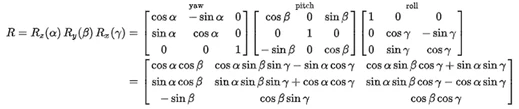
Rotation matrices can be obtained from these three examples using matrix multiplication. For example, the product:
 

DeniseSANFILIPPO_0-1692960637154.png

Represents a rotation whose yaw, pitch, and roll angles are α, β and γ, respectively. More formally, it is an intrinsic rotation whose Tait–Bryan angles are α, β, γ, about axes z, y, x, respectively. Similarly, the product:

 

DeniseSANFILIPPO_1-1692960655994.png


2. What is the SFLP algorithm in the LSM6DSV16X?

A sensor fusion low-power (SFLP) block is available in the LSM6DSV16X for generating the following data based on the accelerometer and gyroscope data processing:

  1. Game rotation vector, which provides a quaternion representing the attitude of the device.
  2. Gravity vector, which provides a three-dimensional vector representing the direction of gravity.
  3. Gyroscope bias, which provides a three-dimensional vector representing the gyroscope bias.

Sensor fusion performance and time required to reach steady state
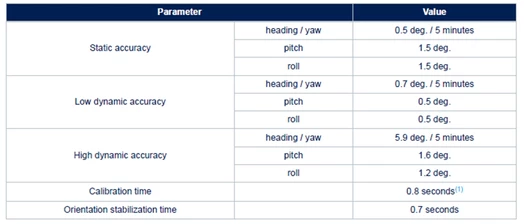
DeniseSANFILIPPO_2-1692960700823.png


3. SFLP demo and tools

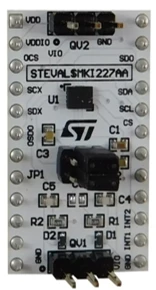
The hardware setup is STEVAL-MKI109V3 and DIL24 adapter board STEVAL-MKI227KA.
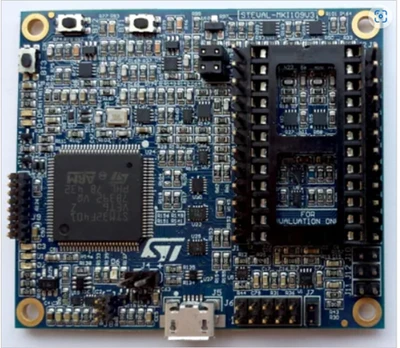
STEVAL-MKI109V3STEVAL-MKI109V3DIL24 adapterDIL24 adapter


The software used is Unico-GUI.
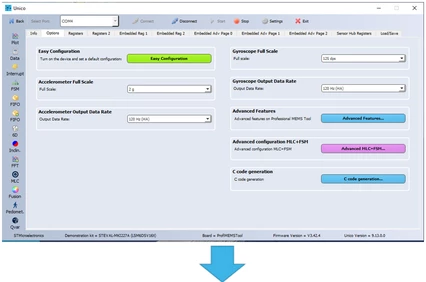
DeniseSANFILIPPO_10-1692961168327.png


DeniseSANFILIPPO_8-1692961003433.png


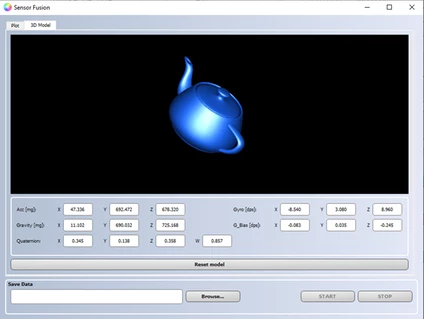
When you shake the demo board, the image follows the actual position displayed. SFLP has integrated quaternion, so customers can directly get quaternion and convert it into euler angles.


4. Yaw angle automatic calibration flow

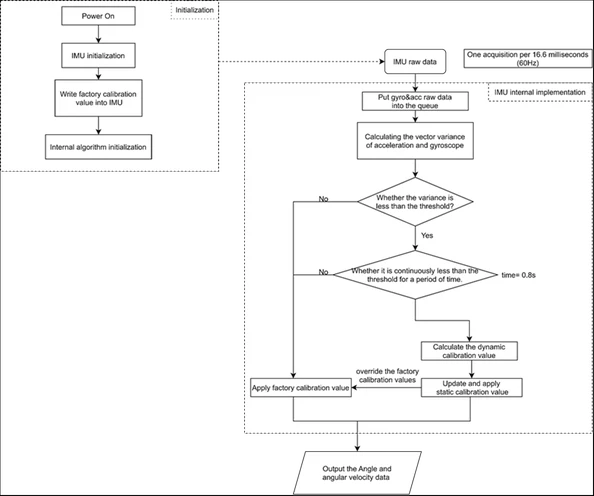
Due to the long-term operation of the gyroscope, the integration error caused by zero deviation becomes increasingly large. The yaw angle may experience significant drift due to lack of calibration of the magnetometer. To solve this problem, the SFLP algorithm adopts a dynamic self-calibration method to ensure yaw angle stability.
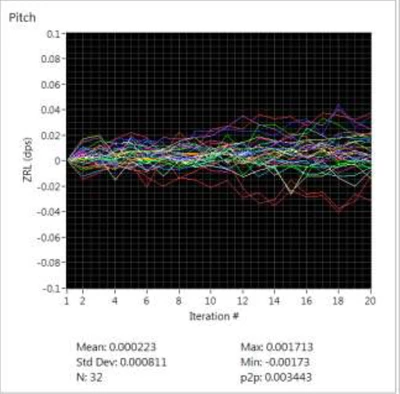
 

DeniseSANFILIPPO_11-1692961221302.png    


5. Automatic calibration flow


DeniseSANFILIPPO_12-1692961257945.png


6. How to configure the SFLP?

Coordinates:
Pitch rotation around the X-axisΩP
Roll rotation around the Y-axis ΩR
Heading/Yaw rotation around the Z-axisΩY
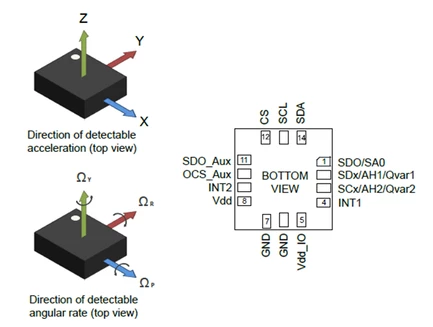
DeniseSANFILIPPO_14-1692961343963.png
  • Game rotation vector, which provides a quaternion representing the attitude of the device.
  • Gravity vector, which provides a three-dimensional vector representing the direction of gravity.
  • Gyroscope bias, which provides a three-dimensional vector representing the gyroscope bias.    

SFLP Register description:

Register bit config

Bit description

SFLP_GAME_EN

Enables SFLP

SFLP_GBIAS_FIFO_EN

Enables Gbias in FIFO mode

SFLP_GRAVITY_FIFO_EN

Enables gravity vector in FIFO mode

SFLP_GAME_FIFO_EN

Enables game rotation vector in FIFO mode

SFLP_GAME_ODR_[2:0]

Configures SFLP ODR

SFLP data format:


TAG

X_L

X_H

Y_L

Y_H

Z_L

Z_H

Axis format

Game rotation vector

13h

X

Y

Z

Half precision floating-point

Gyroscope bias       

16h

X

Y

Z

int16_t (raw, 125 dps sensitivity)              

Gravity vector           

17h

X

Y

Z

int16_t (raw, 2 g sensitivity)     

Code configuration:

 /* Check device ID */
 lsm6dsv16x_device_id_get(&dev_ctx, &whoamI);

 if (whoamI != LSM6DSV16X_ID)
 while (1);

 /* Restore default configuration */
 lsm6dsv16x_reset_set(&dev_ctx, LSM6DSV16X_RESTORE_CTRL_REGS);
 do {
 lsm6dsv16x_reset_get(&dev_ctx, &rst);
 } while (rst != LSM6DSV16X_READY);

 /* Enable Block Data Update */
 lsm6dsv16x_block_data_update_set(&dev_ctx, PROPERTY_ENABLE);
 /* Set full scale */
 lsm6dsv16x_xl_full_scale_set(&dev_ctx, LSM6DSV16X_4g);
 lsm6dsv16x_gy_full_scale_set(&dev_ctx, LSM6DSV16X_2000dps);

 /*
 * Set FIFO watermark (number of unread sensor data TAG + 6 bytes
 * stored in FIFO) to FIFO_WATERMARK samples
 */
 lsm6dsv16x_fifo_watermark_set(&dev_ctx, FIFO_WATERMARK);

 /* Set FIFO batch of sflp data */
 fifo_sflp.game_rotation = 1;
 fifo_sflp.gravity = 1;
 fifo_sflp.gbias = 1;
 lsm6dsv16x_fifo_sflp_batch_set(&dev_ctx, fifo_sflp);

 /* Set FIFO mode to Stream mode (aka Continuous Mode) */
 lsm6dsv16x_fifo_mode_set(&dev_ctx, LSM6DSV16X_STREAM_MODE);

 /* Set Output Data Rate */
 lsm6dsv16x_xl_data_rate_set(&dev_ctx, LSM6DSV16X_ODR_AT_30Hz);
 lsm6dsv16x_gy_data_rate_set(&dev_ctx, LSM6DSV16X_ODR_AT_30Hz);
 lsm6dsv16x_sflp_data_rate_set(&dev_ctx, LSM6DSV16X_SFLP_30Hz);

 lsm6dsv16x_sflp_game_rotation_set(&dev_ctx, PROPERTY_ENABLE);

More details about SFLP software are available on the GitHub repo sensor-fusion-code.


Conclusion

In this article, we described the principles of sensor fusion in the context of an inertial measurement unit and how to use sensor fusion in the LSM6DSV16X device.  The LSM6DSV16X integrates a complete set of acceleration and gyroscope algorithms in the sensor. This allows customers to obtain high-precision fusion algorithm results without specifying specific algorithm implementations.

Customers can use STEVAL-MKI109V3 and LSM6DSV16X to evaluate the SFLP performance and how to configure SFLP on the demo board. Users can quickly deploy algorithms, test, and evaluate performance.

You may also be interested in reading the following knowledge article: How to save power with LSM6DSV16X by leveraging on its adaptive self-configuration with MLC and FSM 

38 replies

Associate
November 12, 2024

Hi Denis

I have to read the game vectors and send them from the board to the computer.

In the computer I can convert the half precision floating to Float32.

The values I get are from about -0.9 to +0.9.

Now I have to convert these values into yaw, roll, pitch.
These values should be 0-360 degrees (or +-180 degrees).
How do I do this? I can't just multiply by 180


ST Employee
November 13, 2024

Hi @Stefan3,

Here below you can find an example based on quaternions read by the IMU. The IMU is oriented according to ENU frame. 

The formula below can be used to convert the quaternions to Euler angles.


void quat_2_euler(float *euler, float *quat)

{

  float sx = quat[1];

  float sy = quat[2];

  float sz = quat[0];

  float sw = quat[3];


  if (sw < 0.0f) {

    sx *= -1.0f;

    sy *= -1.0f;

    sz *= -1.0f;

    sw *= -1.0f;

  }


  float sqx = sx * sx;

  float sqy = sy * sy;

  float sqz = sz * sz;


  euler[0] = -atan2f(2.0f * (sy * sw + sx * sz), 1.0f - 2.0f * (sqy + sqx));

  euler[1] = -atan2f(2.0f * (sx * sy + sz * sw), 1.0f - 2.0f * (sqx + sqz));

  euler[2] = -asinf(2.0f * (sx * sw - sy * sz));


  if (euler[0] < 0.0f)

    euler[0] += 2.0f * M_PI;


  for (uint8_t i = 0; i < 3; i++) {

    euler[i] = RAD2DEG(euler[i]);

  }

}


If you have further doubts, you can also ask them inside the Product Forum of MEMS sensors

Associate
November 13, 2024

Hi Denis, Hi Eliane

I read the game rotation vectors from the LSM9
But unfortunately no fourth value. This is called the scalar part. float sw = quat[3];

How do I calculate this scalar part or how do I read it?

  float sx = quat[1];

  float sy = quat[2];

  float sz = quat[0];

 float sw = quat[3];


2024-11-13_09-41-41.PNG


ST Employee
November 13, 2024

Hi @Stefan3 ,

as AN5763 states, X, Y, and Z axes (vector part of the quaternion) of the game rotation vector are stored in half-precision floating-point format, while w (scalar part of the quaternion) is computed in software after reading the data from the FIFO, since the game rotation vector is a unit quaternion.

You can refer to our GitHub to retrieve the scalar part w of the quaternion, starting from X, Y, Z of the game rotation vector. Focus on the sflp2q function:

 static void sflp2q(float quat[4], uint16_t sflp[3])
{
     float sumsq = 0;

     quat[0] = npy_half_to_float(sflp[0]);
     quat[1] = npy_half_to_float(sflp[1]);
     quat[2] = npy_half_to_float(sflp[2]);

     for (uint8_t i = 0; i < 3; i++)
     sumsq += quat[i] * quat[i];

     if (sumsq > 1.0f) {
     float n = sqrtf(sumsq);
     quat[0] /= n;
     quat[1] /= n;
     quat[2] /= n;
     sumsq = 1.0f;
}

     quat[3] = sqrtf(1.0f - sumsq);
}


Associate
November 15, 2024

Hi Denis

It now works from configuring the LSM6, reading from FIFO, sending to USB and receiving in the App.

Also the conversion from FP16 to FB32 and the calculation of pitch, yaw, roll and each in grad degres is perfect.

A small problem is still, regular spikes in the data.

In decimal the values are about 20-40 und if I convert to FP32 it's looks like a very small number or somtimes very high number

I suppose I read a counter or something similar instead of the quaternion.

2024-11-15_18-05-29.PNG


2024-11-15_17-52-29.PNG

ST Employee
November 21, 2024

Hi @Stefan3 ,

In general, you must read from the FIFO (e.g., a set of 7 bytes) and interpret the contents of the data section according to the tag, as you did. 
I suggest looking at the following example lsm6dsv16x_sensor_fusion available inside our official GitHub: it can be useful to understand the various steps needed to use SFLP with LSM6DSV16X. 

Is the plotted data the data which has been converted to float?
Or do you multiply the data by a scaling factor? Data should be in the range [-1;1].

Associate
November 21, 2024

Hi Denis

Ok before I had only read 1 byte and if that was correct then I have read the 6 others.

With your suggestion to read 7 at once and then when the tag is right I use it, it works very well and also faster.

I can read and transmit at 15Hz, 30Hz, 60Hz, 120Hz, 240Hz, 480Hz without any problems.

The old chart shows Pitch, Yaw, Roll in Grad degrees.

Here a new chart with both, the convertet Float32 value (top) and the chart with the Pitch, Yaw, Roll (bottom). The x (pitch) is 358 grad. It changes the value when I turn, but I suspect not in the right range


2024-11-21_10-56-14.PNG

ST Employee
November 21, 2024

Hi @Stefan3 

a possible error in your code could be an incorrect convention used inside the function called “quat_2_euler”.

My suggestion is to convert the quaternion in such a way it is in the format [x, y, z, w], then you should pass it to the function void quat_2_euler(float *euler, float *quat) without applying any swap of the axes.

So the input of the quat_2_euler function must be quaternion (quat) in the format [x, y, z, w], while the output are the Euler angles in the format [yaw, pitch, roll] in deg. The convention of the Euler angles are that for Android.

Associate
November 21, 2024

Hi Denis

In your code, the axes are assigned as follows in the picture.
I have now done the same for me.


And I use this:
yaw=euler[0]
pitch=euler[1]
roll=euler[2]

Then the results look different. I will do further tests and see how it goes.

One more question: Does the sensitivity of accelero and gyro have an influence?


2024-11-21_18-55-29.PNG

ST Employee
November 26, 2024

Hi @Stefan3,

the sensitivity of the accelerometer and of the gyroscope is not involved when you are converting quaternions to Euler angles.