Snara.21
Senior
July 6, 2021
Solved

How to extract rawdata of sensortile.box . I have received the csV file.. How to understand the data value Date HostTimestamp (ms) NodeName NodeTimestamp RawData Humidity (%) 50:13.1 836 TILEBOX @541833 3131 7502 62.9 How to decode the rawdata

  • July 6, 2021
  • 2 replies
  • 4602 views

..

    This topic has been closed for replies.
    Best answer by Eleon BORLINI

    Hi @Snara.2​ ,

    you can find an explanation in this presentation, p.133, for the Humidity sensor.

    In particular, the csv datalog formatted in excel should look like the following:
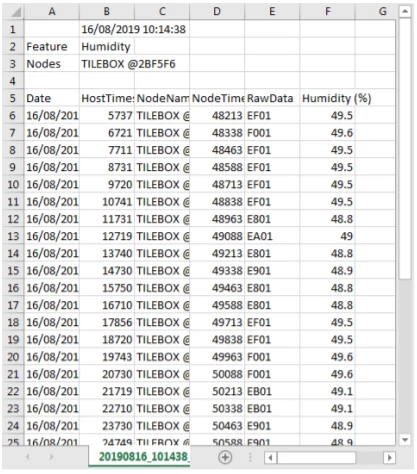
    0693W00000Bd4iQQAR.pngThe fist column is the date, and you should format it as a date in excel; then the host time in millisecond (this value can be used as time axis in an x-y graph), is the time from which the device is operating; then the node name and the node time stamp; and finally you have the relevant data, i.e. the humidity raw data in decimal (7502 dec = 1D4E hex) and the physical percentage value 62.9%.

    The last value is calculated according to these technical note indications.

    If my reply answered your question, please click on Select as Best at the bottom of this post. This will help other users with the same issue to find the answer faster.

    -Eleon

    2 replies

    Eleon BORLINI
    Eleon BORLINIBest answer
    ST Employee
    July 7, 2021

    Hi @Snara.2​ ,

    you can find an explanation in this presentation, p.133, for the Humidity sensor.

    In particular, the csv datalog formatted in excel should look like the following:

    0693W00000Bd4iQQAR.pngThe fist column is the date, and you should format it as a date in excel; then the host time in millisecond (this value can be used as time axis in an x-y graph), is the time from which the device is operating; then the node name and the node time stamp; and finally you have the relevant data, i.e. the humidity raw data in decimal (7502 dec = 1D4E hex) and the physical percentage value 62.9%.

    The last value is calculated according to these technical note indications.

    If my reply answered your question, please click on Select as Best at the bottom of this post. This will help other users with the same issue to find the answer faster.

    -Eleon

    SAbba.1
    Associate III
    July 28, 2023

    Hello, how are you? I was looking at how to interpret the RawData in this case and seeing the technical note indications I am not clear.

    At the same time, I'm seeing how to interpret the RawData in the accelerometer, since I don't understand it. At first I tried with the microphone and it was very simple, since I only had to convert from HEX to DEC and I got the MIC_LEVEL in dB.

    Could you clarify the case of humidity, and more importantly the accelerometer, please.

    Best regards.

    Eleon BORLINI
    ST Employee
    July 28, 2023

    Hi @SAbba.1 ,

    for the conversion between LSB (raw data) and physical data for accelerometers, you can refer to the github repository of the C drivers. For example, for the LIS2DW12, you can refer to the file lis2dw12_reg.c:


    float_t lis2dw12_from_fs2_to_mg(int16_t lsb)
    {
    return ((float_t)lsb) * 0.061f;
    }

    -Eleon

    Snara.21
    Snara.21Author
    Senior
    July 8, 2021

    Thanks Eleon for your reply ... This information is quite useful