GALS
Associate
January 21, 2026
Solved

LIS3DH footprint discrepancy

  • January 21, 2026
  • 1 reply
  • 190 views

Hello ST Community,
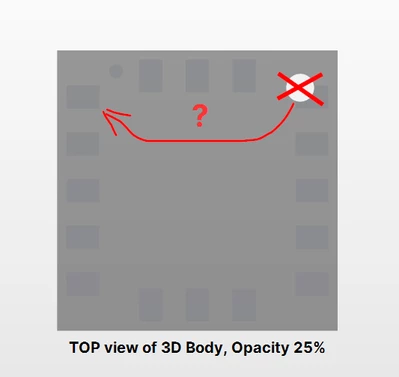
Based on a photo found on the internet of the LIS3DH chip and a comparison with the package information in the datasheet, I found a discrepancy in the footprint.

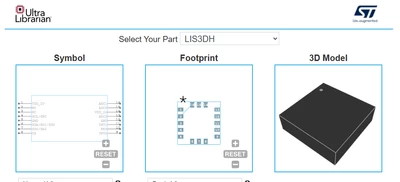
The datasheet appears to show the pin-1 mark on the opposite side compared to the photo. I also found differences between two different online libraries that you recommend on your website.

I am pretty sure that the correct position is as shown in the photo or in the Ultra Librarian library, but could you please clarify the correct location of the pin-1 mark, both on the top of the IC and on the bottom of the IC?

Many thanks.

Internet Photo:
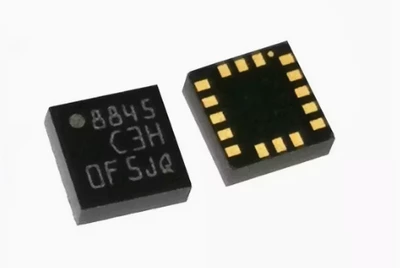
GALS_0-1769007094007.png

Datasheet page 50 (LGA-16 package information)
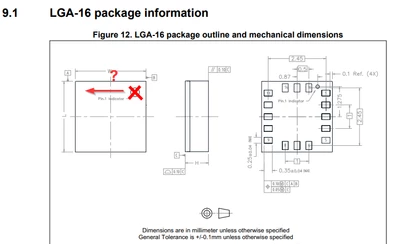
GALS_1-1769007460878.png

SymacSys library ( https://componentsearchengine.com/ )
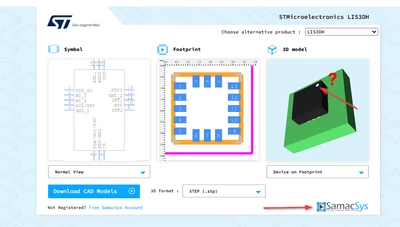
GALS_2-1769008479126.png

GALS_3-1769008503511.png

GALS_4-1769008528456.png

Ultra Librarian 3D model (TOP, Opacity 25%)
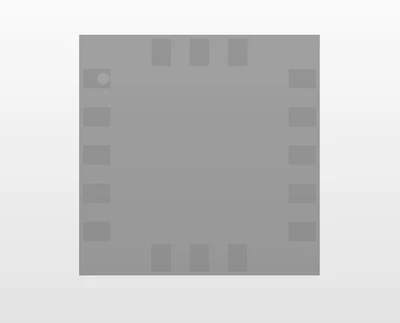
GALS_5-1769008669297.png

GALS_6-1769008885820.png

What do you think @Federica Bossi ? ;)


Best answer by Federica Bossi

Hi @GALS ,

From the LIS3DH datasheet and package drawing, the pin‑1 corner is the one with the small circular dot on the top side, as you can see in the internet photo you attached. On the bottom side, the pad located directly under that same corner is pad 1, and the pads are then numbered counter‑clockwise when viewed from the top of the IC.

So, even if some 3D views or third‑party libraries may look inverted or confusing (top vs bottom view, or rotated), the correct reference is:

  • Top side: pin‑1 mark = small dot (as in the photo).
  • Bottom side: pad directly below that dot = pad 1; numbering continues counter‑clockwise.

When in doubt, always trust the latest LIS3DH datasheet mechanical drawing and ensure that your footprint’s pad 1 is placed at the same corner as the dot in the package outline.

1 reply

Federica Bossi
Federica BossiBest answer
Technical Moderator
January 22, 2026

Hi @GALS ,

From the LIS3DH datasheet and package drawing, the pin‑1 corner is the one with the small circular dot on the top side, as you can see in the internet photo you attached. On the bottom side, the pad located directly under that same corner is pad 1, and the pads are then numbered counter‑clockwise when viewed from the top of the IC.

So, even if some 3D views or third‑party libraries may look inverted or confusing (top vs bottom view, or rotated), the correct reference is:

  • Top side: pin‑1 mark = small dot (as in the photo).
  • Bottom side: pad directly below that dot = pad 1; numbering continues counter‑clockwise.

When in doubt, always trust the latest LIS3DH datasheet mechanical drawing and ensure that your footprint’s pad 1 is placed at the same corner as the dot in the package outline.

In order to give better visibility on the answered topics, please click on 'Accept as Solution' on the reply which solved your issue or answered your question.
GALS
GALSAuthor
Associate
January 22, 2026

Hi Federica!

Perfect, I thought so.

Maybe ST could clarify this for other customers in the latest datasheet, as it is quite confusing; so confusing that even the third-party library developers made a mistake.

Thank you for your answer and your time. I will accept your answer as the solution.

Regards,

Gustavo