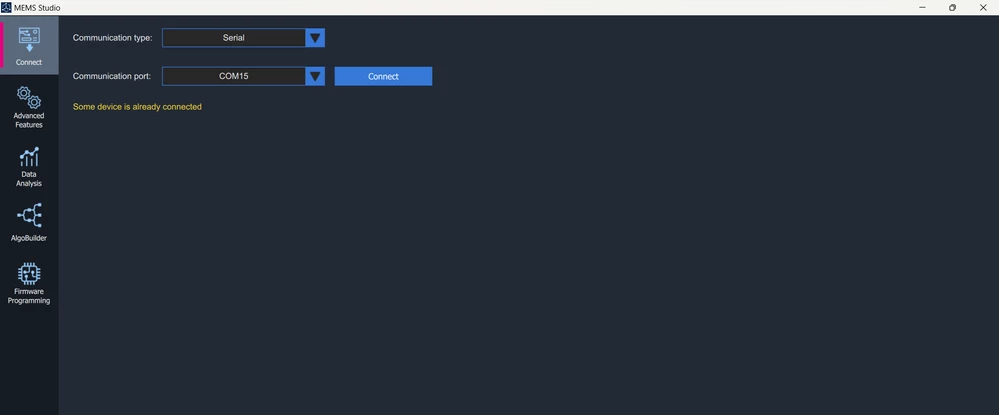
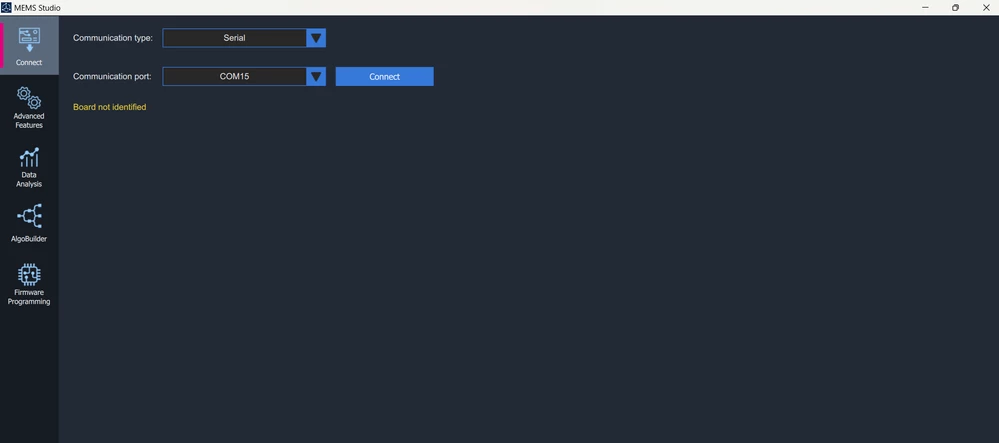
I have an X-NUCLEO-IKS4A1 mounted on top of a NUCLEO-L476RG and I am trying to connect that to Mems Studio. I get one of the two errors in the attached screenshots. Either "Board not identified" or "Some device is already connected".
The NUCLEO (STM32) must be programmed with compatible firmware with MEMS Studio. You can check chapter 2.6 Hardware and firmware compatibility in UM3233.
NUCLEO-L476RG + X-NUCLEO-IKS4A1 can be used in AlgoBuilder in MEMS Studio.
Sensor evaluation firmware (DatalogExtended) is unfortunately not available for NUCLEO-L476RG, please check X-CUBE-MEMS1 package.
However I am using the NUCLEO-H503RB with the X-NUCLEO-IKS4A1A and I have been trying to build the application using STM32CubeMX with X-CUBE-MEMS1 using the "Device MEMS1 Applications" mode.
I am running the following:
Windows 11 Pro Version 21H2
STM32CubeMX 6.12.0
STM32Cube FW_H5 V1.3.0
X-CUBE-MEMS1 10.0.0
STM32CubeIDE1.16.0
I have also experimented with different X-CUBE-MEMS1 settings without success.
The "Board not identified" message is not helpful as it is.
I don't have at my disposal the NUCLEO-F401 board to compare against.
I don't know what is the root cause of the issue and what to look for:
Is it a firmware/hardware configuration issue in STM32CubeMX?
The "Getting started with the STMicroelectronics X-CUBE-MEMS1 software package for STM32CubeMX" documentation make use of the IC pin numbers for the NUCELO-64 board for the F401, but isn't compatible with every NUCLEO-64 such as the H503RB. So I have to manually remap all the GPIO to the corresponding IKS4A1 which has limited exposure in the documentation).
Is MEMS Studio working properly or are there possible OS, driver, firewall, antivirus interaction?
User error?
Incompatible hardware/firmware? I am unsure unless the H503RB is not supported.
The documentation is lacking a very important aspect which is establishing that all the prerequisites are met:
When attempting to establish communication with the board, what is MEMS Studio looking for? Is it trying to communicate with part of the code within the MCU or is it trying to communicate with the sensor devices over the I2C interface?
Can an incorrectly mapped GPIO between MCU and IKS4A1 be a problem (ie: swapped interrupt lines...)?
Are there any steps, documentation that can describe how the MEMS application on the board is supposed to work? How can I make sure it works on my board?
If the firmware and the hardware isn't the problem, then what would be next?
I do not have any project file. I have only connected the NUCLEO-L476RG to my windows device. I have the X-NUCLEO-IKS4A1 mounted on top of the NUCLEO-L476RG at the same time. I opened MEMS Studio and tried clicking on the Connect button in the Connect Tab after selecting the correct port number. This is the error that is being thrown. How do I successfully connect now?
the MEMS Studio opens the serial port and send "CMD_Read_PresString" command to read presentation string. This string describes the firmware and MEMS Studio can adjust the GUI according to the connected firmware.
The firmware from X-CUBE-MEMS1 will not work properly without appropriate X-NUCLEO board connected so it will not able able to respond to the "CMD_Read_PresString" command and the connection will not be establisted.
I have been sidetracked by other projects and just came back to using MEMS-Studio and building the code using Cube-MX with different NUCLEO boards (G491RE, H503RB...) with X-NUCLEO-IKS4A1.
Currently running on STM32CubeIDE 2.0.0 and STM32CubeMX Version 6.17.0 with X-MEMS-App V12.0.0
So far I have encountered the following issues:
Using the X-CUBE-MEMS1 application: IKS4A1_DataLogTerminal, I am able to display sensor data using Putty Serial at 921600 Bd.
I cannot establish connection using MEMS-STUDIO as it returns "Board not identified.." error.
Doing some more investigation, the "CMD_Read_PresString" doesn't exist in the project and has been refferred in different forum post having to do with the "demo_serial.c". This code provided on the Git repo can only be implemented with the application set to IKS4A1_DataLogFusion, which details have been left undocumented in the STM32CubeMX project generation.
With application set to "IKS4A1_DataLogFusion", I am no longer able to display sensor data using Putty serial.
It would appear MEMS-Studio can now connect to the board.
However, I am not yet able to see any sensor data being displayed. Not sure if it is something I need to setup in MEMS-Studio.
It would seem I am not able to attach the .ioc file to this post.
If my .ioc file isn't attached to this post and knowing I am trying to recreate the project using STM32CubeMX targeting the X-NUCLEO-IKS4A1to be used with MEMS-Studio, it shouldn't be difficult for you or another ST employee to attempt recreating the project and validating if it is functional within MEMS-Studio.
First of all, let me clarify the purpose of different projects in the X-CUBE-MEMS1 package. The DataLogTerminal is simple firmware that reads data and sends it to the serial terminal. It can be used as a starting point to see how to configure the sensor and read data. It does not cooperate with MEMS Studio.
Other projects, like DataLogFusion, are intended for middleware library evaluation. These projects cooperate with MEMS Studio to display sensor data and output data from the library.
I don’t have the NUCLEO-G491RE available at the moment, but I did a quick check of your STM32CubeMX project. I noticed one issue - the interrupt from TIM2 is not enabled.
Please enable this interrupt and try again with MEMS Studio. I believe you should see the sensor data coming from the firmware. If not, please let me know, and I will try to get the NUCLEO board to debug the issue.
Hello @Apollo1 My colleague analyzed the project and here are his recommendations:
No need to select MotionMC&EC libraries if you want to generate IKS4A1_DataLogFusion application, just MotionFX is needed but of course you can keep it there.
Circular Mode in DMA settings has to be disabled.
I've changed TIM1 to TIM3.
I've changed USART2 to USART3.
I've increased Minimum Stack Size to 0x4000.
Now the project generates correctly and works with MEMS Studio, you can try the attached ioc.
You can find settings description for devices supporting Linked-List in chapter 4.3.2 of User Manual for X-CUBE-MEMS1 v12.0.0. We do not set LINKEDLIST section in CubeMX for our projects, you can compare your project to "X-CUBE-MEMS1_v12.0.0"\Firmware\Projects\NUCLEO-U575ZI-Q\Applications\IKS4A1\DataLogFusion\ for details.
I was able to generate the code, build and program the board using the H503RB_MEMS_App_ST.ioc file you provided. MEMS-Studio was able to connect to the board successfully.
I have tried updating my version of the ioc file in Cube-MX and I wanted to add some comments based on your feedback and point to some issues I experienced in the process.
I've changed TIM1 to TIM3.
TIM1 does work, however, I think TIM1 should be allocated for more complex setup such as Half-H bridge implementation (BLDC or Digital Power Supply). TIM3 is a basic general purpose timer.
I've changed USART2 to USART3.
On MB1814 project schematic for NUCLEO-503RB, UART over USB (Virtual Com Port) signals VCP_RX and VCP_TX are mapped to pin PA3 and PA4 which belong to USART3.
Within Cube-MX, pin assignment for signals VCP_RX and VCP_TX can be found under "Bsp" section when "Human Machine Interface" with VCOM is checked. Though VCOM has to remain "Unchecked" as it can't be used in the X-CUBE-MEMS1 USART "Found Solutions".
I've increased Minimum Stack Size to 0x4000.
Using default "Minimum Stack Size" of 0x400 will cause a HardFault. The HardFault condition can only be seen when running STM32Cube_IDE in debug mode. So best to avoid using MEMS-Studio "Firmware Programming" to flash the board until it has been shown that MEMS-Studio has been able to connect.
Circular Mode in DMA settings has to be disabled.
Now the project generates correctly and works with MEMS Studio, you can try the attached ioc.
You can find settings description for devices supporting Linked-List in chapter 4.3.2 of User Manual for X-CUBE-MEMS1 v12.0.0. We do not set LINKEDLIST section in CubeMX for our projects, you can compare your project to "X-CUBE-MEMS1_v12.0.0"\Firmware\Projects\NUCLEO-U575ZI-Q\Applications\IKS4A1\DataLogFusion\ for details.
I did follow up on the documentation but I may have overlooked or misinterpreted the "Circular Mode" setting. Having "Circular Mode" set to "Enable" will cause the following error during the build:
error: 'NodeConfig' undeclared (first use in this function)
666 | NodeConfig.NodeType = DMA_GPDMA_LINEAR_NODE;
| ^~~~~~~~~~
On a side note, if "Visibility (Static)" for the Timer is "checked" (under "Project Manager" => "Advanced Settings"), the following error will be reported:
undefined reference to `MX_TIM3_Init'
Once all the above steps have been taken care of, then I can successfully build the code and connect with MEMS_Studio.
PS. In STM32Cube_IDE, the build will fail with the default project settings returning the following error:
../arm-none-eabi/bin/ld.exe: H503RB_MEMS_App.elf section `.text' will not fit in region `FLASH'
../arm-none-eabi/bin/ld.exe: region `FLASH' overflowed by 5880 bytes
Changing the project "Optimization level" to "Optimize for size ..." does fix the issue.
When using a NUCLEO MCU board, the add-on sensor expension board (ie. IKS4A1) isn't required to successfully establish a connection. Though trying to acquired sensor data will fail.